

Voice Transcriber Talk to Text
Liudmyla Oleksa Productivity iPhoneiPadiPod touch
Voice Transcriber Talk to Text is a free Productivity app for iPhone and iPad by Liudmyla Oleksa. Rated 5.0/5 from 1 ratings. Requires iOS 18.6.
- Rating
- 5.0
- 1 ratings
- Price
- Free
- on the App Store
- Size
- 57 MB
- Age 4+
- Updated
- Oct 23
- 2026 · v2.1
Screenshots


About Voice Transcriber Talk to Text
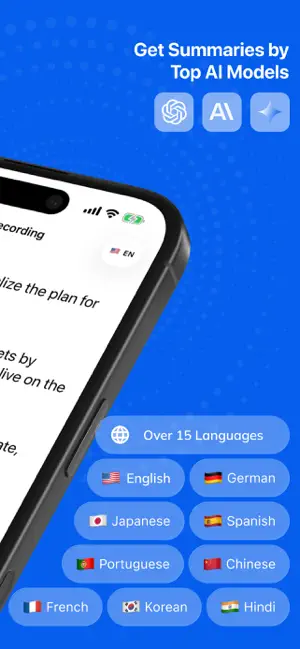
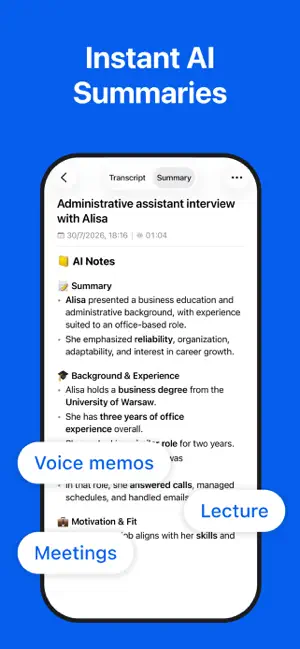
Record and transcribe speech to text in real time - even without internet or while your iPhone is locked. Automatically identify different speakers and organize conversations with clear speaker labels. Transcribe Audio to Text Pro is an all-in-one voice recorder, live transcriber, speech-to-text converter, AI summarizer, and speaker detection app for iPhone. Capture a meeting, lecture, interview, conversation, voice memo, dictation, or podcast, then turn spoken audio into readable text and organized AI notes. LIVE TRANSCRIPTION - EVEN OFFLINE Tap Record and watch speech become text in real time. Live transcription works without an internet connection, helping you capture important conversations and ideas wherever you are. SPEAKER DETECTION AND DIARIZATION Make multi-person recordings easier to understand with automatic speaker diarization. The app detects changes between speakers and separates the transcript using clear speaker labels, so you can quickly see who said what. Speaker detection is useful for: • Business meetings and team discussions • Interviews and research sessions • Classes, lectures, and study groups • Client conversations and consultations • Podcasts and recorded discussions • Any recording with multiple participants RECORD WITH YOUR SCREEN LOCKED Keep recording and transcribing while your iPhone is locked. Put your phone away during a meeting, lecture, class, or interview without interrupting the recording. Audio recording and transcription continue in the background, so you can focus on the conversation instead of keeping the screen open. AI NOTES AND SUMMARIES Turn a long transcript into a concise AI summary or practical meeting minutes. Advanced AI models help identify key information, important ideas, decisions, and useful details. Edit the generated summary, add your own notes, and organize the final text around what matters to you. LISTEN AND READ TOGETHER Play back any recording while the corresponding transcribed text is highlighted. This makes it easy to: • Follow the conversation • Revisit an important quote • Check specific details • Find the right moment in a recording • Review meetings, interviews, and lectures KEY FEATURES • Live audio-to-text transcription • Offline voice and speech transcription • Automatic speaker detection and diarization • Clear speaker labels for multi-person conversations • Recording and transcription with the screen locked • Background audio recording • Built-in voice recorder • AI summaries and meeting minutes • Editable AI notes and generated summaries • Synced audio playback with highlighted text • Export transcripts and notes to PDF • Share recordings, transcripts, and summaries • Support for 15 languages MADE FOR WORK, STUDY, AND EVERYDAY IDEAS Use Transcribe Audio to Text Pro for: • Meetings and business conversations • Team discussions and client calls • Lectures, classes, and study notes • Interviews and research • Voice notes, voice memos, and quick ideas • Dictation and hands-free note taking • Podcast review and content planning • Personal recordings you want to remember MULTILINGUAL TRANSCRIPTION Transcribe speech in English, French, German, Spanish, Portuguese, Japanese, Korean, Chinese, Hindi, Italian, Russian, Arabic, Dutch, Polish, and Turkish. Spend less time replaying audio and typing by hand. Record, identify speakers, transcribe, summarize, edit, export, and share - all in one simple app. Download Transcribe Audio to Text Pro and turn every recording into useful, organized notes. Terms of Use: https://sites.google.com/view/transcriber-app/terms Privacy Policy: https://sites.google.com/view/transcriber-app/privacy
What’s new
Version 2.1 · Updated October 23, 2026
Transcription perfomance improvements
App privacy
The developer, Liudmyla Oleksa, reported these privacy practices to Apple.
Data Used to Track You
The following data may be used to track you across apps and websites owned by other companies:
- Purchases: Purchase History
Data Not Linked to You
The following data, which may be collected but is not linked to your identity, may be used for the following purposes:
- Usage Data: Product Interaction, Advertising Data
- Diagnostics: Crash Data, Performance Data
- Purchases: Purchase History
- User Content: Emails or Text Messages, Audio Data, Other User Content, Customer Support
Used for: Analytics, Product Personalization, App Functionality, Other Purposes
Alternatives to Voice Transcriber Talk to Text
Looking for apps like Voice Transcriber Talk to Text? Here are 6 similar apps on the App Store.
-
 Revera: TLDL Notes, Transcribe
-
 Arca: Offline Voice to Text
-
 Transcribe AI Voice Notes
-
 Mojingoo Unlimited Transcripts
-
 Scriba: Transcribe Audio
-
 Voice Notes - Transcribe Audio
| App | Rating | Price | Last updated | Compare |
|---|---|---|---|---|
| Voice Transcriber Talk to Text | 5.0 / 5 (1 rating) | Free | October 23, 2026 | |
| Revera: TLDL Notes, Transcribe | – | Free | Oct 20, 2026 | Compare |
| Arca: Offline Voice to Text | – | Free | Oct 24, 2026 | Compare |
| Transcribe AI Voice Notes | – | Free | Sep 3, 2026 | Compare |
| Mojingoo Unlimited Transcripts | – | Free | Aug 27, 2026 | Compare |
| Scriba: Transcribe Audio | – | Free | Oct 12, 2026 | Compare |
| Voice Notes - Transcribe Audio | – | Free | Mar 28, 2026 | Compare |