

Scriba: Transcribe Audio
Danjel Durmo Productivity iPhoneiPadiPod touch
Scriba: Transcribe Audio is a free Productivity app for iPhone and iPad by Danjel Durmo. Requires iOS 26.0. Updated October 12, 2026.
- Price
- Free
- on the App Store
- Size
- 3 MB
- Age 4+
- Updated
- Oct 12
- 2026 · v1.1
Screenshots


About Scriba: Transcribe Audio
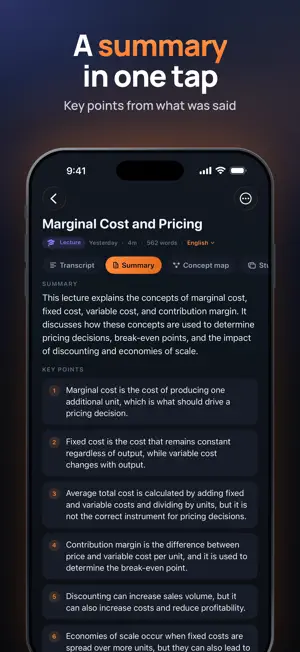
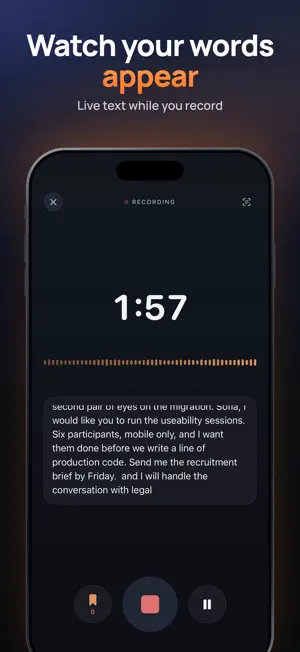
Transcribe a lecture, a meeting or a voice message on your iPhone, then read it, search it and export it. Nothing is uploaded. Free up to 5 minutes per recording; Pro for longer. FREE UP TO 5 MINUTES, THEN A FLAT PRICE Every recording is transcribed in full on your iPhone. Up to 5 minutes is completely free: full transcript, summary, concept map, study cards and action items. For a longer recording you read the first 5 minutes free, and Scriba Pro unlocks the rest instantly, with no re-processing. No per-minute fees, no credits to buy, no weekly plan. NOTHING LEAVES YOUR IPHONE Your recordings and transcripts are never uploaded to a server. No account, no sign-in, no tracking. After a one-time language download, Scriba works in airplane mode, in a basement lecture hall and on the metro, at the same speed. BRING ANYTHING IN • Record with a live transcript as you speak • Import audio files: MP3, M4A, WAV, AIFF • Import a video and Scriba pulls out the audio track • Tap a marker while recording to flag a moment you want to find again • Choose the language, or let Scriba detect it from the ones on your iPhone READ IT PROPERLY • Tap any line to jump the audio there • The line playing now is highlighted as you listen • Playback speed from 0.75x to 2x • Automatic chapters from the speaker's own pauses • Search inside every transcript, and find your notes from iPhone search TURN IT INTO SOMETHING USEFUL • A summary and the key points • A concept map of how the ideas connect • Question-and-answer study cards and a glossary of the terms used • Action items, with who owns them where a name was said All generated on the device from what was actually said. BUILT FOR STUDY AND WORK Students recording lectures. Journalists with interviews. Teams that need the decisions from a meeting. Anyone who gets long voice messages and would rather read them. EXPORT AND SEND Plain text is free. Markdown, PDF, Word-compatible RTF and SRT subtitles come with Scriba Pro. LANGUAGES Scriba transcribes on the device in the languages your iPhone supports, among them English, Italian, French, German, Spanish, Portuguese, Japanese, Korean and Chinese. Settings shows the full list. Requires iOS 26 and an iPhone or iPad that supports on-device speech recognition. SCRIBA PRO (OPTIONAL) • Yearly: USD 39.99 per year, with a 7-day free trial for new subscribers • Monthly: USD 6.99 per month • Lifetime: USD 59.99, one payment, no subscription Payment is charged to your Apple Account at confirmation of purchase. Subscriptions renew automatically unless cancelled at least 24 hours before the end of the current period. Your account is charged for renewal within 24 hours before the end of the current period. You can manage and cancel your subscription in your Apple Account settings after purchase. Any unused portion of a free trial is forfeited when you purchase a subscription. Prices are for the United States; in other countries the price is shown in the app and on the App Store before you confirm. Terms of Use (EULA): https://www.apple.com/legal/internet-services/itunes/dev/stdeula/ Privacy Policy: https://edgemarket.app/scriba/privacy Questions or problems: [email protected]
What’s new
Version 1.1 · Updated October 12, 2026
Scriba 1.1 makes the free version far more useful. • Free up to 5 minutes: every recording or import up to 5 minutes is fully free, AI tools included. For longer ones you read the first 5 minutes free and Pro unlocks the rest instantly. • New Monthly plan, a lower Yearly price with a 7-day free trial, and a lower Lifetime price. The weekly plan is gone. • Notes made before this update stay fully unlocked. • No tracking: the analytics SDK and the tracking prompt are removed. Nothing leaves your iPhone. • Redeem offer codes in Settings.
App privacy
The developer, Danjel Durmo, reported these privacy practices to Apple.
Data Used to Track You
The following data may be used to track you across apps and websites owned by other companies:
- Purchases: Purchase History
- Usage Data: Product Interaction
Data Not Linked to You
The following data, which may be collected but is not linked to your identity, may be used for the following purposes:
- Purchases: Purchase History
- Usage Data: Product Interaction
- Diagnostics: Crash Data, Performance Data, Other Diagnostic Data
Used for: Analytics, App Functionality
Alternatives to Scriba: Transcribe Audio
Looking for apps like Scriba: Transcribe Audio? Here are 6 similar apps on the App Store. The highest rated is Scriba.AI (5.0/5), and 5 of the 6 are free to download.
-
 Audio and video transcription
-
 Scribe Recorder
-
 Damas - Video Link Transcriber
-
 Scriba.AI
5.0
Scriba.AI
5.0
-
 SpeakSense: Voice Recorder
-
 Text Reader & PDF export
5.0
Text Reader & PDF export
5.0
| App | Rating | Price | Last updated | Compare |
|---|---|---|---|---|
| Scriba: Transcribe Audio | – | Free | October 12, 2026 | |
| Audio and video transcription | – | Free | Oct 20, 2026 | Compare |
| Scribe Recorder | – | Free | Jul 13, 2026 | Compare |
| Damas - Video Link Transcriber | – | Free | Oct 21, 2026 | Compare |
| Scriba.AI | 5.0 / 5 (3) | Free | Apr 9, 2026 | Compare |
| SpeakSense: Voice Recorder | – | Free | Aug 19, 2026 | Compare |
| Text Reader & PDF export | 5.0 / 5 (2) | 2.99 USD | Sep 15, 2026 | Compare |