

Essential: Calendar
Chang Hyun Lee Productivity iPhoneiPadiPod touchApple Watch
Essential: Calendar is a free Productivity app for iPhone and iPad by Chang Hyun Lee. Requires iOS 17.0. Updated October 9, 2026.
- Price
- Free
- on the App Store
- Size
- 38 MB
- Age 4+
- Updated
- Oct 9
- 2026 · v1.0.8
Screenshots
About Essential: Calendar
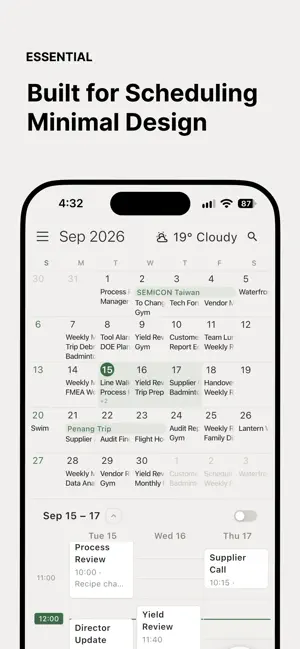
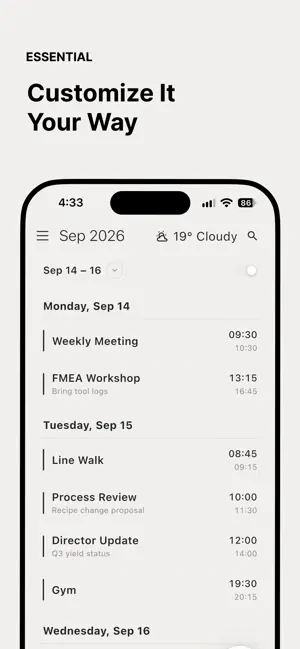
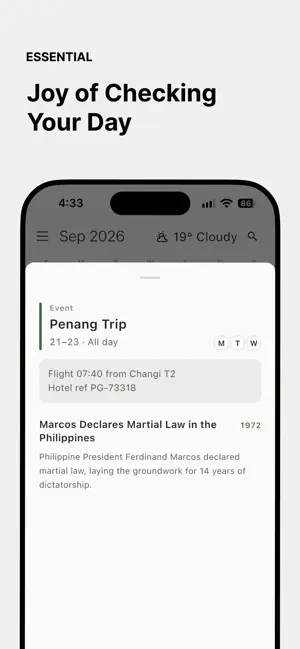
Introducing Essential, a new calendar. Essential boldly holds back on colour to create a minimalist design focused on what truly matters. Unlike other apps, events carry no colours, giving your schedule a calm, well-organised feel. Essential brings a [Monthly Calendar] and a [Timeline] together on a single screen. No need to switch screens to see the details of your day. Essential is built around [Continuity]. Whether you're searching for an event or changing a setting, you can do it without leaving the page. For example, tap the magnifying glass in the top right corner. Instead of taking you to a new screen as most apps do, the icon turns straight into a search field, so you can search right where you are. Beyond its design, Essential offers a few special features. 1. Detailed Weather Useful for those who work outdoors. Hourly forecasts, daily highs and lows, and more, made for anyone who keeps an eye on the weather. 2. A little joy in checking your schedule: "On This Day" An ordinary day for some was a meaningful one for others. While checking your schedule, discover events from history based on real facts. Topics span world history, film, art, economics, design and more. 3. Postpone Move an event to the next day. Plans don't always go as planned, so Essential's postpone feature embraces that uncertainty. It simply moves your event by one day. A little room for the days that don't go perfectly. It's okay not to be perfect. 4. The Dial Essential is inspired by the design philosophy of Dieter Rams, the world-renowned industrial designer. To celebrate his work, we've included a tribute object: the dial in the bottom right corner. Press it to add (+) a new event. Turn it like a dial to move through the timeline in one-hour steps. ――― Privacy Policy: https://dieter-rams-project.minimal-calendar.workers.dev/privacy/en
What’s new
Version 1.0.8 · Updated October 9, 2026
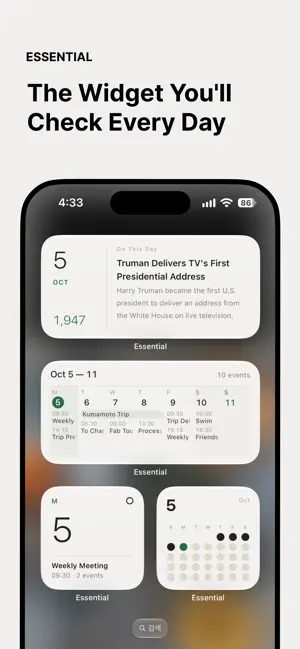
- Added Home Screen and Lock Screen widgets - Added pop-up menu and refined the UI - Added time setting options - Improved UX/UI
App privacy
The developer, Chang Hyun Lee, reported these privacy practices to Apple.
Data Not Linked to You
The following data, which may be collected but is not linked to your identity, may be used for the following purposes:
- Usage Data: Product Interaction, Other Usage Data
- Diagnostics: Performance Data, Other Diagnostic Data
- Location: Coarse Location
Used for: Analytics, App Functionality, Other Purposes
Alternatives to Essential: Calendar
Looking for apps like Essential: Calendar? Here are 6 similar apps on the App Store. The highest rated is Haru - Calendar & Task Manager (5.0/5), and all 6 are free to download.
-
 Haru - Calendar & Task Manager
5.0
Haru - Calendar & Task Manager
5.0
-
 Hoply - HWP/HWPX Viewer
5.0
Hoply - HWP/HWPX Viewer
5.0
-
 Quick Memo+ToDo - PinDeck
-
 WeeklyTodo | Events and Tasks
5.0
WeeklyTodo | Events and Tasks
5.0
-
 Yooti 유티 - 캘린더 할일 루틴 기념일
-
 MellowTask
5.0
MellowTask
5.0
| App | Rating | Price | Last updated | Compare |
|---|---|---|---|---|
| Essential: Calendar | – | Free | October 9, 2026 | |
| Haru - Calendar & Task Manager | 5.0 / 5 (1) | Free | Oct 7, 2026 | Compare |
| Hoply - HWP/HWPX Viewer | 5.0 / 5 (2) | Free | May 31, 2026 | Compare |
| Quick Memo+ToDo - PinDeck | – | Free | Oct 3, 2026 | Compare |
| WeeklyTodo | Events and Tasks | 5.0 / 5 (2) | Free | Oct 7, 2026 | Compare |
| Yooti 유티 - 캘린더 할일 루틴 기념일 | – | Free | Sep 27, 2026 | Compare |
| MellowTask | 5.0 / 5 (3) | Free | Oct 1, 2026 | Compare |