

Needlepoint Studio Designer
Landing NYC Designs, LLC Graphics & Design iPadMac
Needlepoint Studio Designer is a free Graphics & Design app for iPad and Mac by Landing NYC Designs, LLC. Rated 5.0/5 from 1 ratings. Requires iOS 17.0.
- Rating
- 5.0
- 1 ratings
- Price
- Free
- on the App Store
- Size
- 16 MB
- Age 4+
- Updated
- Oct 31
- 2026 · v1.2.5
Screenshots


About Needlepoint Studio Designer
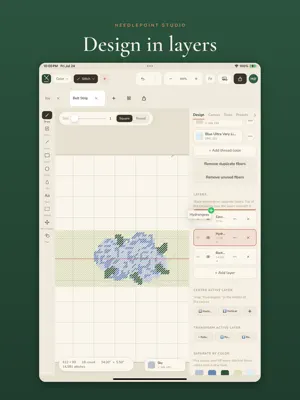
Turn any idea into a needlepoint chart. Needlepoint Studio is a professional charting studio for Mac and iPad - paint on the grid, match real thread colors, chart from a photo, and export print-ready patterns, all in sync across your devices. Made by needlepoint designers, for needlepoint designers. BRING YOUR EXISTING WORK - Open MacStitch and WinStitch (.chart) files, so the pieces you've already made come with you. - Open Open Cross Stitch (.oxs) files too, so work from other charting software comes with you as well. DESIGN WITHOUT LIMITS - Work in layers: put every element on its own layer and move, restack, and rearrange it freely, without redrawing. - Repeat a motif across a belt, a border, or any canvas in a single click. - Add lettering in any font - straight or curved onto an arch - for names, monograms, and titles. - Prep a canvas for production in seconds: blank grid, your signature, and your palette, all a click away. - Save templates for the sizes and setups you come back to again and again. SEE IT BEFORE IT'S STITCHED - Preview any design three ways: the block chart, rendered tent stitches, or a realistic painted-canvas mockup - so you and your customer can see exactly how the finished piece will look. REAL THREADS, TRUE COLORS - Match real thread colors from DMC, Silk & Ivory, Planet Earth, Appleton Wool and more. - Import a photo and turn it into a chart automatically. STITCH RIGHT FROM YOUR SCREEN - Paint mode shows live stitch counts as you work, so you can stitch or paint straight from your iPad. - Design on your Mac and pick it up on your iPad: your work syncs seamlessly between them. EXPORT & SHARE - Print at true finished size - lay the canvas mesh right over the printout and paint your sample by hand. - Bigger than one page? Print across tiles you tape together into a full-size template, or send one large sheet to a wide-format printer. - Export clean, print-ready PDFs and charts - color, symbols, or both - ready for production or the customer. - Export Open Cross Stitch (.oxs) files: send your charts straight to painting services, or any software that reads OXS. - Export a finished-size image of your design - flat color, painted canvas, or tent stitches - ready to print or share. Your designs stay yours: each chart is saved as a file in a folder you choose (iCloud Drive or Dropbox), so your work travels with you and syncs across devices. A serious tool, made with the care of people who actually stitch. Needlepoint Studio is a subscription. Choose Monthly ($12.99/month) or Annual ($129.99/year), each starting with a 7-day free trial. Payment is charged to your Apple ID at confirmation of purchase. Your subscription renews automatically unless canceled at least 24 hours before the end of the current period. Manage or cancel anytime in your Apple ID settings. Terms of Use (EULA): https://grantpointdesigns.com/pages/terms-of-use-needlepoint-studio Privacy Policy: https://grantpointdesigns.com/pages/needlepoint-studio-privacy-policy Questions? [email protected]
What’s new
Version 1.2.5 · Updated October 31, 2026
Your bold grid, your way Set bold grid lines every 10 stitches, every inch (by mesh count), or a custom interval — and it carries through to your exports. Faster with a keyboard Tool shortcuts, hold Ctrl to erase, Option-click to pick a color, Space-drag to pan, and arrow keys to nudge a selection. On Mac, and on iPad with a hardware keyboard. Steadier sign-in and sync Signing in and syncing across devices now ride out brief network hiccups, with fewer unnecessary writes behind the scenes. Import a chart from a picture (Beta) Have a chart as an image or PDF? “Import chart → canvas” reads it and rebuilds it as editable stitches. On iPad you can now pull files straight from Files, Dropbox, Drive, or iCloud — or choose a photo. Just crop tight to the chart and go. (Very dense charts with fine grid lines may still need a quick Columns/Rows nudge — we’re actively refining this.)
App privacy
The developer, Landing NYC Designs, LLC, reported these privacy practices to Apple.
Data Linked to You
The following data, which may be collected and linked to your identity, may be used for the following purposes:
- Purchases: Purchase History
- Contact Info: Email Address
- User Content: Other User Content
- Identifiers: User ID, Device ID
Used for: App Functionality
Alternatives to Needlepoint Studio Designer
Looking for apps like Needlepoint Studio Designer? Here are 6 similar apps on the App Store. The highest rated is Stitch Belle (5.0/5), and 5 of the 6 are free to download.
-
 Stitch Belle
5.0
-
 StitchALot Studio
3.0
-
 Cross Stitch Pattern Maker PDF
-
 CanvasFrog
-
 StitchKit: Embroidery Studio
1.0
-
 StitchItOn
| App | Rating | Price | Last updated | Compare |
|---|---|---|---|---|
| Needlepoint Studio Designer | 5.0 / 5 (1 rating) | Free | October 31, 2026 | |
| Stitch Belle | 5.0 / 5 (1) | Free | Oct 10, 2026 | Compare |
| StitchALot Studio | 3.0 / 5 (2) | Free | Oct 21, 2026 | Compare |
| Cross Stitch Pattern Maker PDF | – | Free | Sep 16, 2026 | Compare |
| CanvasFrog | – | 14.99 USD | Mar 29, 2026 | Compare |
| StitchKit: Embroidery Studio | 1.0 / 5 (1) | Free | Oct 29, 2026 | Compare |
| StitchItOn | – | Free | Sep 16, 2026 | Compare |