

Dredfit: Bodyweight Workouts
Dmitry Novikov Health & Fitness iPhoneiPadiPod touch
Dredfit: Bodyweight Workouts is a free Health & Fitness app for iPhone and iPad by Dmitry Novikov. Requires iOS 17.0. Updated October 10, 2026.
- Price
- Free
- on the App Store
- Size
- 4 MB
- Age 4+
- Updated
- Oct 10
- 2026 · v2.5.0
Screenshots
About Dredfit: Bodyweight Workouts
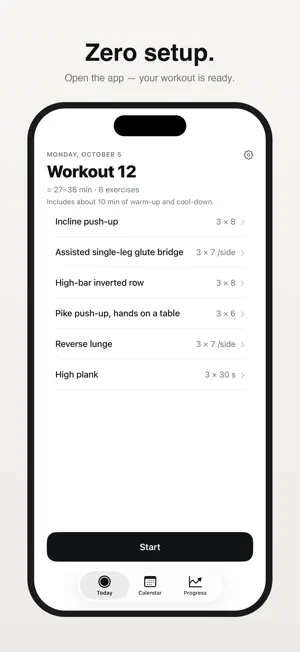
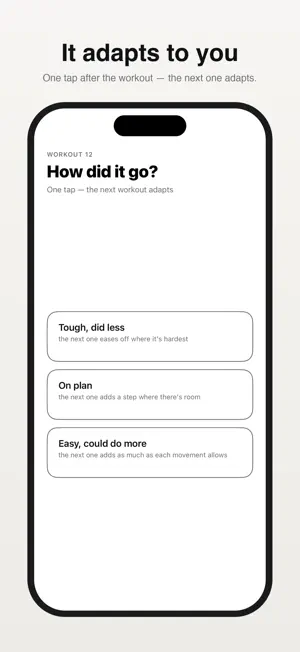
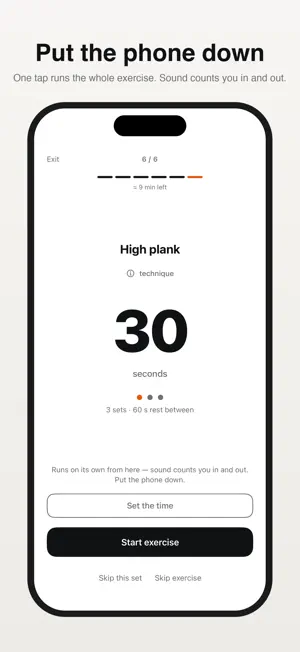
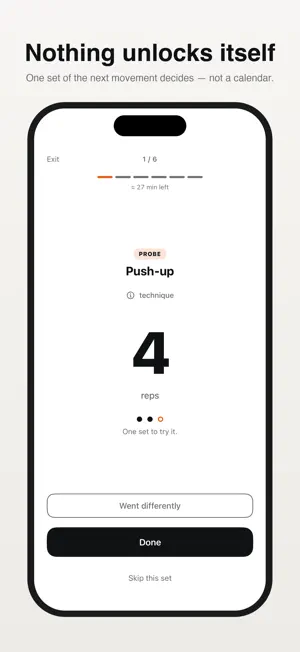
Open the app — your workout is ready. That's the whole idea. Dredfit is an adaptive bodyweight trainer that works like a thermostat. No onboarding quiz, no goal picker, no settings. It adjusts every next workout to how the last one went: answer one question afterwards — tough, on plan, or easy — and the plan moves. Already training? Enter what you did, and it becomes the plan. WHERE IT STARTS • Day one is three sets of four, in the gentlest variation of six movements: knee push-ups, squats, a glute bridge and the like. About 32 minutes with the warm-up and cool-down. • That is where you start, not the least you can do: answer "tough" and the plan comes down — an easier variation, or a set off, as far as two sets of four, a session of about 24 minutes. What day one asks of you is the three sets of four. If that is roughly within reach, everything else follows from your answers; if it is not, this is the wrong tool for now — better said here than after you install it. WHY IT WORKS • Nothing is ever planned that you have not already done. Your position is two facts: the variation you are on, and the dose — reps in a set, or seconds in a hold. One step is +1 rep (or +5 seconds) in ONE set. • A harder variation is not handed to you — you try it. At the top of the rep range the last set becomes a probe: one set of the next variation. Manage it and the next workout starts there. Don't, and the plan simply stays as it is — nothing about the working sets is lost. • A pull in every workout keeps your shoulders in balance. • Three shortfalls in a row roll that movement back three steps — a breather, not a punishment. • No streaks, no guilt mechanics, no "we miss you". Ever. WHAT'S INSIDE • 59 exercises across 10 movement patterns, and no step up is more than half again as hard as the one before it — bar the one boundary where a hold turns into reps, crossed only by a probe. A chair, a table, a wall, a towel and a step cover 52 of them. • Optional pull-up-bar module: switch it on and every other workout swaps in a vertical pull, from bar hangs to full pull-ups — the only seven variations needing equipment. • Guided warm-up and cool-down, both pausable, with time to get ready before every position. Rest timers with a 3-2-1 countdown you can stretch as well as skip, hold timers for planks, and four seconds between any tap and any running clock. • Every exercise explains itself: three technique steps, two common mistakes, and an "In life" line. • A Live Activity counts the rest — and a hold — down on the lock screen; widgets in every size. • Every movement has its own ladder with its own denominator, plus a chart and a calendar. Milestones are calm: no confetti. YOU DECIDE HOW LONG IT TAKES • Before you start, Today shows a range: the full workout, and the shortest that session can be made. Inside it you can drop a set while enough of the exercise still stands, leave the exercise, or drop all that is left of a longer one; the minutes fall as you go. The app never picks which movements you leave out. • An interrupted workout can be continued, even if the app was closed mid-way. Out of time? "Finish now" records honestly what you did. • Coming back after a break, the plan offers to meet you lower — further down the longer you were away — and catches up quickly, because it follows what you show. • Rest days you choose, a reminder on training days, export and import of your history as plain JSON, and workouts saved to Apple Health with an estimate of what they cost. PRIVATE BY DESIGN No account. No ads. No analytics. No network requests at all. Your training is a small file on your phone, and it goes only where you send it. App Privacy label: Data Not Collected — the honest kind. Free, for iPhone, iOS 17+. In English, German, French, Italian, Spanish, Portuguese (Brazil) and Russian. If you have problems with your joints, heart or blood pressure, talk to a doctor before training. Sharp pain during an exercise always means stop.
What’s new
Version 2.5.0 · Updated October 10, 2026
The plan engine moves to 3.8, and the numbers on screen now say what will happen and record what did. New on screen: two lines about pushes and pulls, and a message when a save fails. The estimate on Today is unchanged, and so is your history: the saved data only gains optional fields, so nothing is migrated. • Pushes keep pace with your pulls. A push on its top variation moves up to four or five sets only once your pulls show as many. Before, a milestone could say "Now 4 sets" and the next plan then cut the push below what you had just done. While a push waits, Progress says "+1 set once pulling catches up". When the pull limit takes a set off a push, the plan says "Fewer sets for now — pushes keep pace with your pulls.", and "A set is back." when it gives it back. • Numbers you enter count as a tap would. Numbers that match the plan grow at the weekly pace of "On plan"; on pulls, pull-ups and calves they grew about half again as fast. Mixed numbers, such as 10, 8, 8 on 9-9-8, count the best set they prove, so a probe no longer comes later. A number above the plan still becomes the plan at once. A set returned to a pull now says "A set is back.". • A workout started before updating carries on: "Continue the workout?" stays on Today, on the plan the workout began with. • A skipped set no longer gets a card on the hold summary, nor a number it never ran in the next plan and History. A set with a rest after it can't be corrected above what its clock ran. Skipping a hold's probe opens the summary. "Next time" and the probe's caption name the plan that will actually come. • "Stop · 30 s" records exactly 30; about half the taps used to record 31. A Stop before the button shows a number now always hands the set back; at 3–4 s it used to record 5 s. • The big number on the work screen is the one the clock will count, also with a hold time you set and on a second side handed back by a Stop in its first seconds. A set stopped by hand stays marked as an estimate after you correct it or tap OK. • In Silent mode every 3-2-1 is felt in full; the first vibration used to land late. After a pause, a "Get ready" comes back with at least four seconds and its whole 3-2-1, and so does a rest frozen behind the technique sheet. • A cool-down the workout never reached records 0; its 4 minutes used to go into the calorie estimate. • If a save fails, a banner says so, with "Try again". A history the app can't read is never replaced by an empty one: a card stands in place of "Start". • Also: a double tap no longer acts on the next screen; a rest restored in its last half-second no longer hangs at 0; "Next time" and the selected row in Progress are easier to read; "+5 s — your addition" is no longer overstated; on a fresh install the calendar no longer calls the workout Today offers "tomorrow"; a typo no longer erases your body weight; the reminder time no longer shifts.
App privacy
The developer, Dmitry Novikov, reported these privacy practices to Apple.
Data Not Collected
The developer does not collect any data from this app.
Alternatives to Dredfit: Bodyweight Workouts
Looking for apps like Dredfit: Bodyweight Workouts? Here are 6 similar apps on the App Store. The highest rated is FitBoost: Home Workout Planner (5.0/5), and all 6 are free to download.
-
 FitBoost: Home Workout Planner
5.0
FitBoost: Home Workout Planner
5.0
-
 Fitnopia
-
 Favorkout: Workout Generator
-
 Grind
5.0
Grind
5.0
-
 No-equipment home workouts
-
 LAB 23: Legs, Abs & Booty
| App | Rating | Price | Last updated | Compare |
|---|---|---|---|---|
| Dredfit: Bodyweight Workouts | – | Free | October 10, 2026 | |
| FitBoost: Home Workout Planner | 5.0 / 5 (1) | Free | Sep 13, 2026 | Compare |
| Fitnopia | – | Free | Jul 5, 2026 | Compare |
| Favorkout: Workout Generator | – | Free | Sep 9, 2026 | Compare |
| Grind | 5.0 / 5 (1) | Free | Oct 1, 2026 | Compare |
| No-equipment home workouts | – | Free | Oct 2, 2026 | Compare |
| LAB 23: Legs, Abs & Booty | – | Free | May 18, 2026 | Compare |