
Letter Grade Writing
Gazzini Ventures Education iPad
Letter Grade Writing is a free Education app for iPad by Gazzini Ventures. Requires iOS 16.4. Updated September 10, 2026.
- Price
- Free
- on the App Store
- Size
- 47 MB
- Age 4+
- Updated
- Sep 10
- 2026 · v1.1.1
Screenshots
About Letter Grade Writing
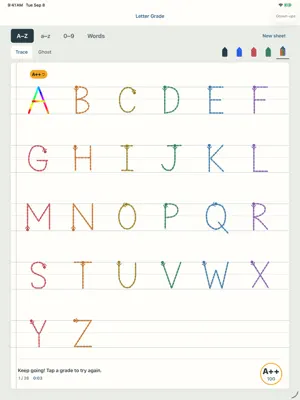
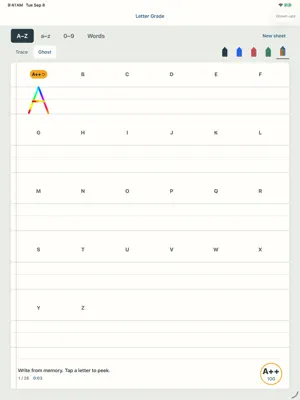
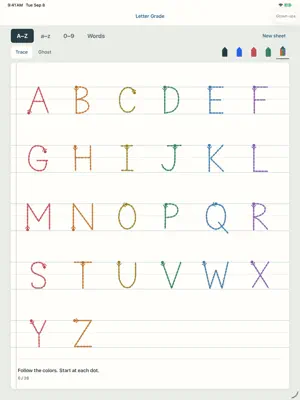
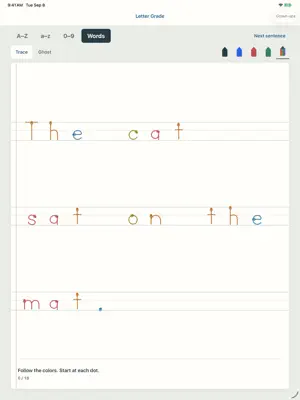
Handwriting worksheets either require a teacher to hover and grade, or they don't give instant enough feedback to be actionable. With letter-grade, learners get instant feedback on their handwriting in real-time, and can use the app with minimal supervision. Trace any letter or number on real classroom-ruled paper and the instant the last stroke is finished, the letter grades itself — no buttons, no waiting. A tidy B+. A hard-won A. And for a letter written fast AND well, the rare Lightning Blast. Apple Pencil is recommended to make the app truly useful. Handwriting is where reading starts. Tracing letters builds the letter knowledge and motor memory that early readers lean on — and Letter Grade makes a kid want to do the next one, because the next one might be an A++. HOW IT WORKS • Trace with Apple Pencil or a finger — big, naturally-sized letters on a 3-line handwriting sheet (solid top, dashed middle, solid baseline) • Every letter earns exactly one grade the moment it's finished, with a celebration to match — never a red X • Tap a letter's grade to clear it and try again — the whole sheet earns a big average grade • Capitals A–Z, lowercase a–z, numbers 0–9 — plus Words mode: whole sentences on ruled paper, capital first, period last • Ghost mode: the guides vanish at the first stroke, so the letters have to live in their head • Pick your pencil color — including the magic rainbow pen • Stroke guides teach proper order and direction, the classroom way (ball-and-stick manuscript print) PRIVACY, PLAINLY Letter Grade collects nothing. Not "very little" — nothing. • No ads, no tracking, no analytics, no accounts • No microphone, no camera, no photos, no location — the app never even asks • No internet: the app makes zero network connections and works fully in airplane mode • Everything your child writes stays on the iPad, period No subscriptions, no in-app purchases, no "premium letters." The whole app is the app. Made for iPad, made for ages 4–8, made by a parent who wanted exactly this and couldn't find it.
What’s new
Version 1.1.1 · Updated September 10, 2026
Grown-up settings are now easier to reach: hold the star to open them directly. We removed the sibling-app promotions and moved privacy information to the bottom of Settings.
App privacy
The developer, Gazzini Ventures, reported these privacy practices to Apple.
Data Not Collected
The developer does not collect any data from this app.
Alternatives to Letter Grade Writing
Looking for apps like Letter Grade Writing? Here are 6 similar apps on the App Store.


| App | Rating | Price | Last updated | Compare |
|---|---|---|---|---|
| Letter Grade Writing | – | Free | September 10, 2026 | |
| TraceBuds | – | Free | Jul 14, 2026 | Compare |
| ReaderQuest | – | Free | May 15, 2026 | Compare |
| ExamReadyMath | – | Free | Apr 26, 2026 | Compare |
| MathDrillFourthGrade | – | Free | Feb 12, 2025 | Compare |
| Numo Math | – | Free | Sep 18, 2026 | Compare |
| Energetic Numbers | – | Free | Oct 14, 2024 | Compare |