

SnapVeed: Image to Video
Amir Gelman Photo & Video iPhoneiPadiPod touchMac
SnapVeed: Image to Video is a free Photo & Video app for iPhone and iPad by Amir Gelman. Requires iOS 26.0. Updated August 28, 2026.
- Price
- Free
- on the App Store
- Size
- 3 MB
- Age 4+
- Updated
- Aug 28
- 2026 · v1.2.3
Screenshots


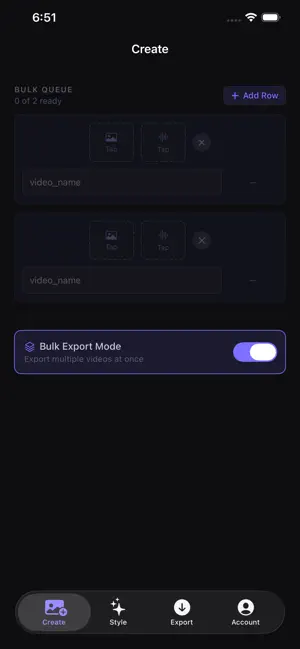
About SnapVeed: Image to Video
Forget the timeline. Forget the editing. SnapVeed skips everything you'd normally do in a video editor. Just drop in a photo and a song — SnapVeed instantly builds a polished, cinematic video for you. No scrubbing, no keyframes, no timeline to fight with. HOW IT WORKS 1. Pick a photo 2. Pick a song 3. Export That's it. SnapVeed automatically fills the background to match your video's shape, adds a subtle cinematic Ken Burns pan-and-zoom timed to your song, and renders the finished video. BULK MODE — YOUR BIGGEST TIME-SAVER Have ten photos and ten songs? Don't repeat the process ten times. Queue up a whole batch of photo+song pairs in Bulk Mode and export them all in one go — perfect for turning a big batch of memories or tracks into videos in minutes, not hours. MORE FEATURES • Smart Fill, Gaussian Blur, and Edge Stretch — three ways to fill the background around your photo • Export up to 4K resolution, in MP4, MOV, or M4V • Compressed Mode for quick, smaller exports — or turn it off for maximum quality • Rotate controls to fix a photo's orientation before export No editing skills, no timeline, no learning curve — just a photo, a song, and a finished video. SnapVeed Premium unlocks every feature with a 1-week free trial, then $9.90/month or $39.90/year. SnapVeed Premium is an auto-renewing subscription. Payment is charged to your Apple Account at purchase confirmation. Your subscription renews automatically unless canceled at least 24 hours before the end of the current period. Manage or cancel anytime in your Apple Account settings. Terms of Use (EULA): https://www.apple.com/legal/internet-services/itunes/dev/stdeula Privacy Policy: https://snapveed.com/privacy-policy
What’s new
Version 1.2.3 · Updated August 28, 2026
Bug fix: the free trial could previously be restarted by deleting and reinstalling the app. This has been fixed — the 7-day trial is now tracked by the App Store itself.
App privacy
The developer, Amir Gelman, reported these privacy practices to Apple.
Data Linked to You
The following data, which may be collected and linked to your identity, may be used for the following purposes:
- Identifiers: User ID
Used for: App Functionality
Data Not Linked to You
The following data, which may be collected but is not linked to your identity, may be used for the following purposes:
- Usage Data: Product Interaction
Used for: Analytics
Alternatives to SnapVeed: Image to Video
Looking for apps like SnapVeed: Image to Video? Here are 6 similar apps on the App Store. The highest rated is Picture to Video AI Generator (5.0/5), and all 6 are free to download.
-
 Picture to Video AI Generator
5.0
-
 Image to Video | Vidifier
4.3
-
 Vido AI: Photo to Video
5.0
-
 AI Video: Image to Video Maker
4.2
-
 AI Image to Video - Animator
5.0
-
 Image to Video
3.8
| App | Rating | Price | Last updated | Compare |
|---|---|---|---|---|
| SnapVeed: Image to Video | – | Free | August 28, 2026 | |
| Picture to Video AI Generator | 5.0 / 5 (2) | Free | Oct 18, 2026 | Compare |
| Image to Video | Vidifier | 4.3 / 5 (3) | Free | Oct 28, 2026 | Compare |
| Vido AI: Photo to Video | 5.0 / 5 (5) | Free | Oct 26, 2026 | Compare |
| AI Video: Image to Video Maker | 4.2 / 5 (18) | Free | Jan 20, 2026 | Compare |
| AI Image to Video - Animator | 5.0 / 5 (3) | Free | Oct 27, 2026 | Compare |
| Image to Video | 3.8 / 5 (18) | Free | Feb 28, 2026 | Compare |