

Trailseek
MICHAEL CHERRY Navigation iPhoneiPadiPod touchApple Watch
Trailseek is a free Navigation app for iPhone and iPad by MICHAEL CHERRY. Rated 5.0/5 from 2 ratings. Requires iOS 17.0. Updated July 23, 2026.
- Rating
- 5.0
- 2 ratings
- Price
- Free
- on the App Store
- Size
- 6 MB
- Age 4+
- Updated
- Jul 23
- 2026 · v1.1
Screenshots
About Trailseek
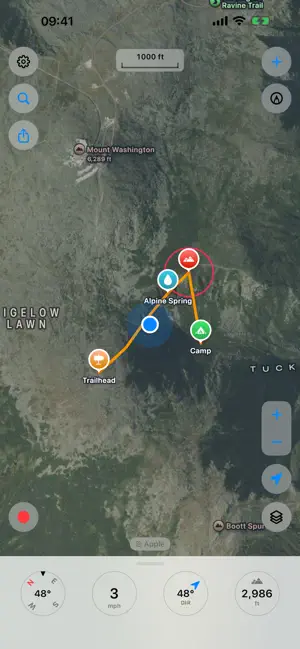
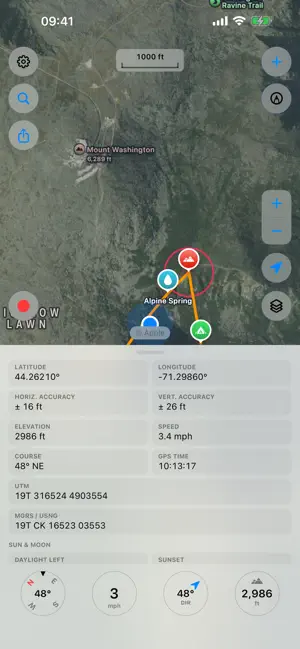
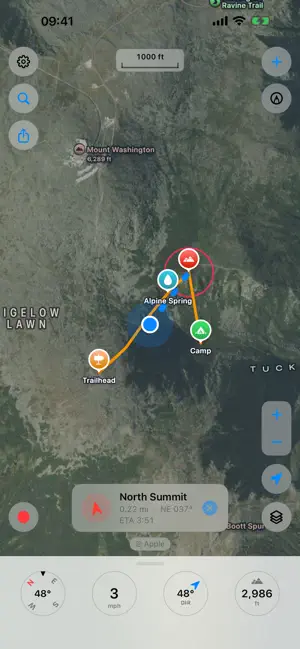
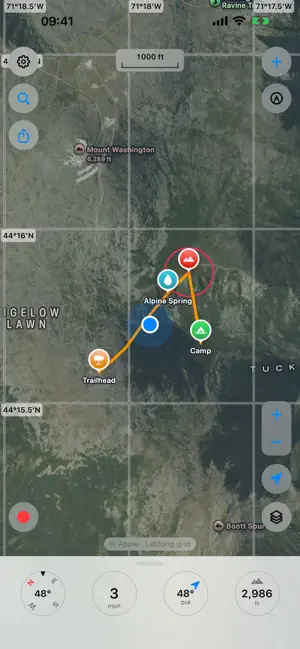
Trailseek is an offline GPS app for hiking and backcountry travel. It records your track, marks waypoints, shows where you are on topographic and satellite maps, and points you back to any spot. Your location and data stay on your device. Maps - Free maps with no account: Apple Maps, satellite, hybrid, OpenStreetMap, OpenTopoMap, and USGS Topo. - A 3D terrain option adds relief to the Apple maps. - Download USGS Topo areas and use them with no signal. - Turn on a coordinate grid for latitude and longitude, UTM, or MGRS and USNG. Waypoints - Drop a waypoint at the map center, your location, or a long press. - Set a name, an icon, a color, and a note. - Attach photos from the camera or your library. - Search and sort the list. Tracks - Record distance, time, speed, and elevation. - Elevation comes from the barometer and GPS together. - Recording continues with the screen off. - Review a saved track's stats and elevation profile. Navigation - Follow a compass arrow to a waypoint, with distance, bearing, and ETA. - It uses GPS and the compass, so it works with no signal and no map. Coordinates - Show your position as decimal degrees, degrees decimal minutes, or degrees minutes seconds. - UTM and MGRS/USNG are always there. - Tap a value to copy it. GPX and sharing - Import and export waypoints and tracks as GPX. - Share a waypoint or track as a file, plain coordinates, or a maps link. Drawing - Draw on the map with Apple Pencil on iPad or a finger on iPhone. - Drawings stay fixed to the ground as you pan and zoom, and share between devices. iPad - The map fills the screen and the panels open as popovers. Apple Watch - Record a track, mark and browse waypoints, and navigate from your wrist. - See your track and waypoints on the watch map. - Waypoints and tracks sync with your iPhone. More - A ruler measures distance and bearing between two points. - Sunrise, sunset, moonrise, moonset, and the moon phase for your location. - A trip computer tracks distance, moving time, and average speed. Privacy - No account, no sign-in, no ads, and no tracking. - Your tracks, waypoints, photos, and location stay on your device. Trailseek does not collect them.
What’s new
Version 1.1 · Updated July 23, 2026
• Shared drawings now open in Trailseek. When someone sends you a Trailseek drawing in Messages or Mail, tap it to preview and import and it lands geo-anchored, right where it belongs on the map. • GPX sharing fixed. Waypoints and tracks you share are now correctly recognized as GPX by other apps, instead of as a generic file. Thanks for using Trailseek. Happy trails!
App privacy
The developer, MICHAEL CHERRY, reported these privacy practices to Apple.
Data Not Collected
The developer does not collect any data from this app.
Alternatives to Trailseek
Looking for apps like Trailseek? Here are 6 similar apps on the App Store. The highest rated is cMaps - Own your maps (5.0/5), and all 6 are free to download.
-
 MeshTrail
4.7
MeshTrail
4.7
-
 cMaps - Own your maps
5.0
cMaps - Own your maps
5.0
-
 Hiker: Offline Trail Maps
-
 Compass Waypoint: Track Back
-
 SGS MinFinder
-
 TrailTreks: NZ Topo Maps
| App | Rating | Price | Last updated | Compare |
|---|---|---|---|---|
| Trailseek | 5.0 / 5 (2 ratings) | Free | July 23, 2026 | |
| MeshTrail | 4.7 / 5 (3) | Free | Aug 15, 2026 | Compare |
| cMaps - Own your maps | 5.0 / 5 (8) | Free | Sep 24, 2026 | Compare |
| Hiker: Offline Trail Maps | – | Free | Aug 15, 2026 | Compare |
| Compass Waypoint: Track Back | – | Free | May 22, 2026 | Compare |
| SGS MinFinder | – | Free | Sep 28, 2026 | Compare |
| TrailTreks: NZ Topo Maps | – | Free | Oct 17, 2026 | Compare |
Compare Trailseek with the top alternatives: ratings, updates, ASO score and keyword gaps →