

DayCommand: AI Calendar
Sadd Tech LLC Productivity iPhoneiPadiPod touch
DayCommand: AI Calendar is a free Productivity app for iPhone and iPad by Sadd Tech LLC. Requires iOS 17.0. Updated October 22, 2026.
- Price
- Free
- on the App Store
- Size
- 16 MB
- Age 4+
- Updated
- Oct 22
- 2026 · v1.0.3
Screenshots


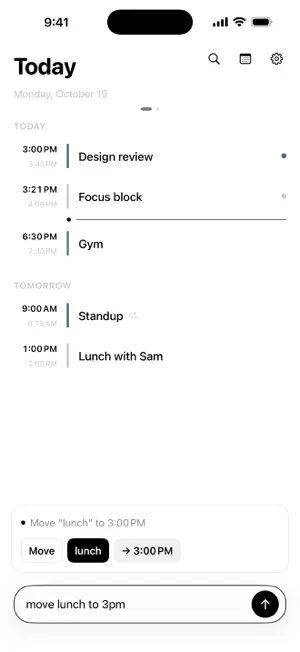
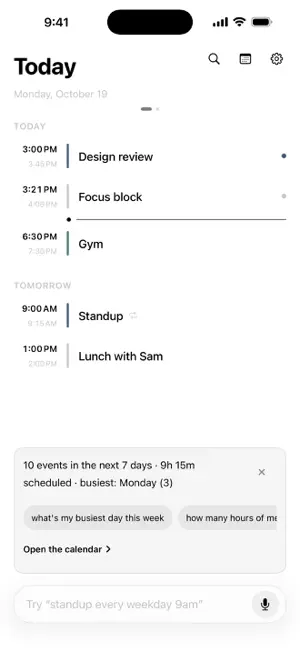
About DayCommand: AI Calendar
DayCommand understands what you type or say — no forms, no menus, no tapping through a dozen fields. "standup every weekday 9am" creates a recurring event on every calendar you've connected. "move lunch to 3pm" finds it and moves it. "cancel gym tomorrow" removes it — with an undo. "am I free at 3?" and "find 30 min for a run" answer questions your calendar app has never been able to. WHAT MAKES IT DIFFERENT • On-device, not cloud. Parsing runs entirely on your phone — no message limits, no monthly quota, no round-trip to a server. It works on a plane. • One command, every calendar. Connect Apple, Google, and Outlook calendars at once, and a single command writes to all of them — moves, renames, and deletes fan out everywhere automatically, so your calendars never drift out of sync with each other. • Real mutations, not just creation. Most "smart" calendar apps can only parse new events. This one moves, renames, resizes, and cancels existing events by fuzzy-matched title — and answers scheduling questions directly. • Genuinely private. Your calendar data goes only to the accounts you connect. Voice dictation runs on-device (Apple CoreML). Nothing about how the app understands your commands is sent anywhere. FEATURES • Natural-language create, move, rename, resize, and cancel — with a confirm card before anything destructive happens • Recurring events: daily/weekly/monthly, intervals, ordinal weekdays ("first Monday of the month"), end dates • Free-time finder: "find 30 min for a run" returns bookable time slots • 60-day agenda with a week strip, live parse preview as you type • Voice dictation, fully on-device • Home Screen widgets • Siri quick-add • Conflict detection when two events would overlap • Time-zone awareness for events created while traveling DayCommand connects to Apple Calendar (iCloud), Google Calendar, and Outlook/Microsoft 365 Calendar. Connect one or all three — everything works the same either way.
What’s new
Version 1.0.3 · Updated October 22, 2026
More reliable on-device voice downloads, with clearer retry and recovery. Safer edits and deletes across connected calendars, better handling of questions and sentence breaks, and improved accessibility.
App privacy
The developer, Sadd Tech LLC, reported these privacy practices to Apple.
Data Not Collected
The developer does not collect any data from this app.
Alternatives to DayCommand: AI Calendar
Looking for apps like DayCommand: AI Calendar? Here are 6 similar apps on the App Store. The highest rated is Stoobs: Random Reminders (5.0/5), and all 6 are free to download.
-
 Stoobs: Random Reminders
5.0
-
 DaysYet: Life & Time Countdown
-
 My Workday: Pay Widget
-
 Saint Francis Schedule
5.0
-
 Simple Fast Speech To Text
-
 0sec: voice ai calendar
5.0
| App | Rating | Price | Last updated | Compare |
|---|---|---|---|---|
| DayCommand: AI Calendar | – | Free | October 22, 2026 | |
| Stoobs: Random Reminders | 5.0 / 5 (1) | Free | Oct 27, 2026 | Compare |
| DaysYet: Life & Time Countdown | – | Free | Oct 21, 2026 | Compare |
| My Workday: Pay Widget | – | Free | Oct 5, 2026 | Compare |
| Saint Francis Schedule | 5.0 / 5 (5) | Free | Aug 27, 2026 | Compare |
| Simple Fast Speech To Text | – | Free | Sep 16, 2026 | Compare |
| 0sec: voice ai calendar | 5.0 / 5 (1) | Free | Sep 24, 2026 | Compare |