

DaysYet: Life & Time Countdown
Shungo Ichikawa Productivity iPhoneiPadiPod touchMac
DaysYet: Life & Time Countdown is a free Productivity app for iPhone and iPad by Shungo Ichikawa. Requires iOS 17.0. Updated October 3, 2026.
- Price
- Free
- on the App Store
- Size
- 4 MB
- Age 4+
- Updated
- Oct 3
- 2026 · v0.1.8
Screenshots

About DaysYet: Life & Time Countdown
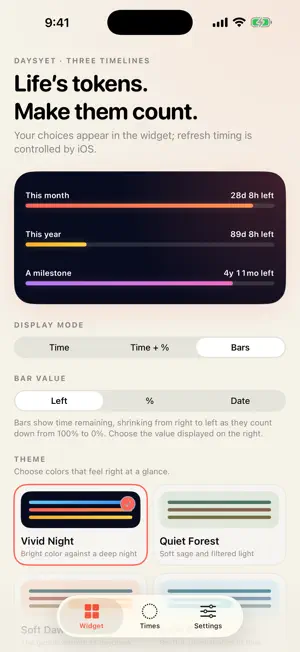
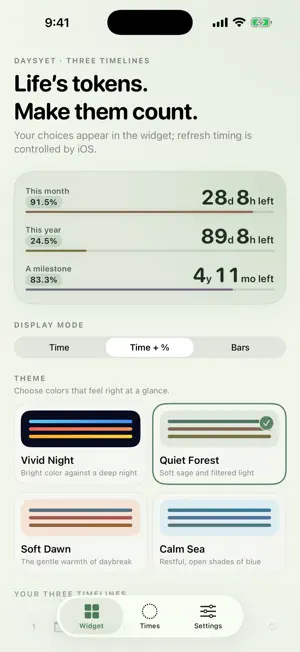
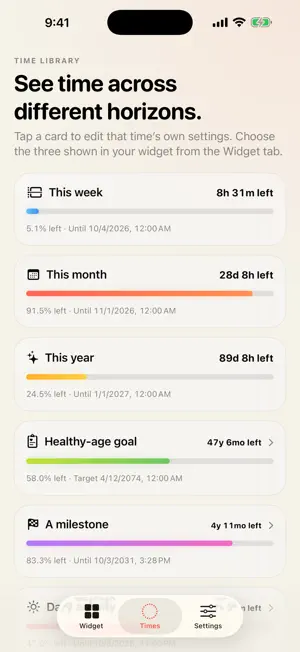
Make time for what matters. DaysYet brings life and everyday countdowns to your Home and Lock Screens. See time left and the percentage remaining for your week, month, year, daily activities, workday, study days, and personal milestones. Use it as a quiet memento mori: a reminder to be intentional with your time. Set your own healthy-age goal as a personal planning milestone. DaysYet counts down to the age you choose; it does not predict your health or lifespan. Keep three timeline rows or four circles on your Home Screen, and one timeline on your Lock Screen. THREE TIMELINES AT A GLANCE Choose from this week, this month, this year, two activity schedules, a healthy-age goal you set, a milestone date with its own start date, and study days. Use the three selected in the app, or configure a different combination for each widget. FOUR CIRCLES Show four timelines in a 2×2 grid with Small and Large Home Screen widgets. Choose each position, percentage/time left/end date for the center, and a theme. Defaults are This week, This month, This year, and Daily activity. The four selections are independent of the app's three timelines. Touch and hold the added widget > Edit Widget to change them. TWO ACTIVITY SCHEDULES AND YOUR WEEK Set up two activities, such as your whole day and work hours, with custom names, start and end times, and active weekdays. Set individual weekdays to Off and use overnight schedules in your device’s local time. An activity that has started continues until its end, even if the next day is Off. Choose the first day of This week using the device calendar setting or any weekday. Edit an activity schedule by tapping its card on the Times tab. Your existing work times and display selections are preserved. COUNT YOUR AVAILABLE STUDY DAYS Plan a period of up to 366 days, including the start and end dates. Give it a name, select weekdays, and add or exclude individual dates in the calendar. Two-week and four-week shortcuts help you start a short-term plan. Show the remaining study days in the app or widgets. The count and percentage show selected days still available, including today when selected. It does not record completed study sessions or access your device calendar. Edit your plan by tapping Study days on the Times tab. THREE DISPLAY LAYOUTS Switch between a large time-left countdown, a combined view of time left, remaining percentage, and bars, and three evenly spaced progress bars. The colored portion shows time remaining, counting down from 100% to 0%. Bars keep their left edge fixed and shrink from right to left as time passes. Circular indicators drain clockwise from the top. For progress bars, choose time left, remaining percentage, or the target date and time. FOUR THOUGHTFUL THEMES Alongside the vivid dark original, choose calmer palettes inspired by a quiet forest, soft dawn, or calm sea. Follow the app setting or give each widget its own look. Three-row widgets support Small and Medium; Four circles supports Small and Large. Inline, Circular, and Rectangular Lock Screen widgets are also available. Choose one timeline to show on the Lock Screen. JAPANESE AND ENGLISH Use the app, widget, and widget configuration in Japanese or English. ON DEVICE BY DESIGN No account is required. Your birth date, configured dates, activity names, times and weekdays, week-start choice, and study plan remain in the on-device area shared by the app and widget and are not sent to the developer. DaysYet contains no advertising or analytics SDKs. You can delete all saved data from Settings at any time. The healthy-age goal is a personal planning marker you choose. It is not a statistic, medical advice, diagnosis, or a prediction of your health or lifespan.
What’s new
Version 0.1.8 · Updated October 3, 2026
• Added the Four circles Home Screen widget. Small and Large sizes show four timelines in a 2×2 grid. • Choose the top-left, top-right, bottom-left, and bottom-right timelines, center values (remaining percentage, time left, or end date), and theme for each widget. Defaults are This week, This month, This year, and Daily activity. • Supports Japanese, English, Dynamic Type, and VoiceOver. Existing three-row and Lock Screen widgets and your saved settings remain available.
App privacy
The developer, Shungo Ichikawa, reported these privacy practices to Apple.
Data Not Collected
The developer does not collect any data from this app.
Alternatives to DaysYet: Life & Time Countdown
Looking for apps like DaysYet: Life & Time Countdown? Here are 6 similar apps on the App Store. The highest rated is Life Planner by BarretOps (5.0/5), and all 6 are free to download.
-
 Life Planner by BarretOps
5.0
Life Planner by BarretOps
5.0
-
 Remindr: AI Notes & Memory
-
 UNTIL Timer
-
 FambamOS: Family Calendar
-
 Timo: Shared Calendar
-
 Hewn Family
5.0
Hewn Family
5.0
| App | Rating | Price | Last updated | Compare |
|---|---|---|---|---|
| DaysYet: Life & Time Countdown | – | Free | October 3, 2026 | |
| Life Planner by BarretOps | 5.0 / 5 (3) | Free | Aug 27, 2026 | Compare |
| Remindr: AI Notes & Memory | – | Free | Jul 13, 2026 | Compare |
| UNTIL Timer | – | Free | Sep 23, 2026 | Compare |
| FambamOS: Family Calendar | – | Free | Sep 7, 2026 | Compare |
| Timo: Shared Calendar | – | Free | Sep 8, 2026 | Compare |
| Hewn Family | 5.0 / 5 (3) | Free | Sep 18, 2026 | Compare |