

ClientWorkSystem
Tiberiu Nedelea Productivity iPhoneiPadiPod touchMacApple Watch
ClientWorkSystem is a free Productivity app for iPhone and iPad by Tiberiu Nedelea. Requires iOS 16.4. Updated October 21, 2026.
- Price
- Free
- on the App Store
- Size
- 52 MB
- Age 4+
- Updated
- Oct 21
- 2026 · v1.0.30
Screenshots

About ClientWorkSystem
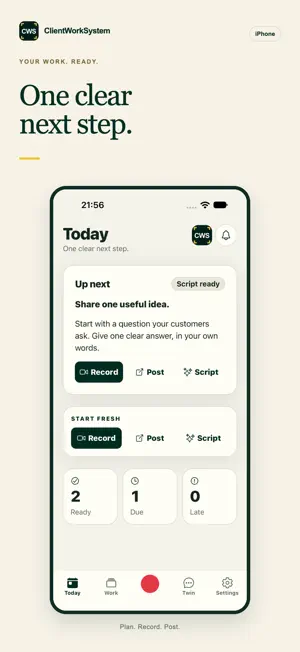
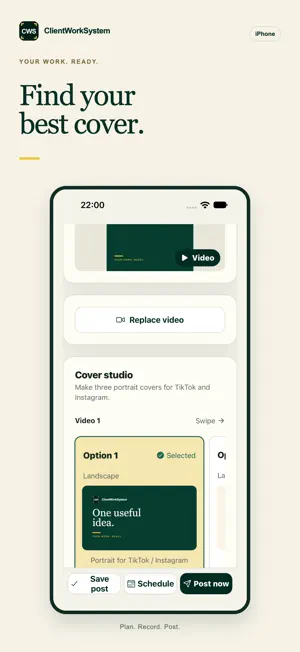
ClientWorkSystem helps busy service business owners plan social content, prepare scripts, record videos, and move each piece of work toward delivery. Know what is ready today. Open your content calendar and see the next useful step. Record with the words in front of you. Keep your script on screen while you film, so you can speak clearly without learning every line. Keep work safe when the internet drops. Recordings stay on your iPhone until they can upload safely. Reopen the app and retry without starting again. Turn an idea into a post. Use Quick Post to begin with a point, photo, or voice note. Ask your private Digital Twin when you need a useful next move. Sign in to your existing ClientWorkSystem account using your email address, private sign-in link or access code. You can also scan your sign-in QR code using the camera control on the sign-in screen. Use the same private workspace across mobile and web. Camera, microphone, photos, and notifications are used only when you choose features that need them.
What’s new
Version 1.0.30 · Updated October 21, 2026
What's new Chat - Send up to 10 photos at once. - Photos, clips and voice notes play right inside Chat. - Answer questions with one tap. Your work shows as cards in Chat. - Smoother Chat screen with fixes for photo sending, double messages and refreshing. Quick Post - After you tap Create you see the progress and a clear way back or to a new post. - Unfinished posts wait in your inbox so you can pick up where you left off. - Fresh title ideas while you type, and the action bar stays above the keyboard. Post screen - See 3 versions side by side and remake with one tap. Posting and scheduling - TikTok and X go out together with Post now. - Quick 15-minute slots and a colour-coded time grid. Home and lock screen - One calm card shows all your work with a progress ring and one-tap answers. - Carousel pictures appear on the lock-screen card as they finish. Also - Recording uploads resume by themselves if the connection drops. - The app tells you when a new version is ready. - Sign in with your verified email. - Fixes for drafts, accounts, sign-out and notifications.
App privacy
The developer, Tiberiu Nedelea, reported these privacy practices to Apple.
Data Linked to You
The following data, which may be collected and linked to your identity, may be used for the following purposes:
- Usage Data: Product Interaction
- Contact Info: Email Address, Name, Phone Number
- User Content: Photos or Videos, Audio Data, Other User Content
- Identifiers: User ID, Device ID
Used for: Analytics, App Functionality
Alternatives to ClientWorkSystem
Looking for apps like ClientWorkSystem? Here are 6 similar apps on the App Store. The highest rated is Playbook - Creative Storage (4.8/5), and all 6 are free to download.
-
 links for later
4.7
links for later
4.7
-
 Second Home
-
 Tinker by Shopify
4.3
Tinker by Shopify
4.3
-
 Playbook - Creative Storage
4.8
Playbook - Creative Storage
4.8
-
 Endless Paper
3.2
Endless Paper
3.2
-
 Quip - Docs, Chat, Sheets
4.7
Quip - Docs, Chat, Sheets
4.7
| App | Rating | Price | Last updated | Compare |
|---|---|---|---|---|
| ClientWorkSystem | – | Free | October 21, 2026 | |
| links for later | 4.7 / 5 (27) | Free | May 22, 2025 | Compare |
| Second Home | – | Free | Oct 8, 2026 | Compare |
| Tinker by Shopify | 4.3 / 5 (57) | Free | Sep 3, 2026 | Compare |
| Playbook - Creative Storage | 4.8 / 5 (119) | Free | Oct 28, 2026 | Compare |
| Endless Paper | 3.2 / 5 (500) | Free | Oct 25, 2026 | Compare |
| Quip - Docs, Chat, Sheets | 4.7 / 5 (25,714) | Free | Aug 4, 2026 | Compare |
Compare ClientWorkSystem with the top alternatives: ratings, updates, ASO score and keyword gaps →