

见山分镜
嘉敏 章 Photo & Video iPhoneiPadiPod touchMac
见山分镜 is a free Photo & Video app for iPhone and iPad by 嘉敏 章. Rated 5.0/5 from 1 ratings. Requires iOS 17.0. Updated October 21, 2026.
- Rating
- 5.0
- 1 ratings
- Price
- Free
- on the App Store
- Size
- 30 MB
- Age 4+
- Updated
- Oct 21
- 2026 · v0.9.4
Screenshots



About 见山分镜
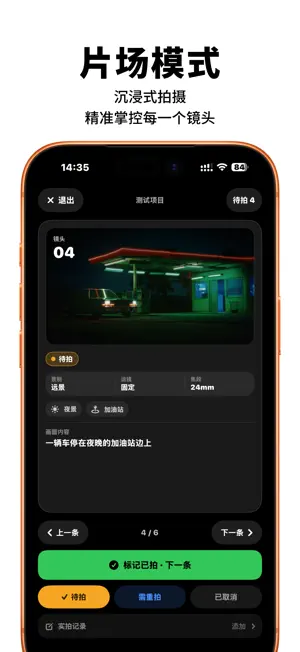
MontFrame is a storyboard and shoot-planning app for video creators, directors and small production teams. Plan your shots Capture shot descriptions, framing, camera movements, focal lengths, dialogue and duration in a table. Add reference images and review your sequence on a visual storyboard. Prepare your shoot Organize shooting plans by scene and create call sheets with locations, weather and arrival times. Export PDFs for your crew. Work on set Mark completed shots and track takes and progress as your team works. Collaborate and sync Invite teammates with editing, status-only or viewing permissions. Share storyboards with clients by link. Use the same account on iPhone, Mac and the web. Export your work Export storyboards as PDFs, images or CSV files. Your language Choose Simplified Chinese, Traditional Chinese or English, or follow your system language. Your project content stays unchanged. MontFrame Pro The free plan includes 3 projects; invited projects do not count toward this limit. Pro offers unlimited projects, with no cloud storage quota currently imposed. Pro benefits work across devices using the same MontFrame account. Eligible new monthly subscribers can try Pro free for 7 days. Prices are displayed on Apple's in-app subscription screen. Subscriptions renew automatically and can be managed or canceled in your Apple account. Terms: https://montframe.cn/terms Privacy: https://montframe.cn/privacy
What’s new
Version 0.9.4 · Updated October 21, 2026
New shot tags: tag your shots, see tags in Table, Board and Frame views, and filter by tag. Shot field menus now offer built-in options plus values already used in the project. Redesigned project idea boards: sub-boards, columns and cards are grouped, with a filter by type, and columns and sub-boards open faster. Search now uses the system search button. Table view is easier to read and shows long content in full; reference images no longer reload while scrolling. Confirmations and choices use system dialogs, and close buttons are now always at the top right. Redesigned Profile, Password & Security, and Appearance and Language settings. Simpler Feedback and Pro pages. Fixed reference image undo, animations occasionally freezing, and other issues.
App privacy
The developer, 嘉敏 章, reported these privacy practices to Apple.
Data Linked to You
The following data, which may be collected and linked to your identity, may be used for the following purposes:
- Purchases: Purchase History
- Location: Precise Location
- Contact Info: Email Address, Name
- User Content: Photos or Videos, Customer Support, Other User Content
- Identifiers: User ID
Used for: App Functionality
Alternatives to 见山分镜
Looking for apps like 见山分镜? Here are 6 similar apps on the App Store. The highest rated is Reelboard: Storyboard Editor (5.0/5), and all 6 are free to download.
-
 TesserCam - the AI Camera
-
 BiCamera - Dual Video Recorder
-
 KIRO分屏相机
-
 视频转换提示词-自动生成创作提示词-专业镜头拆分
-
 口袋监看
口袋监看
-
 Reelboard: Storyboard Editor
5.0
Reelboard: Storyboard Editor
5.0
| App | Rating | Price | Last updated | Compare |
|---|---|---|---|---|
| 见山分镜 | 5.0 / 5 (1 rating) | Free | October 21, 2026 | |
| TesserCam - the AI Camera | – | Free | Sep 7, 2026 | Compare |
| BiCamera - Dual Video Recorder | – | Free | Aug 22, 2026 | Compare |
| KIRO分屏相机 | – | Free | Jun 20, 2026 | Compare |
| 视频转换提示词-自动生成创作提示词-专业镜头拆分 | – | Free | Apr 14, 2026 | Compare |
| 口袋监看 | – | Free | Oct 22, 2026 | Compare |
| Reelboard: Storyboard Editor | 5.0 / 5 (1) | Free | Oct 10, 2026 | Compare |
Compare 见山分镜 with the top alternatives: ratings, updates, ASO score and keyword gaps →