

Reelboard: Storyboard Editor
Soyeon Noh Photo & Video iPhoneiPadiPod touch
Reelboard: Storyboard Editor is a free Photo & Video app for iPhone and iPad by Soyeon Noh. Rated 5.0/5 from 1 ratings. Requires iOS 26.0.
- Rating
- 5.0
- 1 ratings
- Price
- Free
- on the App Store
- Size
- 44 MB
- Age 4+
- Updated
- Oct 10
- 2026 · v1.2.4
Screenshots

About Reelboard: Storyboard Editor
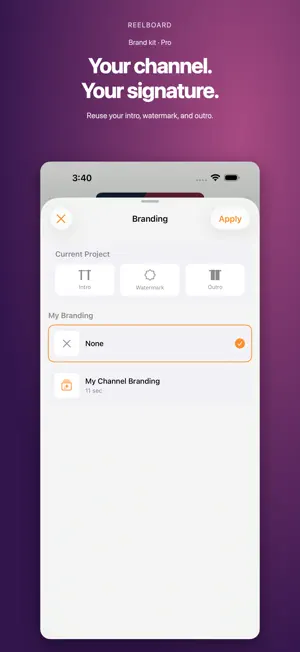
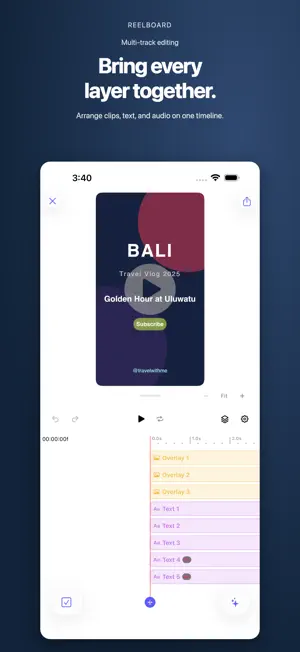
Plan your scenes. Build your timeline. Make the video your own. Reelboard brings storyboarding and video editing into one workflow on iPhone and iPad. Outline your shots, arrange clips, add text and music, and reuse your channel’s branding across projects. START WITH A STORYBOARD Plan scenes with notes and durations, then turn your plan into a timeline. Organize a vlog, a short video, or your next channel episode before you start editing. EDIT ACROSS TRACKS Combine video, photos, text, stickers, and audio. Trim and split clips, arrange layers, and use groups to manage related elements. Animate position, scale, rotation, and opacity with keyframes. Add transitions, speed changes, reverse playback, and freeze frames. ADD CAPTIONS AND SOUND Create captions with speech recognition and adjust their style. Shape your soundtrack with volume, pan, and fades. KEEP YOUR STYLE CONSISTENT Reuse block templates and branding elements across projects. With Reelboard Pro, build a brand kit with an intro, watermark, and outro. GO FURTHER WITH REELBOARD PRO Pro includes advanced tools such as color wheels, curves, scopes, LUTs, chroma key, multicam, motion blur, audio enhancement, and assisted editing tools. Feature availability is shown in the app. EXPORT YOUR VIDEO Choose your project’s aspect ratio, preview your edits, and export the finished video to share. Some features require Reelboard Pro, an optional in-app subscription. See the app for current plans and any available trial offers. Support: [email protected] Terms of Use https://codefulteam.notion.site/Terms-of-use-7071f46c208d4fa589302cb23bc9fa68 Privacy Policy https://codeful.notion.site/Privacy-Policy-31a4dae300458098b1f8e5634e3829a8
What’s new
Version 1.2.4 · Updated October 10, 2026
This update improves how your edits carry through to the finished video. • Fixed reverse-video preview positioning and orientation. • Improved preservation of timing and animation when splitting, trimming, duplicating, and ungrouping clips. • Fixed group opacity, animated masks, and branding backgrounds. • Improved audio handling for speed changes.
App privacy
The developer, Soyeon Noh, reported these privacy practices to Apple.
Data Not Linked to You
The following data, which may be collected but is not linked to your identity, may be used for the following purposes:
- Usage Data: Product Interaction
- Diagnostics: Crash Data
Used for: Analytics, App Functionality
Alternatives to Reelboard: Storyboard Editor
Looking for apps like Reelboard: Storyboard Editor? Here are 6 similar apps on the App Store. The highest rated is Blur Face in Photos (5.0/5), and 4 of the 6 are free to download.
-
 Rec Time Movie
-
 Remote Camera App for Selfie
3.0
-
 Blur Face in Photos
5.0
-
 Background Eraser - BG Remover
4.4
-
 Grainy Filter Vintage: PhotoML
3.6
-
 Cleanify: Duplicate Photo
2.5
| App | Rating | Price | Last updated | Compare |
|---|---|---|---|---|
| Reelboard: Storyboard Editor | 5.0 / 5 (1 rating) | Free | October 10, 2026 | |
| Rec Time Movie | – | Free | Dec 9, 2023 | Compare |
| Remote Camera App for Selfie | 3.0 / 5 (2) | 3.99 USD | Sep 20, 2025 | Compare |
| Blur Face in Photos | 5.0 / 5 (1) | Free | Jan 26, 2026 | Compare |
| Background Eraser - BG Remover | 4.4 / 5 (13) | Free | Oct 11, 2026 | Compare |
| Grainy Filter Vintage: PhotoML | 3.6 / 5 (5) | 9.99 USD | Sep 8, 2026 | Compare |
| Cleanify: Duplicate Photo | 2.5 / 5 (2) | Free | Apr 12, 2024 | Compare |