

CreamAudio Recorder
Siarhei Hladkou Utilities iPhoneiPadiPod touchMac
CreamAudio Recorder is a paid Utilities app for iPhone and iPad by Siarhei Hladkou. Requires iOS 18.0. Updated October 5, 2026.
- Price
- 5.99 USD
- on the App Store
- Size
- 4 MB
- Age 12+
- Updated
- Oct 5
- 2026 · v1.0.1
Screenshots


About CreamAudio Recorder
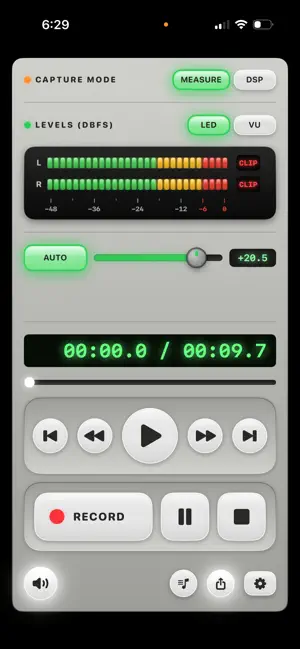
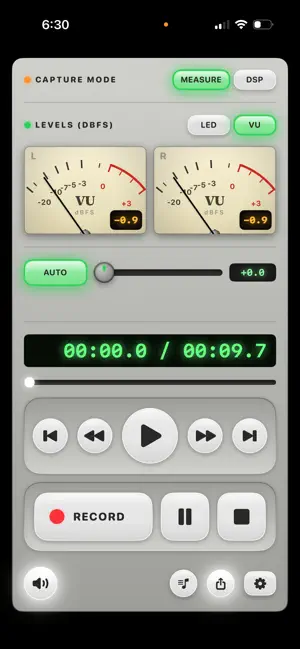
CreamAudio Recorder captures audio the way engineers and musicians need it: straight from the hardware, with nothing added and nothing taken away. MEASURE mode — unprocessed, by default Every recording starts in MEASURE mode, which turns off automatic gain control, noise suppression, and EQ so what hits the file is the raw, linear signal from the input — the built-in mic, or an attached USB/Thunderbolt/class-compliant audio interface. No smoothing, no "enhancement," no surprises — just a clean, faithful, repeatable recording. Built for acoustic measurement, instrument capture, room tone, and any use where accuracy matters more than a processed sound. DSP mode — Apple's stereo mic, when you want it (iPhone/iPad) Flip the switch to DSP mode on iPhone or iPad to hand the signal to Apple's mic-array processing and unlock true stereo capture from the built-in microphones, with the OS's natural-sound tuning (AGC/EQ/noise suppression) applied — good for interviews, ambience, and everyday recording where a fuller, processed sound is what you want. DSP mode only ever applies to the built-in mic; plug in an external interface and the signal is always the raw, unprocessed one. Recording Set your format before you hit record: WAV (24-bit PCM) or AAC (.m4a) at your choice of 96/128/192/256 kbps, recorded directly with no intermediate conversion Share a take straight from the app via the standard system share sheet — AirDrop, Messages, Mail, Save to Files, or any other app — in the format you recorded (WAV by default) Record-level gain boost up to +24 dB, with optional auto level Live stereo metering: switchable analog VU needle or segmented LED ladder Background recording continues when the app is backgrounded or the screen locks Universal: macOS, iPhone, and iPad CreamAudio Recorder is a paid app — a single purchase unlocks every feature described here. There are no subscriptions and no in-app purchases; all features are included.
What’s new
Version 1.0.1 · Updated October 5, 2026
Your recordings now appear in the Files app, under On My iPhone → CreamAudio Recorder → Recordings, so you can copy or share them directly. This update also fixes microphone and capture-mode issues and improves audio device reliability.
App privacy
The developer, Siarhei Hladkou, reported these privacy practices to Apple.
Data Not Collected
The developer does not collect any data from this app.
Alternatives to CreamAudio Recorder
Looking for apps like CreamAudio Recorder? Here are 6 similar apps on the App Store. The highest rated is Morse Decoder AI (2.0/5), and 4 of the 6 are free to download.
-
 Globezones
-
 Arsenal Gun Collection
-
 SwissWallet
-
 Morse Decoder AI
2.0
Morse Decoder AI
2.0
-
 AI Limits & Reset Tracker
-
 Remocle - Timezone Converter
| App | Rating | Price | Last updated | Compare |
|---|---|---|---|---|
| CreamAudio Recorder | – | 5.99 USD | October 5, 2026 | |
| Globezones | – | Free | Oct 19, 2024 | Compare |
| Arsenal Gun Collection | – | 5.99 USD | Oct 28, 2026 | Compare |
| SwissWallet | – | Free | Apr 22, 2025 | Compare |
| Morse Decoder AI | 2.0 / 5 (4) | 2.99 USD | Jan 8, 2024 | Compare |
| AI Limits & Reset Tracker | – | Free | Oct 23, 2026 | Compare |
| Remocle - Timezone Converter | – | Free | Jun 15, 2026 | Compare |