

Morse Decoder AI
Yuriy Kvasha Utilities iPhoneiPadiPod touch
Morse Decoder AI is a paid Utilities app for iPhone and iPad by Yuriy Kvasha. Rated 2.0/5 from 4 ratings. Requires iOS 12.0. Updated January 8, 2024.
- Rating
- 2.0
- 4 ratings
- Price
- 2.99 USD
- on the App Store
- Size
- 60 MB
- Age 4+
- Updated
- Jan 8
- 2024 · v1.1
Screenshots

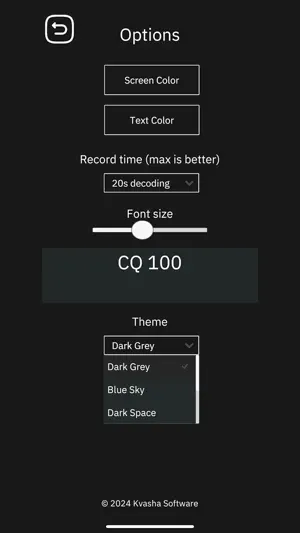

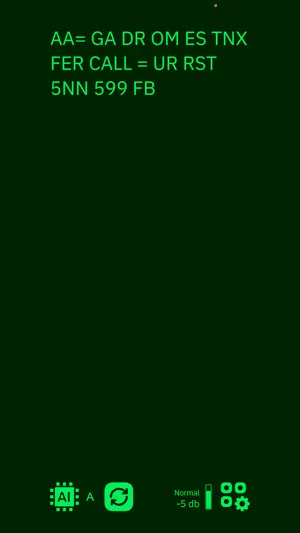
About Morse Decoder AI
The Morse Decoder AI is an application for decoding Morse code signals using artificial intelligence. The application is designed for use by amateur radio enthusiasts for educational purposes. The Morse decoder listens to the audio stream through the microphone or line input and, upon detecting Morse code signals, decodes them into text. The neural network of the application is trained to decode signals with a speed ranging from 10 to 40 words per minute within a frequency range of 200 Hz to 900 Hz. The application supports two modes of operation: direct (default) and tone filtering mode. In direct mode, the neural network will attempt to decipher Morse code signals in the audio range of 250 Hz to 900 Hz. This mode is suitable for confident reception of Morse code at levels of 7db-9db on the S-meter. The tone filtering mode is ideal for decoding Morse code from noisy weak signals in the presence of radio interference. The audio input signal is first filtered using band-pass filters before being passed to the neural network for decoding. This mode allows for the decoding of faint signals, but it requires the accurate specification of the signal's tone frequency. Each radio amateur selects their own CW tone frequency in the transceiver settings, and it is important to tune precisely to the carrier frequency using the ZIN/SPOT button in YAESU transceivers, or the AUTOTUNE button in ICOM transceivers. There are 3 band-pass filter options available: 25Hz, 50Hz, 150Hz. If you can accurately determine the CW signal tone frequency, using the 25Hz filter, you can decode very faint Morse code signals. The application offers two neural network options: A and B, which can be easily switched in the interface. Network A is recommended for use with stable signal transmission with a constant duration of dots and dashes, while network B is recommended when using a straight key, where the duration of dots and dashes may vary. You have the ability to switch between these networks in real time and observe how each network hears and decodes Morse code. It is important to monitor the level of the incoming audio signal, for which the application provides a sound level indicator. Ensure that the signal is not too quiet or too loud. It is recommended to maintain the signal around -7db, which is sufficient for decoding. Keep in mind that higher audio frequencies are quieter than lower frequencies. Additionally, the application provides various color themes, allowing radio enthusiasts to customize the appearance of the application for comfortable use.
What’s new
Version 1.1 · Updated January 8, 2024
- Added Band Pass filter for decoding weak signals - Improved neural networks type A and B
App privacy
The developer, Yuriy Kvasha, reported these privacy practices to Apple.
Data Not Linked to You
The following data, which may be collected but is not linked to your identity, may be used for the following purposes:
- User Content: Audio Data
- Diagnostics: Crash Data, Performance Data
Used for: Other Purposes
Alternatives to Morse Decoder AI
Looking for apps like Morse Decoder AI? Here are 6 similar apps on the App Store. The highest rated is FT Control for YAESU (4.6/5), and 2 of the 6 are free to download.
-
 FT8 Decoder
4.2
FT8 Decoder
4.2
-
 MagicSDR: SDR Radio Receiver
3.1
MagicSDR: SDR Radio Receiver
3.1
-
 FT Control for YAESU
4.6
FT Control for YAESU
4.6
-
 xCluster
4.0
xCluster
4.0
-
 HAM-Toolbox
4.0
HAM-Toolbox
4.0
-
 Dxpeditions365
3.3
Dxpeditions365
3.3
| App | Rating | Price | Last updated | Compare |
|---|---|---|---|---|
| Morse Decoder AI | 2.0 / 5 (4 ratings) | 2.99 USD | January 8, 2024 | |
| FT8 Decoder | 4.3 / 5 (8) | 1.99 USD | Jun 6, 2025 | Compare |
| MagicSDR: SDR Radio Receiver | 3.1 / 5 (10) | 12.99 USD | Aug 10, 2026 | Compare |
| FT Control for YAESU | 4.6 / 5 (8) | 89.99 USD | Oct 27, 2026 | Compare |
| xCluster | 4.0 / 5 (5) | Free | Sep 30, 2026 | Compare |
| HAM-Toolbox | 4.0 / 5 (7) | 14.99 USD | Apr 17, 2026 | Compare |
| Dxpeditions365 | 3.3 / 5 (3) | Free | Jul 4, 2026 | Compare |
Compare Morse Decoder AI with the top alternatives: ratings, updates, ASO score and keyword gaps →