

Shapely 3D
Fabrizio Brancati Graphics & Design iPhoneiPadiPod touchMac
Shapely 3D is a free Graphics & Design app for iPhone and iPad by Fabrizio Brancati. Rated 2.0/5 from 1 ratings. Requires iOS 26.0. Updated October 12, 2026.
- Rating
- 2.0
- 1 ratings
- Price
- Free
- on the App Store
- Size
- 20 MB
- Age 4+
- Updated
- Oct 12
- 2026 · v1.3.0
Screenshots


About Shapely 3D
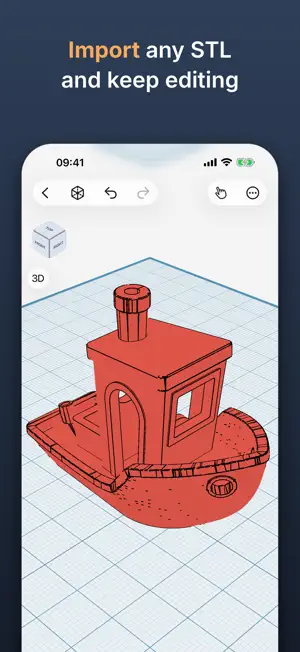
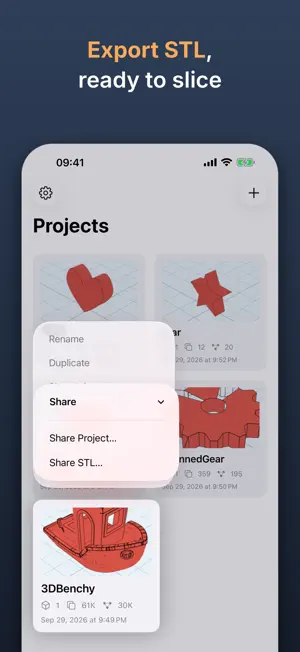
Shapely 3D is a fast, native 3D modeling app built for iPad — sketch, sculpt, and export real 3D models with just your finger or Apple Pencil. Build scenes from simple primitives, then move, rotate, and scale them with an on-screen gizmo. Snap to a configurable grid, measure distances as you work, and use the orientation cube to jump straight to any view. Shapely 3D saves your work as a native document you can open again anytime, right where you left off. Before you print, tap View in Room to see the model on your desk at its actual size, through the camera, or export a USDZ for Quick Look and any USD tool. Apple Pencil Pro's squeeze switches sketch modes mid-drawing and hover shows where the next shape will land. Every project is in Spotlight, Siri and Shortcuts. Shapely 3D Pro unlocks: • CSG boolean operations — union, subtract, and intersect shapes to build more complex forms • STL export — send your models straight to a 3D printer or another CAD tool • Sketch & Extrude — draw a 2D profile and pull it into a solid • Smoothing — round any object with adjustable, non-destructive subdivision • Cut tool — slice objects apart along a face or a drawn line • Edit Faces — move, extrude, and reshape the individual faces of any object, and give any face a color of its own • Repair — find the holes, stray faces, and inside-out faces a slicer would trip on, see them in red, and fix them before you export Whether you're prototyping a part, teaching geometry, or just enjoy building things in 3D, Shapely 3D keeps the fundamentals simple and gets out of your way.
What’s new
Version 1.3.0 · Updated October 12, 2026
Shapely 3D 1.3 is built for iPhone Duo. Two screens, one project, and a hinge we treat with the respect it deserves. MADE FOR IPHONE DUO - Shapely 3D runs at the native size of both screens. Closed, the outer screen is the whole editor: the catalog, the gizmo, Edit Points, booleans, the printability check. Open the phone and the same project gets more workplane around it, with your selection and your camera right where you left them. Nothing is letterboxed, nothing hides behind the fold, nothing asks you to start over. - Built with Xcode 27.1 and the iOS 27.1 SDK, so the phone is treated as what it is, not as a tall iPhone with a line down the middle. The line is a feature. We checked. PRINTABILITY, NOW WITH A SENSE OF PROPORTION - The check now tells minor mesh issues from ones that need repair. Hairline gaps, slivers and a few flipped triangles - the kind every slicer closes on its own, and the classic 3DBenchy is full of - get a quiet grey mark and a "Minor issues" status that says the model prints as it is. No export gate, no lecture. The orange warning, "Needs repair" and the question at the door are kept for holes and inside-out surfaces a slicer would get wrong. Benchy has printed a million times. It did not need our opinion. ALSO NEW - The projects home now recommends one other independent app, through Kickstart Exchange - matched by app, not by you: no tracking, no identifiers, no "based on your activity". Shapely 3D Pro never sees it. Pro is ad-free, and stays that way. - The Pro screen opens with the Pro artwork - the app icon with its sparkles, the same picture the App Store shows for the purchase - instead of a generic sparkles symbol. It borrowed a symbol for three releases. It has its own picture now. FIXED - Importing an STL from Files or iCloud Drive works again on iPhone and iPad. In 1.2.0 it said "could not import" to every file you picked, which was true, and unhelpful. - Fixed a crash on iPad that could close the app while moving, rotating or scaling an object. Of all the moments to leave, mid-drag was the worst one. Everything from 1.2 - the printability check, Repair, Import USDZ, the Printing tab - is right where it was. Folded or not.
App privacy
The developer, Fabrizio Brancati, reported these privacy practices to Apple.
Data Not Linked to You
The following data, which may be collected but is not linked to your identity, may be used for the following purposes:
- Usage Data: Product Interaction, Advertising Data
- Purchases: Purchase History
- Diagnostics: Crash Data, Other Diagnostic Data
Used for: Third-Party Advertising, Developer’s Advertising or Marketing, Analytics, App Functionality
Alternatives to Shapely 3D
Looking for apps like Shapely 3D? Here are 6 similar apps on the App Store. The highest rated is 3D Print Designer CAD (4.6/5), and all 6 are free to download.
-
 3D Model Print Simple Edit
4.0
3D Model Print Simple Edit
4.0
-
 Forma3D - 3D Modeling & Print
4.4
Forma3D - 3D Modeling & Print
4.4
-
 3D Print Designer CAD
4.6
3D Print Designer CAD
4.6
-
 3D Model Maker: ImgTo3D
4.3
3D Model Maker: ImgTo3D
4.3
-
 Remeshy: AI 3D Printables
4.6
Remeshy: AI 3D Printables
4.6
-
 3D Designs for Bambu Lab Handy
2.1
3D Designs for Bambu Lab Handy
2.1
| App | Rating | Price | Last updated | Compare |
|---|---|---|---|---|
| Shapely 3D | 2.0 / 5 (1 rating) | Free | October 12, 2026 | |
| 3D Model Print Simple Edit | 4.0 / 5 (3) | Free | Oct 25, 2026 | Compare |
| Forma3D - 3D Modeling & Print | 4.4 / 5 (7) | Free | Oct 27, 2026 | Compare |
| 3D Print Designer CAD | 4.6 / 5 (34) | Free | May 26, 2026 | Compare |
| 3D Model Maker: ImgTo3D | 4.3 / 5 (324) | Free | Sep 27, 2026 | Compare |
| Remeshy: AI 3D Printables | 4.6 / 5 (156) | Free | Oct 28, 2026 | Compare |
| 3D Designs for Bambu Lab Handy | 2.1 / 5 (11) | Free | Sep 2, 2026 | Compare |
Compare Shapely 3D with the top alternatives: ratings, updates, ASO score and keyword gaps →