

ProbeDeck: ClickHouse® Client
Vladimir Chemeris Developer Tools iPhoneiPadiPod touch
ProbeDeck: ClickHouse® Client is a free Developer Tools app for iPhone and iPad by Vladimir Chemeris. Requires iOS 17.0. Updated October 8, 2026.
- Price
- Free
- on the App Store
- Size
- 20 MB
- Age 4+
- Updated
- Oct 8
- 2026 · v1.2.7
Screenshots


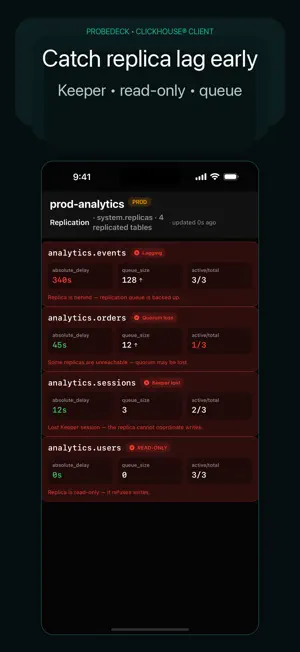
About ProbeDeck: ClickHouse® Client
ProbeDeck is a secure mobile client compatible with ClickHouse® servers, built for cluster operations from your iPhone. ProbeDeck is built for DevOps, SRE, platform and data engineers on call. Connect over TLS, through an SSH tunnel or a bastion. See cluster health, find the query that is eating the cluster and kill it in seconds, while production credentials never touch someone else's server. WHY PROBEDECK • Trust-first. Your credentials stay on your device and never leave it. There is no backend, no proxy, no traffic relay. Your connection goes straight from your phone to your server. • It knows ClickHouse. Replication lag, read-only replicas and Keeper trouble, parts and merges, "too many parts", stuck mutations, disk pressure. These are the pages you get, so this is the first screen you see. • Safety on each statement. ProbeDeck classifies your SQL before it sends anything. DROP, TRUNCATE, ALTER UPDATE and ALTER DELETE, DETACH, DROP PARTITION, OPTIMIZE FINAL and KILL need a type-to-confirm step showing the exact target. Costly statements carry a warning. Set a connection read-only and unlock writes when you mean to. • Honest about what cannot be undone. KILL MUTATION stops a mutation but does not roll back what it already wrote. ProbeDeck says so instead of offering a fake Undo. • Built for mobile networks. Reconnect with backoff, path-aware monitoring of Wi-Fi and cellular handoffs, and specific errors in place of an endless spinner. A ClickHouse error in the response body reads as a query error, not as a dead network. • A production badge marks each risky action, so you know which cluster you are about to touch. WHAT YOU CAN DO • Connect over TLS, an SSH tunnel or a bastion host, with a Face ID app lock. • Inspect a self-signed or custom-CA certificate fingerprint and accept it per connection. • Read cluster health at a glance: replicas, disks, parts, merges, mutations and metrics. • List running queries with elapsed time, memory and the user behind each one. • KILL QUERY on the query burning the cluster, KILL MUTATION on the one that is stuck. • Browse databases, tables, columns and DDL. • Run SQL in the editor and read results laid out for a phone screen. • Ask the AI assistant why a replica is lagging, through your own Ollama or your own API key. PRIVACY • Local-first. Your hosts, passwords, SSH keys and certificates stay on your device, in the iOS Keychain. • No secrets in logs. ProbeDeck keeps passwords, hostnames, database, table and column names and values out of its logs. • The AI assistant talks to your Ollama or your key. Nothing reaches us, because we run no server. Schema context is filtered by an allow-list before it goes to a model, and the assistant never executes anything by itself. • Crash and error reporting is on by default and can be turned off in Settings. Reports are scrubbed and never include hostnames, table names, values or credentials. • No tracking, no IDFA and no advertising identifiers. ProbeDeck is foreground-first. It fits on-call inspection and operations rather than always-on background alerting. FREE VS PRO ProbeDeck is free to try, with a real, usable free tier, not a locked demo. • Free: connect over TLS, SSH tunnel or bastion; the whole monitoring surface, including replicas, disks, parts, merges, mutations and metrics; browse schema and data; run read SQL; one saved connection. • Pro unlocks operating: KILL QUERY and KILL MUTATION, write and DDL SQL, the AI assistant, and multiple saved connections. "ProbeDeck Pro" is a one-time unlock. No subscription, no ads, no account required. ProbeDeck works with self-hosted ClickHouse, ClickHouse Cloud and clusters behind an SSH bastion, over the HTTP interface on ports 8123 and 8443. ClickHouse is a registered trademark of ClickHouse, Inc. ProbeDeck is not affiliated with, endorsed by, or sponsored by ClickHouse, Inc.
What’s new
Version 1.2.7 · Updated October 8, 2026
Test Connection gives up after 10 seconds when the server stays silent and counts the seconds while it waits. In 1.2.6 it could hang for a minute. The dashboard reports a silent server in about 5 seconds, down from several minutes. After a failed test, the form shows what to check: the port, firewall or VPN if the server never accepted the connection, or a busy server if it connected and sent no reply. Error messages appear in all 11 app languages. For a ClickHouse Cloud address, the form suggests port 8443 with TLS and sets both in one tap. Paste a full https:// URL into the host field and the app fills in the host, port and TLS. Enter a native protocol port such as 9000 or 9440 and the form offers the matching HTTP port. In the free version, + opens the ProbeDeck Pro screen once you have a saved connection. That screen has a new Edit Current Connection button, so you can open the saved connection and fix it. If the app cannot reach your server or sign in, the error screen shows Edit Connection next to Retry, and the connection menu has the same item. If you swipe down a form with unsaved changes, the app asks before it discards them. Error reports from failed connections include the port, whether you use TLS or SSH, and the kind of address, such as ClickHouse Cloud or a private IP. They never include the name or IP address of your server or SSH bastion. You can turn them off in Settings under Privacy.
App privacy
The developer, Vladimir Chemeris, reported these privacy practices to Apple.
Data Not Linked to You
The following data, which may be collected but is not linked to your identity, may be used for the following purposes:
- Usage Data: Product Interaction
- Diagnostics: Crash Data
Used for: Analytics
Alternatives to ProbeDeck: ClickHouse® Client
Looking for apps like ProbeDeck: ClickHouse® Client? Here are 6 similar apps on the App Store. The highest rated is GitFlow for GitHub Actions (5.0/5), and all 6 are free to download.
-
 DBPort: Modern Database Client
-
 Master SQL - Database Manager
-
 TablePro
4.7
-
 GitFlow for GitHub Actions
5.0
-
 Dashboard for Cloudflare
4.8
-
 Hey Terminal: SSH Client
5.0
| App | Rating | Price | Last updated | Compare |
|---|---|---|---|---|
| ProbeDeck: ClickHouse® Client | – | Free | October 8, 2026 | |
| DBPort: Modern Database Client | – | Free | Oct 14, 2026 | Compare |
| Master SQL - Database Manager | – | Free | Oct 16, 2026 | Compare |
| TablePro | 4.7 / 5 (3) | Free | Nov 3, 2026 | Compare |
| GitFlow for GitHub Actions | 5.0 / 5 (1) | Free | Oct 22, 2026 | Compare |
| Dashboard for Cloudflare | 4.8 / 5 (4) | Free | Oct 28, 2026 | Compare |
| Hey Terminal: SSH Client | 5.0 / 5 (1) | Free | Oct 22, 2026 | Compare |