

Nook: Home Inventory
Beijing Yima Dangxian Technology And Culture Co., Ltd Productivity iPhoneiPadiPod touchApple Watch
Nook: Home Inventory is a free Productivity app for iPhone and iPad by Beijing Yima Dangxian Technology And Culture Co., Ltd. Rated 5.0/5 from 1 ratings.
- Rating
- 5.0
- 1 ratings
- Price
- Free
- on the App Store
- Size
- 22 MB
- Age 4+
- Updated
- Oct 20
- 2026 · v2.0
Screenshots



About Nook: Home Inventory
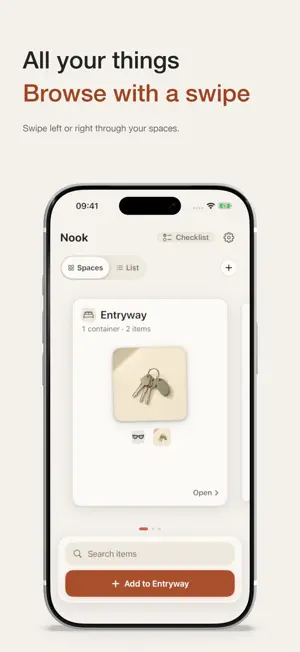
A spare key, a charging cable, the box of travel essentials. Nook helps you remember where you put things and what you need to bring. Your home, at a glance Swipe through your spaces on the home screen. Arrange rooms, cabinets, drawers, and boxes in a hierarchy that reflects your home. Switch to the list to see how they fit together. Put things in order Sort the spaces list and the items inside a container by name, A–Z or Z–A, or newest first. Your custom order is still there whenever you want it. Start with a name Enter an item's name and choose where it belongs. A photo is optional, and you can add notes when you need them. Things to do. Things to bring. Build a checklist for work, a weekend away, or everyday errands. Mix text entries with items you've already recorded. Check off your progress; taking an item out is a separate action. Know where to look Search by name to see the location you recorded, then open that container in Nook. Mark an item as taken out when you use it, and mark it as home when you put it back. Nook keeps the locations and status you enter; it does not automatically track physical objects. Start free. Unlock once. Record up to 30 inventory items for free, with unlimited text-only checklist entries. A one-time in-app purchase unlocks unlimited inventory items. No subscription. Existing records remain available to view and manage.
What’s new
Version 2.0 · Updated October 20, 2026
Nook 2.0 makes browsing and organizing easier. • Sort spaces and items by name, A–Z or Z–A, or newest first. Switch back to your custom order at any time. • Use the location path to move between levels of your storage hierarchy. • Choose container types more easily and get clearer confirmation after creating a container. • A refreshed lifetime unlock page explains the purchase and makes Restore Purchase easier to find.
App privacy
The developer, Beijing Yima Dangxian Technology And Culture Co., Ltd, reported these privacy practices to Apple.
Data Not Collected
The developer does not collect any data from this app.
Alternatives to Nook: Home Inventory
Looking for apps like Nook: Home Inventory? Here are 6 similar apps on the App Store. The highest rated is HomeLog: Home Inventory (5.0/5), and all 6 are free to download.
-
 HomeLog: Home Inventory
5.0
HomeLog: Home Inventory
5.0
-
 Keymera
-
 快拍收纳
快拍收纳
-
 Home Inventory Tracker DW
-
 ToteCubby
5.0
ToteCubby
5.0
-
 Planish: ADHD Day Planner
| App | Rating | Price | Last updated | Compare |
|---|---|---|---|---|
| Nook: Home Inventory | 5.0 / 5 (1 rating) | Free | October 20, 2026 | |
| HomeLog: Home Inventory | 5.0 / 5 (1) | Free | Sep 16, 2026 | Compare |
| Keymera | – | Free | Jul 11, 2026 | Compare |
| 快拍收纳 | – | Free | Sep 28, 2026 | Compare |
| Home Inventory Tracker DW | – | Free | Jul 15, 2026 | Compare |
| ToteCubby | 5.0 / 5 (1) | Free | Mar 6, 2026 | Compare |
| Planish: ADHD Day Planner | – | Free | Oct 11, 2026 | Compare |