

gtmux
Chaoyi Chen Developer Tools iPhoneiPadiPod touch
gtmux is a free Developer Tools app for iPhone and iPad by Chaoyi Chen. Rated 5.0/5 from 3 ratings. Requires iOS 15.1. Updated October 25, 2026.
- Rating
- 5.0
- 3 ratings
- Price
- Free
- on the App Store
- Size
- 30 MB
- Age 4+
- Updated
- Oct 25
- 2026 · v1.0.149
Screenshots


About gtmux
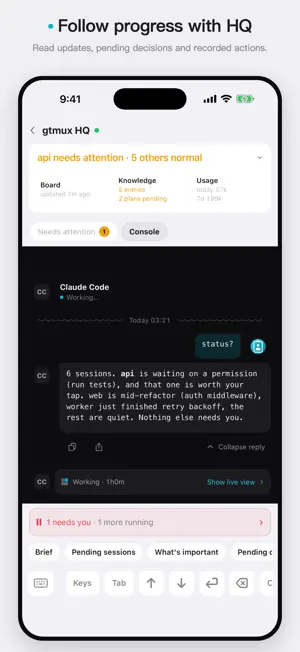
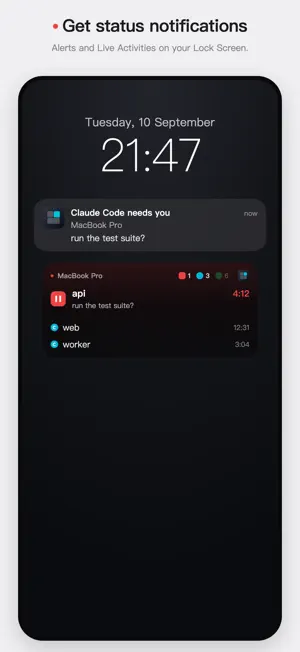
View and control tmux sessions on your Mac or Linux server from iPhone and iPad. Follow Claude Code, Codex, DeepSeek Harness and other supported coding agents alongside ordinary terminal panes. Read their progress, reply to questions and continue work while away from your desk. Sessions and replies • Check agent status and requests that need your attention. • Read conversations and terminal output, send messages, and answer recognized permission requests or choices. • Use function keys and modifier combinations when a session needs keyboard input. Input access is controlled separately from viewing. HQ and knowledge HQ follows multiple agent sessions, summarizes progress and shows pending decisions and recorded actions. It can dispatch work within your authorization. HQ keeps project context, reusable lessons and your feedback in a local knowledge base, updating and referring to those records in later tasks to become more familiar with your projects and the way you work. Usage and notifications Check the limits, reset times and usage records available from supported agents. Receive notifications when your attention is needed or a task finishes, and follow session state through Live Activities. Connections Pair with multiple servers, or open a limited session-sharing link. Sharing can be revoked, and terminal input must be enabled separately. iPad supports a sidebar layout and hardware keyboard shortcuts. English and Simplified Chinese are included. Getting started Install the free, open-source gtmux server on your Mac or Linux machine, then scan its pairing code. The built-in demo works without a server. Connect over your own network or a gtmux tunnel; sessions keep running on your server. Setup: ccy.dev/projects/gtmux. Privacy gtmux collects no data and requires no account. Your sessions and pairing credentials stay on your devices and server. Notifications pass through a relay to Apple's push service without being stored by the relay.
What’s new
Version 1.0.149 · Updated October 25, 2026
Conversations • Working sessions use a single progress line. Expanded Live previews stay open through refreshes. • Pending questions appear above the conversation and remain accessible with the keyboard open. • Unsent drafts stay with their server and session. Large-text prompts and collapse controls have improved layouts. Knowledge and settings • Knowledge entries show their intended use and progress, with clearer categories, sources and record details. • Keep an entry open after changing its intended use or recording where it was applied. • Settings, sharing, diagnostics and HQ use consistent labels. Send failures explain what happened and how to continue. Update gtmux on your server to 1.0.149 or later to use all new features. Installation and updates: https://ccy.dev/projects/gtmux/docs/install/
App privacy
The developer, Chaoyi Chen, reported these privacy practices to Apple.
Data Not Collected
The developer does not collect any data from this app.
Alternatives to gtmux
Looking for apps like gtmux? Here are 6 similar apps on the App Store. The highest rated is CodePress Mobile (5.0/5), and all 6 are free to download.
-
 Wolf Monitor
-
 farcrew: terminal for agents
-
 Gitzy
4.0
Gitzy
4.0
-
 RemoteX: Server Ops
-
 CodePress Mobile
5.0
CodePress Mobile
5.0
-
 Voxa Code
| App | Rating | Price | Last updated | Compare |
|---|---|---|---|---|
| gtmux | 5.0 / 5 (3 ratings) | Free | October 25, 2026 | |
| Wolf Monitor | – | Free | Jun 29, 2026 | Compare |
| farcrew: terminal for agents | – | Free | Sep 7, 2026 | Compare |
| Gitzy | 4.0 / 5 (1) | Free | Apr 7, 2026 | Compare |
| RemoteX: Server Ops | – | Free | Jul 5, 2026 | Compare |
| CodePress Mobile | 5.0 / 5 (1) | Free | Oct 28, 2026 | Compare |
| Voxa Code | – | Free | Jul 14, 2026 | Compare |
Compare gtmux with the top alternatives: ratings, updates, ASO score and keyword gaps →