

RemoteX: Server Ops
Primoz Cigoj Developer Tools iPhoneiPadiPod touch
RemoteX: Server Ops is a free Developer Tools app for iPhone and iPad by Primoz Cigoj. Requires iOS 15.1. Updated July 5, 2026.
- Price
- Free
- on the App Store
- Size
- 56 MB
- Age 4+
- Updated
- Jul 5
- 2026 · v1.2.10
Screenshots



About RemoteX: Server Ops
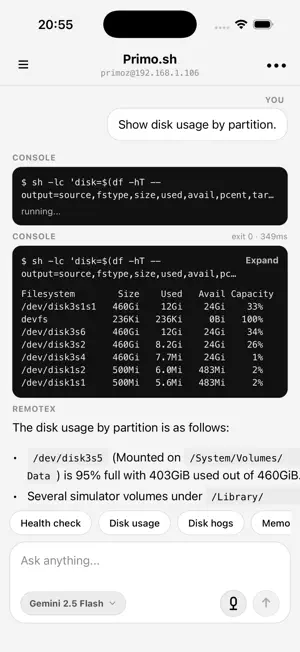
RemoteX is a local-first AI workspace for infrastructure operations. Connect SSH Servers, Kubernetes clusters, and Databases, then interact with them in plain English. Ask: • "why is production slow?" • "show failing pods" • "what changed recently?" • "explain this Postgres query" • "check disk usage across all servers" RemoteX can inspect infrastructure, read logs, query databases, analyze files, and propose actions — while keeping you in control through approval-based execution and Face ID protection. There is no RemoteX backend between you and your infrastructure. Conversations, servers, and chat history sync end-to-end encrypted across your iPhone, iPad, and Mac through your own iCloud. Apple sees nothing but a blob — only your devices hold the key. WHAT YOU CAN CONNECT • SSH servers • Kubernetes clusters via kubeconfig • PostgreSQL, MySQL, SQLite, and Redis • Private infrastructure through SSH bastions/tunnels WHAT IT DOES • Diagnose infrastructure in plain English • Chat with multiple servers and environments at once • Read pod logs and inspect Kubernetes resources • Run read-only database queries with safety limits • Explain SQL queries and query plans • Browse and manage remote files • Attach PDFs, spreadsheets, logs, code, JSON, YAML, and documents directly into AI chat • Generate summaries and operational insights instead of walls of terminal output • One-tap operational recipes and reusable playbooks • Background monitoring with notifications • Full-text conversation search • Voice input support • Multiple chats per environment or project • Continue conversations across iPhone, iPad, and Mac — pick up on your phone what you started on your Mac SAFETY & CONTROL • Every state-changing action requires approval • Face ID / Touch ID protection for sensitive operations • Clear target routing when actions go through bastion hosts • SSH host-key pinning with algorithm validation • Read-only query protections for databases • Row caps and timeout limits for AI-generated queries ACROSS YOUR DEVICES • End-to-end encrypted sync between iPhone, iPad, and Mac via your own iCloud • A passphrase you set is the key — Apple and RemoteX cannot decrypt your data • No central server, no account — sync runs entirely between your devices • Open a chat on iPhone, continue on Mac; add a server on Mac, see it on iPhone LOCAL-FIRST SECURITY • SSH credentials, API keys, kubeconfigs, and database credentials stay on your device • No RemoteX-managed infrastructure proxy • Optional iCloud sync is end-to-end encrypted with a passphrase only you know — your data is unreadable to Apple, RemoteX, and anyone in between • Bring your own AI provider: • Anthropic • OpenAI • Google Gemini • Commands and infrastructure context are sent directly to the AI provider you choose • Optional crash reporting via Sentry (disabled by default) BUILT FOR • DevOps engineers • Platform teams • Solo founders running infrastructure • SREs and on-call engineers • Developers managing production systems PRO FEATURES RemoteX is free for one server. Upgrade for: • Unlimited infrastructure connections • Background monitoring and alerts • Extended monitoring history • Custom playbooks and recipes • Advanced search REQUIREMENTS • SSH access to your infrastructure • API key from Anthropic, OpenAI, or Google AI Studio • iPhone with Face ID or Touch ID Terms of Use: https://remotex.dev/terms Privacy Policy: https://remotex.dev/privacy
What’s new
Version 1.2.10 · Updated July 5, 2026
New in RemoteX 1.2.10: - Added a mobile SSH Shell screen with one-off commands, saved command receipts, recent command history, and an optional interactive terminal. - Improved approval, activity, and command output flows so read-only work stays cleaner and write actions produce clearer receipts. - Added mobile skill improvements, including imported skill support and removing imported skills. - Improved review/diff handling for changed files. - Fixed stale waiting states, chat scroll behavior, shell lifecycle issues, and several mobile stability/polish problems.
App privacy
The developer, Primoz Cigoj, reported these privacy practices to Apple.
Data Linked to You
The following data, which may be collected and linked to your identity, may be used for the following purposes:
- Purchases: Purchase History
- Usage Data: Product Interaction
- Diagnostics: Crash Data, Performance Data
- Contact Info: Email Address
- User Content: Other User Content
- Identifiers: User ID
Used for: Analytics, App Functionality
Alternatives to RemoteX: Server Ops
Looking for apps like RemoteX: Server Ops? Here are 6 similar apps on the App Store. The highest rated is gtmux (5.0/5), and all 6 are free to download.
-
 Wolf Monitor
-
 RelayPulse
-
 Termcorp
-
 farcrew: terminal for agents
-
 CosmoRemote: Mac Build & Test
-
 gtmux
5.0
gtmux
5.0
| App | Rating | Price | Last updated | Compare |
|---|---|---|---|---|
| RemoteX: Server Ops | – | Free | July 5, 2026 | |
| Wolf Monitor | – | Free | Jun 29, 2026 | Compare |
| RelayPulse | – | Free | Oct 2, 2026 | Compare |
| Termcorp | – | Free | Jul 21, 2026 | Compare |
| farcrew: terminal for agents | – | Free | Sep 7, 2026 | Compare |
| CosmoRemote: Mac Build & Test | – | Free | Oct 30, 2026 | Compare |
| gtmux | 5.0 / 5 (3) | Free | Nov 1, 2026 | Compare |