

WOD Timer 365: Cross Training
STANISLAV SPASOV SLAVKOV Health & Fitness iPhoneiPadiPod touch
WOD Timer 365: Cross Training is a free Health & Fitness app for iPhone and iPad by STANISLAV SPASOV SLAVKOV. Requires iOS 16.0. Updated October 9, 2026.
- Price
- Free
- on the App Store
- Size
- 67 MB
- Age 4+
- Updated
- Oct 9
- 2026 · v1.18.0
Screenshots



About WOD Timer 365: Cross Training
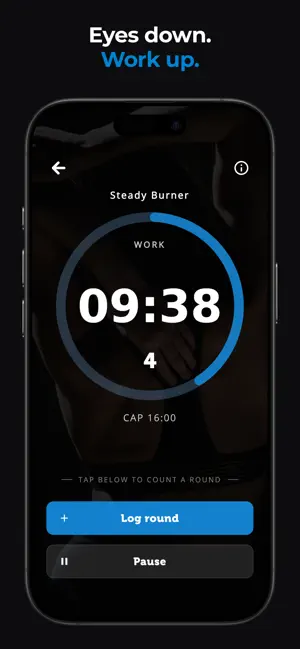
A new WOD every day — and the timer built to run it. Bodyweight workouts for every level, plus four dedicated modes: AMRAP, EMOM, Tabata, and For Time. Tap, set, go. A NEW WOD EVERY DAY Open the app and Today's WOD is waiting: a real workout with movements and reps, a fresh pick from the WOD library. Beginner, Intermediate, and Advanced. All bodyweight, so you can train at the box, at home, or in a hotel room with zero equipment. Today's WOD is free, every day. Single-mode AMRAPs, EMOMs, and For Time pieces, plus mixed WODs that chain several parts into one session — the timer runs every part and every transition for you. Like one? Save it to My Workouts. Want a different one right now? Surprise me (Premium) serves up a new WOD with every tap. FOUR WORKOUT MODES AMRAP — As Many Rounds As Possible Set the cap, hit start, count rounds. Log rounds mid-workout with one tap — every round is timed. The countdown keeps you honest; your effort does the rest. FOR TIME — Race the Clock Track elapsed time with or without a cap. Log rounds as you go, benchmark workouts, chase PRs, and see exactly how fast you're getting. No-cap mode for open-ended sessions. EMOM — Every Minute On The Minute Structured minute-by-minute intervals with audio cues at every transition. Perfect for strength and conditioning. TABATA — High-Intensity Intervals Adjustable work, rest, and round counts. Run the classic 20/10, go 40/20, or build any interval you need. FEATURES THAT KEEP YOU FOCUSED Voice Announcements — Hands-free coaching. Spoken cues for "Work," "Rest," and transitions so your eyes stay on the bar, not your phone. Audio Cues — Clear, distinct beeps mark every start, transition, and finish. Train with confidence even when your phone is across the room. Mid-Workout Reminder — Optional halfway voice cue keeps your head in the game during long grinders. Customizable Countdown — 3, 5, 10 seconds, or any custom lead-in. Background Mode — The timer runs with your screen off and your music keeps playing. Switch apps without losing a second. TRACK YOUR PROGRESS Every workout logged automatically. After AMRAP and For Time sessions, your round splits are there the moment you finish — fastest, slowest, average, and how far under the cap you came in. Copy the results and paste them into your gym chat. Pace Analysis (Premium) keeps those splits in your history and compares every attempt with your last one, round by round, so you can see exactly where you faded and where you got faster. Add notes, watch your AMRAP rounds climb and your For Time benchmarks drop. BUILT FOR THE BOX AND THE HOME GYM Bold dark interface with large numbers visible from across the room. Each mode is color-coded — blue for AMRAP, orange for For Time, green for EMOM, maroon for Tabata — so you always know your mode at a glance. PREMIUM Never run out of workouts: Surprise me, plus every saved multi-part WOD. Track your pace and progress with Pace Analysis. Save unlimited workouts. Remove all ads. One-time purchase or subscription — your choice. WHY WOD TIMER 365? Most timer apps are just a clock. Most workout apps are bloated. WOD Timer 365 is a timer you can read from across the room and a new WOD every day of the year to run on it. That's the 365. Four focused modes. Zero learning curve. No clutter. Terms of Use (EULA): https://www.apple.com/legal/internet-services/itunes/dev/stdeula/
What’s new
Version 1.18.0 · Updated October 9, 2026
New: Your timer, your sound. Choose what plays when the clock hits zero: air horn, boxing bell, whistle and more. Hear them all in Settings → Sound type. We love hearing from you: every review shapes what we build next, so keep the feedback coming. Happy training!
App privacy
The developer, STANISLAV SPASOV SLAVKOV, reported these privacy practices to Apple.
Data Used to Track You
The following data may be used to track you across apps and websites owned by other companies:
- Identifiers: Device ID
- Usage Data: Product Interaction, Advertising Data
Data Linked to You
The following data, which may be collected and linked to your identity, may be used for the following purposes:
- Identifiers: Device ID
- Usage Data: Product Interaction, Advertising Data
Used for: Third-Party Advertising, Analytics
Data Not Linked to You
The following data, which may be collected but is not linked to your identity, may be used for the following purposes:
- Purchases: Purchase History
- Diagnostics: Other Diagnostic Data, Crash Data
Used for: Analytics, App Functionality
Alternatives to WOD Timer 365: Cross Training
Looking for apps like WOD Timer 365: Cross Training? Here are 6 similar apps on the App Store. The highest rated is QBod: AI Meal & Workout Coach (5.0/5), and all 6 are free to download.
-
 HIIT & Tabata Workouts-Hiitify
-
 QBod: AI Meal & Workout Coach
5.0
QBod: AI Meal & Workout Coach
5.0
-
 WOD Timer: Interval Training
-
 MyGymBuddy: AI Calorie Counter
-
 GRIT: Workout & WOD Timer
-
 Voice Timer - Workouts & More
5.0
Voice Timer - Workouts & More
5.0
| App | Rating | Price | Last updated | Compare |
|---|---|---|---|---|
| WOD Timer 365: Cross Training | – | Free | October 9, 2026 | |
| HIIT & Tabata Workouts-Hiitify | – | Free | Aug 13, 2026 | Compare |
| QBod: AI Meal & Workout Coach | 5.0 / 5 (14) | Free | Oct 3, 2026 | Compare |
| WOD Timer: Interval Training | – | Free | Sep 13, 2025 | Compare |
| MyGymBuddy: AI Calorie Counter | – | Free | Sep 23, 2026 | Compare |
| GRIT: Workout & WOD Timer | – | Free | Oct 15, 2026 | Compare |
| Voice Timer - Workouts & More | 5.0 / 5 (14) | Free | Jun 26, 2025 | Compare |