

Video Shrink: Compress Size
keisuke haraguchi Photo & Video iPhoneiPadiPod touch
Video Shrink: Compress Size is a free Photo & Video app for iPhone and iPad by keisuke haraguchi. Requires iOS 17.0. Updated September 4, 2026.
- Price
- Free
- on the App Store
- Size
- 1 MB
- Age 4+
- Updated
- Sep 4
- 2026 · v1.5
Screenshots

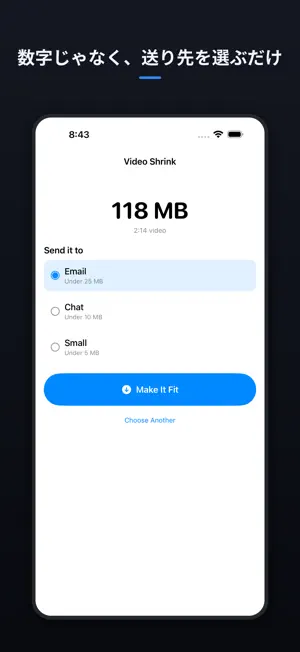

About Video Shrink: Compress Size
"This file is too large to send." Every other compressor answers that by asking you for a percentage, a bitrate, or a resolution — numbers you have no way to choose correctly. So you compress, try to send it, fail, and compress again. Video Shrink asks one question instead: where is it going? • Pick a destination, not a number — the app does the arithmetic • It measures the result and re-encodes if it overshot, so it actually fits • Before and after, side by side • Sound is kept. Portrait stays portrait. • Works entirely offline. Nothing is uploaded, ever. • No ads. No account. No subscription. Free shrinks one video at a time. A single one-time purchase unlocks batches — there is no subscription.
What’s new
Version 1.5 · Updated September 4, 2026
Added a one-time purchase to compress videos in batches.
App privacy
The developer, keisuke haraguchi, reported these privacy practices to Apple.
Data Not Collected
The developer does not collect any data from this app.
Alternatives to Video Shrink: Compress Size
Looking for apps like Video Shrink: Compress Size? Here are 6 similar apps on the App Store. The highest rated is Video Compress - Resize Videos (5.0/5), and all 6 are free to download.
-
 Snug Video
-
 Reduce Video Size: Compressor
-
 Video Compress - Easily Shrink
-
 Video Compressor-Fast Compress
-
 Crispy - Video Compressor
4.0
Crispy - Video Compressor
4.0
-
 Video Compress - Resize Videos
5.0
Video Compress - Resize Videos
5.0
| App | Rating | Price | Last updated | Compare |
|---|---|---|---|---|
| Video Shrink: Compress Size | – | Free | September 4, 2026 | |
| Snug Video | – | Free | Oct 14, 2026 | Compare |
| Reduce Video Size: Compressor | – | Free | Oct 11, 2026 | Compare |
| Video Compress - Easily Shrink | – | Free | Mar 14, 2026 | Compare |
| Video Compressor-Fast Compress | – | Free | Apr 20, 2026 | Compare |
| Crispy - Video Compressor | 4.0 / 5 (1) | Free | Oct 19, 2026 | Compare |
| Video Compress - Resize Videos | 5.0 / 5 (6) | Free | Mar 18, 2024 | Compare |