

Crispy - Video Compressor
Faruk Sengul Photo & Video iPhoneiPadiPod touch
Crispy - Video Compressor is a free Photo & Video app for iPhone and iPad by Faruk Sengul. Rated 4.0/5 from 1 ratings. Requires iOS 17.0.
- Rating
- 4.0
- 1 ratings
- Price
- Free
- on the App Store
- Size
- 17 MB
- Age 4+
- Updated
- Oct 19
- 2026 · v1.2.1
Screenshots



About Crispy - Video Compressor
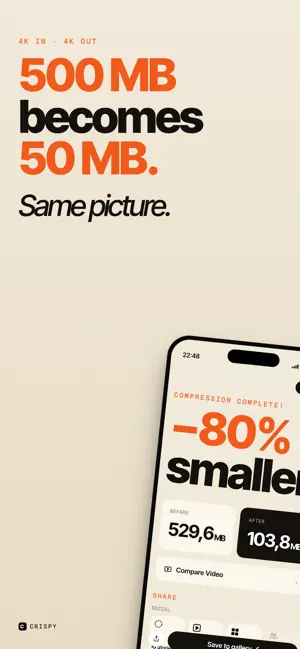
Stop choosing between 4K quality and file size. You filmed it in 4K. Then WhatsApp rejected it for being too big. You tried another compressor — and it dumped your footage down to 1080p, ruining the quality you bought your iPhone for. Crispy fixes that. Crispy is a video compressor built around a single promise: shrink your file size dramatically without throwing away your resolution. A 500 MB 4K clip becomes 50 MB — still in true 4K. Then when Instagram, TikTok, or Reels re-compresses your upload, they have far less quality left to butcher. — WHY CRISPY IS DIFFERENT — - Keep your 4K. Most compressors quietly downscale to 1080p or 720p to hit smaller file sizes. Crispy uses smart bitrate compression so 4K stays 4K, HDR stays HDR. - 100% on-device. Your videos never leave your iPhone. No cloud uploads, no servers, no accounts, no tracking. Compress on a plane, in the subway, anywhere. - Built on Apple AVFoundation. Native Apple video technology — not a hacky FFmpeg wrapper. Faster encoding, lower battery drain, full HEVC and H.264 support. - No watermarks. Ever. — ONE-TAP PRESETS FOR EVERY PLATFORM — Why fiddle with bitrate sliders? Crispy includes 15+ optimized presets: - WhatsApp — fits the 16 MB attachment limit - Instagram Reels — vertical, platform-perfect bitrate - TikTok — optimal upload spec - YouTube Shorts — 9:16 ready - X (Twitter) — under the upload cap - Telegram, Discord, Signal - Gmail, Outlook, iCloud Mail — email-friendly sizes - Save to Photos — storage saver mode One tap. Done. No guesswork. — FEATURES YOU'LL ACTUALLY USE — - Batch compression — queue dozens of videos at once - Custom mode — full control over resolution, bitrate, frame rate, codec (H.264 / HEVC) - Resize and crop for any aspect ratio - Trim before compressing — drop the parts you don't need - Metadata preserved — keep dates, location, and HDR data - Built-in duplicate video scanner — find and remove identical clips eating your storage - MP4, MOV, HEVC, H.264 supported - Estimated output size shown before you compress - Dark Mode, Dynamic Type, VoiceOver — fully accessible — WHO IT'S FOR — Content creators who shoot in 4K and need to upload without quality loss. Travelers and parents whose 256 GB iPhones are full of memories. Anyone who's ever stared at the "file too large" error in WhatsApp. Editors who need to send proxies. People who care that their videos look as good as the day they were filmed. — PRIVACY-FIRST. ALWAYS. — Crispy does zero cloud processing. Your videos are compressed entirely on your iPhone's chip. We don't see them. We can't see them. There's no upload, no analytics on your content, no third-party SDKs touching your footage. If you're tired of compressor apps that quietly ship your camera roll to a server somewhere, this is the one. — FREE WITH ADS, OR AD-FREE FOREVER — Crispy is free to use with all features unlocked — supported by ads. Don't want to see ads? A one-time "Remove Ads" purchase removes them permanently. No subscriptions, no recurring charges. Pay once, enjoy forever. Download Crispy today. Compress without compromise.
What’s new
Version 1.2.1 · Updated October 19, 2026
• Select several photos or videos and compress or delete them in one go • Swipe review now offers Compress as well as Delete • The original and compressed videos play together for easy comparison • Saved copies keep the original's date • Ads now appear directly, with no extra choice screens • Home shows your latest photos and videos • Many fixes and polish
App privacy
The developer, Faruk Sengul, reported these privacy practices to Apple.
Data Used to Track You
The following data may be used to track you across apps and websites owned by other companies:
- Identifiers: Device ID
Data Not Linked to You
The following data, which may be collected but is not linked to your identity, may be used for the following purposes:
- Identifiers: Device ID
- Diagnostics: Performance Data, Crash Data
Used for: Third-Party Advertising, Developer’s Advertising or Marketing, Analytics, App Functionality
Alternatives to Crispy - Video Compressor
Looking for apps like Crispy - Video Compressor? Here are 6 similar apps on the App Store. The highest rated is Squeeze - Video Compressor (4.8/5), and all 6 are free to download.
-
 Squeeze - Video Compressor
4.8
Squeeze - Video Compressor
4.8
-
 Video Compressor - Kompresso
4.6
Video Compressor - Kompresso
4.6
-
 Video Compressor Video Resizer
4.5
Video Compressor Video Resizer
4.5
-
 Video Compressor & Reduce size
4.6
Video Compressor & Reduce size
4.6
-
 Video Compressor, Size Reducer
4.6
Video Compressor, Size Reducer
4.6
-
 Video Compressor - resize all
4.8
Video Compressor - resize all
4.8
| App | Rating | Price | Last updated | Compare |
|---|---|---|---|---|
| Crispy - Video Compressor | 4.0 / 5 (1 rating) | Free | October 19, 2026 | |
| Squeeze - Video Compressor | 4.8 / 5 (35) | Free | Aug 15, 2026 | Compare |
| Video Compressor - Kompresso | 4.6 / 5 (117) | Free | Oct 15, 2026 | Compare |
| Video Compressor Video Resizer | 4.5 / 5 (80) | Free | Oct 27, 2026 | Compare |
| Video Compressor & Reduce size | 4.6 / 5 (1,319) | Free | Oct 14, 2026 | Compare |
| Video Compressor, Size Reducer | 4.6 / 5 (936) | Free | Oct 23, 2026 | Compare |
| Video Compressor - resize all | 4.8 / 5 (994) | Free | Mar 28, 2025 | Compare |