

Compress Videos: Free Up Space
Island Palm Mobile LLC Photo & Video iPhoneiPadiPod touch
Compress Videos: Free Up Space is a free Photo & Video app for iPhone and iPad by Island Palm Mobile LLC. Rated 4.6/5 from 917 ratings. Requires iOS 14.0.
- Rating
- 4.6
- 917 ratings
- Price
- Free
- on the App Store
- Size
- 41 MB
- Age 4+
- Updated
- Jun 26
- 2026 · v1.11
Screenshots
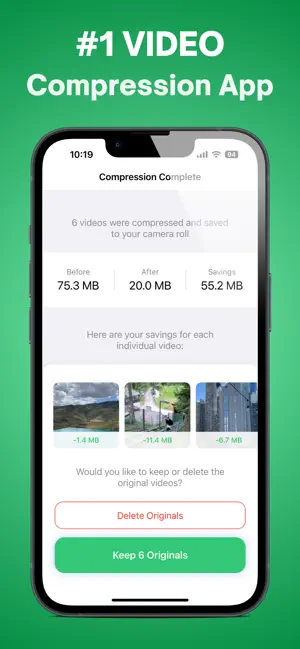


About Compress Videos: Free Up Space
Here’s what you can do with TinyVid Video Compressor: • Free up storage on your iPhone in seconds • Save time and money by quickly compressing your large videos • Compress videos without losing quality (using AI) • Find recommended large videos for you to compress ———————————————————— Here’s how to use TinyVid Video Compressor 1. Open up your camera roll and select the video that you want to compress 2. Tap the “Compress Video” button 3. Your videos will quickly be compressed and saved to your camera roll (opening up TONS of free space on your phone) ———————————————————— TinyVid subscription policy: Once you sign up to TinyVid Premium, you will have full access to all of TinyVid features for free for 3 days. You can cancel your subscription any time and you will be sent a reminder before your TinyVid subscription begins after your trial. TinyVid Premium Subscription: - With a TinyVid Premium subscription you have access to compress your photos and videos, access all of TinyVid's advanced video compress features, and access to all future updates. - TinyVid Premium weekly subscription is billed weekly for $6.99, and payment will be charged to iTunes Account after a 30 day free trial. - Subscription automatically renews unless auto-renew is turned off at least 24-hours before the end of the current period. - Account will be charged for renewal within 24-hours prior to the end of the current period, and identify the cost of the renewal. - Subscriptions can be managed by the user and auto-renewal can be turned off by going to the user's iPhone Settings -> Apple ID -> Subscriptions. ———————————————————— Have any questions or recommendations? Feel free to reach out to me at: [email protected] Privacy Policy: https://tinyvidapp.com/privacy Terms of Use: https://tinyvidapp.com/terms
Ratings & reviews
4.6
917 ratings
What’s new
Version 1.11 · Updated June 26, 2026
Fixed a bug that was causing some videos to not properly compress when using the advanced features.
App privacy
The developer, Island Palm Mobile LLC, reported these privacy practices to Apple.
Data Used to Track You
The following data may be used to track you across apps and websites owned by other companies:
- Usage Data: Advertising Data
Data Linked to You
The following data, which may be collected and linked to your identity, may be used for the following purposes:
- Usage Data: Advertising Data
Used for: Third-Party Advertising, Developer’s Advertising or Marketing, Analytics
Data Not Linked to You
The following data, which may be collected but is not linked to your identity, may be used for the following purposes:
- Location: Coarse Location
- Usage Data: Product Interaction
- Diagnostics: Crash Data
Used for: Third-Party Advertising, Developer’s Advertising or Marketing, Analytics, App Functionality
Alternatives to Compress Videos: Free Up Space
Looking for apps like Compress Videos: Free Up Space? Here are 6 similar apps on the App Store. The highest rated is Video Compressor - resize all (4.8/5), and all 6 are free to download.
-
 Video Compressor - resize all
4.8
Video Compressor - resize all
4.8
-
 Compress Videos & Resize Video
4.7
Compress Videos & Resize Video
4.7
-
 Video Compress - Shrink Videos
4.5
Video Compress - Shrink Videos
4.5
-
 Video Compressor : Save Space
4.7
Video Compressor : Save Space
4.7
-
 Video Compressor - HQ Compress
4.7
Video Compressor - HQ Compress
4.7
-
 Video Compressor & Reduce size
4.6
Video Compressor & Reduce size
4.6
| App | Rating | Price | Last updated | Compare |
|---|---|---|---|---|
| Compress Videos: Free Up Space | 4.6 / 5 (917 ratings) | Free | June 26, 2026 | |
| Video Compressor - resize all | 4.8 / 5 (972) | Free | Mar 28, 2025 | Compare |
| Compress Videos & Resize Video | 4.7 / 5 (17,565) | Free | Apr 28, 2026 | Compare |
| Video Compress - Shrink Videos | 4.5 / 5 (11,502) | Free | Aug 23, 2026 | Compare |
| Video Compressor : Save Space | 4.7 / 5 (481) | Free | Sep 2, 2026 | Compare |
| Video Compressor - HQ Compress | 4.7 / 5 (2,153) | Free | Aug 13, 2026 | Compare |
| Video Compressor & Reduce size | 4.6 / 5 (1,316) | Free | Oct 1, 2026 | Compare |