

VoiceCap: AI Meeting Recorder
Su ideja, MB Productivity iPhoneiPadiPod touch
VoiceCap: AI Meeting Recorder is a free Productivity app for iPhone and iPad by Su ideja, MB. Requires iOS 16.4. Updated September 14, 2026.
- Price
- Free
- on the App Store
- Size
- 51 MB
- Age 4+
- Updated
- Sep 14
- 2026 · v1.3.0
Screenshots

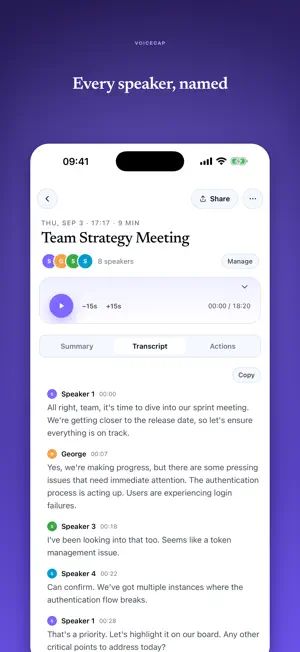


About VoiceCap: AI Meeting Recorder
VoiceCap records your in-person meetings and turns them into clean transcripts, summaries and action items. You get shareable notes in minutes, with every speaker named. Built for people who run real meetings. Client sessions, board meetings, negotiations, site visits, interviews. Press record, put your phone on the table, and stay in the conversation instead of scribbling notes. What you get after every meeting: • A full transcript with each speaker labeled by name • A summary short enough to send to your team • Action items pulled out for you • A searchable archive of everything that was said Accuracy where other tools give up. VoiceCap transcribes over 30 languages and hits 95%+ accuracy on Baltic, Scandinavian and the smaller European languages most global apps ignore. Online calls too. Send VoiceCap into your Zoom, Teams, Google Meet or Webex call without leaving your phone, and get the same transcript, summary and action items back. One app for every meeting, in the room or on a call. Decisions that stay on the record. VoiceCap reads each meeting and proposes the decisions it contains, along with the reasoning and the options the room turned down. Confirm the real ones in your VoiceCap dashboard and later meetings link back to them, so nobody re-argues a call the team already made. Ask your AI assistant what was agreed. Connect your VoiceCap account to the AI tools your team already works in and ask who owns what, or what changed since last month. The connection is read-only, and everyone sees only the meetings they could already open. Made in the EU, for European teams. Your recordings stay in EU data centres and are handled under GDPR, and you can delete any recording whenever you want. Free to start. Record your first meetings without a card, and read the transcripts and summaries before you decide anything. Plans and current prices are at voicecap.ai/pricing. Who uses VoiceCap: • Consultants who bill against an accurate record • Lawyers who need every commitment documented • Sales teams who follow up on what was actually agreed • Founders and managers who want to be present, not taking minutes • Researchers and journalists transcribing interviews • Students recording and transcribing lectures Questions or feedback? Email [email protected]
App privacy
The developer, Su ideja, MB, reported these privacy practices to Apple.
Data Not Linked to You
The following data, which may be collected but is not linked to your identity, may be used for the following purposes:
- Usage Data: Product Interaction
- Diagnostics: Crash Data, Performance Data, Other Diagnostic Data
- Contact Info: Email Address, Name
- User Content: Audio Data, Other User Content
- Identifiers: User ID, Device ID
Used for: Analytics, App Functionality
Alternatives to VoiceCap: AI Meeting Recorder
Looking for apps like VoiceCap: AI Meeting Recorder? Here are 6 similar apps on the App Store. The highest rated is Habit & Idea Tracker BrainFrog (4.0/5), and all 6 are free to download.
-
 Habit & Idea Tracker BrainFrog
4.0
Habit & Idea Tracker BrainFrog
4.0
-
 PDF SuperApp: Reader & AI
-
 Voxxli: AI Meeting Note Taker
-
 MeetingInsights: AI Minutes
-
 Meeting Transcriber: AI Notes
-
 AI Recap
| App | Rating | Price | Last updated | Compare |
|---|---|---|---|---|
| VoiceCap: AI Meeting Recorder | – | Free | September 14, 2026 | |
| Habit & Idea Tracker BrainFrog | 4.0 / 5 (1) | Free | Aug 6, 2025 | Compare |
| PDF SuperApp: Reader & AI | – | Free | Aug 8, 2026 | Compare |
| Voxxli: AI Meeting Note Taker | – | Free | Aug 4, 2026 | Compare |
| MeetingInsights: AI Minutes | – | Free | Sep 3, 2026 | Compare |
| Meeting Transcriber: AI Notes | – | Free | Oct 10, 2026 | Compare |
| AI Recap | – | Free | Oct 11, 2026 | Compare |