

AI Recap
Duy Nguyen Productivity iPhoneiPadiPod touch
AI Recap is a free Productivity app for iPhone and iPad by Duy Nguyen. Requires iOS 15.1. Updated October 19, 2026.
- Price
- Free
- on the App Store
- Size
- 97 MB
- Age 4+
- Updated
- Oct 19
- 2026 · v2.0.2
Screenshots


About AI Recap
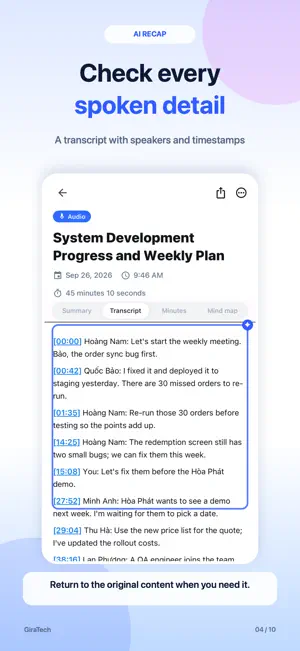
AI Recap turns lengthy content into the points you need to remember and the work you need to do. Keep AI results together in one app, with Vietnamese and English interfaces. SUMMARIZE DIFFERENT SOURCES • Record a meeting or upload an audio recording • Summarize PDF, DOCX, text documents and images • Choose the result language, search your summaries and filter by source type FROM MEETINGS TO USEFUL RESULTS • Read key points, a breakdown by topic and decisions • Check the transcript with speakers and timestamps • View structured minutes, edit them and export a PDF • Explore a mind map to see the discussion at a glance • Turn the action plan into tasks after checking the assignee and deadline AI CHAT SUMMARIES • Catch up on unread conversations with an AI summary card • Open the details to review key points and suggested tasks; return to the chat to check the source content • Request a conversation summary when you need one • Send direct or group messages, voice messages, photos, GIFs, videos, audio, more document formats and archives • React with emoji and see who reacted • Find shared content in Media, Documents and Links; filter by type or sender and return to the original message • Recognize documents by their first-page previews and open supported formats in the app • Translate messages in another language; reply, pin, recall and mention colleagues • Report inappropriate content and block users GIRA AI ASSISTANT • Find information, summarize messages, create meeting tasks and plan your work • Ask about your own tasks, messages and data • Review and approve every proposed change before it is applied TASKS WITH AI • Bring together AI task suggestions from meetings, chats and documents • Check the details, assignee, deadline and source; unselect what you do not need • Assign after confirming, then track Overdue, Today and Upcoming work • Follow task sources, subtasks, comments and completion status • Choose who a task reports to, receive progress notifications and filter tasks that report to you • Attach photos and documents when creating or updating tasks; add files to comments and view photos inline VOICE CALLS AND CALL SUMMARIES • Call a colleague from a direct chat; receive calls through the iOS call interface, including on the lock screen • Answering is always voice only. A call is recorded for an AI summary only when both people agree: for that call, or when both have turned on Always agree • While recording, both people always see an indicator and either can stop it CONNECTIONS AND YOUR ACCOUNT • Scan QR codes with the camera or from a saved image; save and share your own code • Send, accept or decline friend requests in a chat and view group members’ profiles • Create an account step by step, set a PIN and choose Face ID sign-in on supported devices • Select a country calling code for international numbers and verify your email with a code during sign-up • Recover your PIN with an SMS or email code and clear on-screen guidance • Add a job title to your profile and QR card PRIVACY The app asks for your consent before sending meeting recordings, call audio, files, chat content or questions to the third-party AI service Google Gemini to provide AI features. Contacts are used only to find people already using the app when you allow access; phone numbers and email addresses are not stored. Sign-in is required. AI Recap is a GiraTech product.
What’s new
Version 2.0.2 · Updated October 19, 2026
Version 2.0.2 refreshes the AI Assistant: • A cleaner AI Assistant home: ask something new or reopen an earlier conversation in one tap. • Answers with sources: see the excerpt from the meeting, call, chat, task or file an answer is based on, and open the original. • Speak instead of typing: tap the microphone to dictate a question; the text appears in the box so you can edit it before sending. • Clearer task change proposals: only what will change is shown, for example old due date → new due date, before you confirm. • VIP for businesses: leave your contact details on the Summaries tab and the GiraTech team will get in touch. • A new step-by-step Change PIN screen. • Bug fixes and stability improvements.
App privacy
The developer, Duy Nguyen, reported these privacy practices to Apple.
Data Linked to You
The following data, which may be collected and linked to your identity, may be used for the following purposes:
- Contact Info: Email Address, Name, Phone Number
- User Content: Emails or Text Messages, Photos or Videos, Audio Data, Other User Content
- Identifiers: User ID, Device ID
Used for: App Functionality
Alternatives to AI Recap
Looking for apps like AI Recap? Here are 6 similar apps on the App Store.
-
 Recap: AI Meeting Notes
-
 TODO for AI
-
 MyPocketRate
-
 NoteTalk: AI Note Taker
-
 VoiceCap: AI Meeting Recorder
-
 AI Note Taker - YapBrain
| App | Rating | Price | Last updated | Compare |
|---|---|---|---|---|
| AI Recap | – | Free | October 19, 2026 | |
| Recap: AI Meeting Notes | – | Free | Apr 29, 2026 | Compare |
| TODO for AI | – | Free | Oct 21, 2026 | Compare |
| MyPocketRate | – | Free | Mar 3, 2026 | Compare |
| NoteTalk: AI Note Taker | – | Free | Jun 26, 2026 | Compare |
| VoiceCap: AI Meeting Recorder | – | Free | Sep 14, 2026 | Compare |
| AI Note Taker - YapBrain | – | Free | Mar 11, 2026 | Compare |
Compare AI Recap with the top alternatives: ratings, updates, ASO score and keyword gaps →