

Warikomi TODO
Yoichi Negishi Productivity iPhoneiPadiPod touch
Warikomi TODO is a free Productivity app for iPhone and iPad by Yoichi Negishi. Requires iOS 17.6. Updated October 26, 2026.
- Price
- Free
- on the App Store
- Size
- 46 MB
- Age 4+
- Updated
- Oct 26
- 2026 · v1.1.0
Screenshots


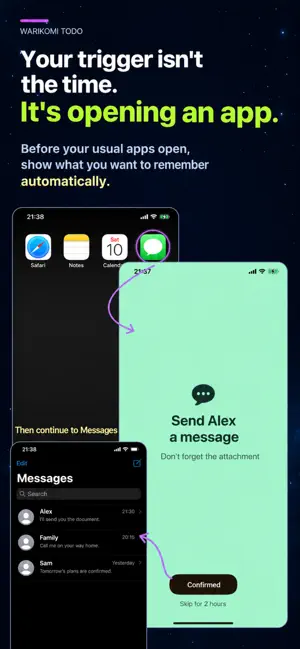
About Warikomi TODO
WARIKOMI TODO is a reminder app that displays your TODO memo just before you open an app you have selected. Instead of sending a notification at a set time, it turns your everyday app habits into a cue to remember what you need to do. KEY FEATURES • Show TODO memos before opening selected apps • Complete a TODO or temporarily skip it to continue to the selected app • Schedule memos for every day, selected weekdays, specific dates each month, and time windows • Show memos repeatedly • Move unused TODOs to Stock and restore them when needed • View your TODOs alongside the icons of their selected apps • Restore your purchased Premium plan HOW IT WORKS 1. Write a TODO you want to remember. 2. Choose the app that will trigger your memo. 3. Set the days and time window. When your schedule conditions are met, your TODO appears just before the selected app opens. For example, attach a memo to a social app you check regularly and set it to appear only between 6 AM and 9 AM. Opening that app can remind you to: • Check a social media post you don't want to miss • Check what you need to take before leaving home Outside the 6–9 AM window, that memo will not appear when you open the same app until the next scheduled day. You can also: • Attach a memo to a game so you remember an in-game event you want to complete. • Attach a memo to a video app with a routine you want to fit into your day, such as “Do squats while watching.” There are plenty of ways to make it work for you. For recurring TODOs, you can set a memo to become eligible to appear again after a chosen interval. It's useful for things you want to remember throughout the day without having to do them at an exact time. It's a flexible approach to TODOs, built around opening apps rather than notifications at preset times. Choose time windows, weekdays, or specific dates each month to control when your memos can appear. Which apps will you stick your memos to? FREE PLAN Create up to 1 active TODO memo. PREMIUM PLAN Create up to 10 active TODO memos. You can also attach multiple TODO memos to the same app. Premium is available as a monthly or annual subscription. Payment is charged to your Apple Account, and your subscription renews automatically unless canceled. Prices and subscription periods are shown on the purchase confirmation screen. You can manage or cancel your subscription at any time in your iPhone's Settings. BEFORE YOU START Permission to use Apple's Screen Time features is required to display TODO memos before your selected apps open. Privacy Policy https://warikomi-todo.pages.dev/privacy Terms of Use https://warikomi-todo.pages.dev/terms Support https://warikomi-todo.pages.dev/support
What’s new
Version 1.1.0 · Updated October 26, 2026
• Customize themes, visual effects, and the app icon. • Choose a design for the Add TODO button. • Updated the confirmation button label on the memo screen.
App privacy
The developer, Yoichi Negishi, reported these privacy practices to Apple.
Data Not Linked to You
The following data, which may be collected but is not linked to your identity, may be used for the following purposes:
- Purchases: Purchase History
Used for: Analytics, App Functionality
Alternatives to Warikomi TODO
Looking for apps like Warikomi TODO? Here are 6 similar apps on the App Store. The highest rated is Simplenote (4.7/5), and all 6 are free to download.
-
 Conclave - History's greatest
-
 CatchIn: Save & Find Anything
-
 Hooklink
-
 Notification Todo
-
 -ing: Habit Challenges
3.7
-
 Simplenote
4.7
| App | Rating | Price | Last updated | Compare |
|---|---|---|---|---|
| Warikomi TODO | – | Free | October 26, 2026 | |
| Conclave - History's greatest | – | Free | Oct 6, 2026 | Compare |
| CatchIn: Save & Find Anything | – | Free | Sep 30, 2026 | Compare |
| Hooklink | – | Free | Oct 28, 2026 | Compare |
| Notification Todo | – | Free | Jan 10, 2024 | Compare |
| -ing: Habit Challenges | 3.7 / 5 (3) | Free | Oct 16, 2026 | Compare |
| Simplenote | 4.7 / 5 (4,321) | Free | Nov 4, 2024 | Compare |
Compare Warikomi TODO with the top alternatives: ratings, updates, ASO score and keyword gaps →