

CatchIn: Save & Find Anything
Anjaneykumar Malipatil Productivity iPhoneiPadiPod touch
CatchIn: Save & Find Anything is a free Productivity app for iPhone and iPad by Anjaneykumar Malipatil. Requires iOS 17.0. Updated September 30, 2026.
- Price
- Free
- on the App Store
- Size
- 21 MB
- Age 4+
- Updated
- Sep 30
- 2026 · v1.1.0
Screenshots

About CatchIn: Save & Find Anything
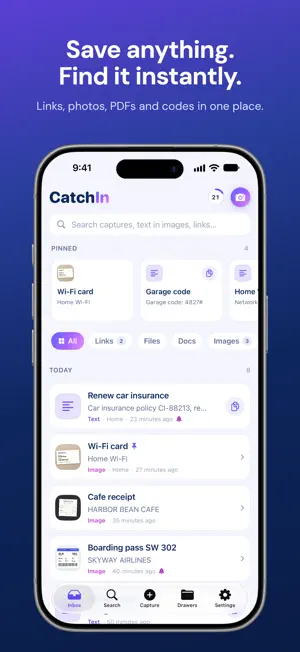
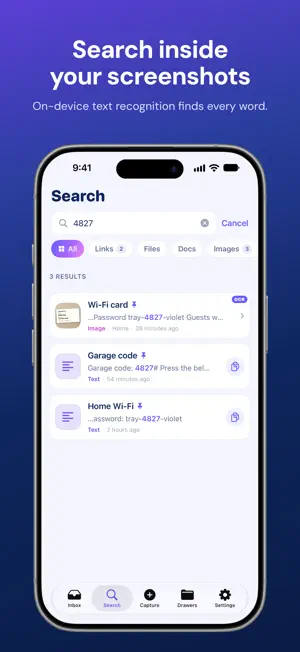
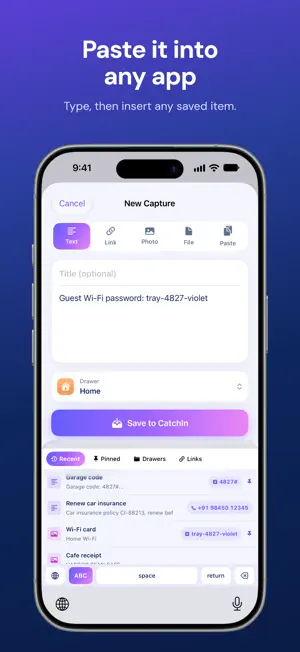
Save anything. Find it instantly. The garage code in a text. The Wi-Fi password on a sticker. The booking PDF, the invoice, the link a friend sent. CatchIn is one private inbox for everything you'll need again — and the fastest way to find it and use it. ONE SHARE • Tap Share → CatchIn in Safari, Photos, Files, Mail, Messages or any app • Text, links, screenshots, photos, PDFs and files — all in one place • Saves instantly without leaving the app you're in ONE SEARCH • Search as you type across titles, notes, tags, links and files • Finds words INSIDE screenshots and PDFs with on-device text recognition • Captures also appear in iPhone Spotlight ONE INSERT • The CatchIn keyboard types like a normal keyboard and puts saved items into any text field • Smart Quick-copy grabs just the code, email or phone number — and document numbers like passport, PAN, Aadhaar, IBAN or card numbers from a photo • Pinned widget keeps your most-used info on the Home Screen and Lock Screen • Upcoming widget lists every reminder by day MADE FOR SPEED • Quick Capture for text, links, photos, files and your clipboard • Drawers to organise — only if you want to • Siri and Shortcuts: "Save to CatchIn", "Search CatchIn" • Optional reminders that open straight to the saved item, with Copy and Snooze PRIVATE BY DESIGN • Your captures stay on your iPhone — no account needed • Text recognition runs on-device • No ads, no tracking, and nothing you save is ever used for analytics • Keyboard works without Full Access and never stores what you type • Face ID lock with CatchIn Pro CATCHIN PRO Free includes 10 captures with search, OCR, pins, drawers, keyboard and widgets. CatchIn Pro unlocks unlimited captures, unlimited drawers and Face ID lock, as a monthly or yearly subscription. Payment is charged to your Apple Account at confirmation of purchase. Subscriptions renew automatically unless cancelled at least 24 hours before the end of the current period. Manage or cancel anytime in Settings → [your name] → Subscriptions. Terms of Use (EULA): https://www.apple.com/legal/internet-services/itunes/dev/stdeula/ Terms: https://catchin-app.web.app/terms Privacy Policy: https://catchin-app.web.app/privacy
What’s new
Version 1.1.0 · Updated September 30, 2026
Bug fixed
App privacy
The developer, Anjaneykumar Malipatil, reported these privacy practices to Apple.
Data Not Linked to You
The following data, which may be collected but is not linked to your identity, may be used for the following purposes:
- Purchases: Purchase History
Used for: App Functionality
Alternatives to CatchIn: Save & Find Anything
Looking for apps like CatchIn: Save & Find Anything? Here are 6 similar apps on the App Store. The highest rated is Scrappy: Screen Time Guard Dog (5.0/5), and all 6 are free to download.
-
 Deadline Guard - Reminders
-
 TimesOut: Daily Planner & ToDo
-
 Amaravathi Training Institute
-
 Scrappy: Screen Time Guard Dog
5.0
Scrappy: Screen Time Guard Dog
5.0
-
 Batch Rename And Organize
1.0
Batch Rename And Organize
1.0
-
 Finish: To Do List & Planner
3.6
Finish: To Do List & Planner
3.6
| App | Rating | Price | Last updated | Compare |
|---|---|---|---|---|
| CatchIn: Save & Find Anything | – | Free | September 30, 2026 | |
| Deadline Guard - Reminders | – | Free | Sep 19, 2026 | Compare |
| TimesOut: Daily Planner & ToDo | – | Free | Sep 14, 2026 | Compare |
| Amaravathi Training Institute | – | Free | Dec 12, 2023 | Compare |
| Scrappy: Screen Time Guard Dog | 5.0 / 5 (2) | Free | Sep 2, 2026 | Compare |
| Batch Rename And Organize | 1.0 / 5 (2) | Free | Mar 12, 2026 | Compare |
| Finish: To Do List & Planner | 3.6 / 5 (23) | Free | Oct 9, 2026 | Compare |