

My Shift Work Calendar
Vikas Mawasi Productivity iPhoneiPadiPod touch
My Shift Work Calendar is a free Productivity app for iPhone and iPad by Vikas Mawasi. Requires iOS 26.0. Updated October 13, 2026.
- Price
- Free
- on the App Store
- Size
- 16 MB
- Age 4+
- Updated
- Oct 13
- 2026 · v1.0.3
Screenshots


About My Shift Work Calendar
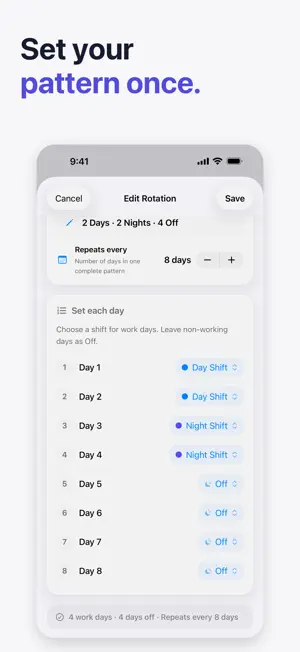
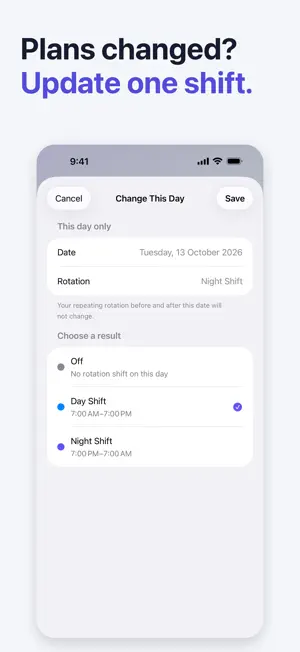
Know when you’re working—without rebuilding your schedule every week. Shift Work Calendar is a personal schedule planner for people whose work does not fit a simple Monday-to-Friday routine. Create your shift types once, build a repeating rotation, and see the months ahead in a clear calendar. PLAN YOUR SHIFT PATTERN • Create day, evening, night, split, or custom shifts • Set start and end times, including overnight shifts • Build repeating rotations in a simple day-by-day cycle • Preview a rotation before adding it to your calendar • Correct individual days without rebuilding the full pattern SEE WHAT’S NEXT • View your schedule month by month • See your next shift at a glance • Check the selected day’s shift details • Use Next Shift and Week at a Glance Home Screen widgets GET USEFUL REMINDERS • Receive an alert before an upcoming shift • Review tomorrow’s scheduled work • Get an optional weekly preview • Know when your planned schedule is about to end • No unnecessary days-off reminders MADE FOR REAL ROTATING WORK Whether you work in healthcare, emergency services, manufacturing, security, transport, hospitality, or another rotating role, the app keeps your personal roster easy to understand. YOUR SCHEDULE, YOUR DEVICE No account is required. Your schedule is stored locally on your iPhone, and you can export your personal data as JSON from Settings. FREE AND PRO The free plan includes up to three active shift types, one active rotation, and 30-day rotation planning. Pro unlocks unlimited shift types, unlimited rotations, and longer-range planning. Monthly and annual subscriptions are available in the app. Prices are shown in your local App Store currency before purchase. Subscriptions renew automatically unless canceled at least 24 hours before the end of the current period. You can manage or cancel subscriptions in your Apple Account settings. Restore Purchases is available in the app. Terms of Use: https://www.apple.com/legal/internet-services/itunes/dev/stdeula/ Privacy Policy: https://sweet-berry-b1e.notion.site/Privacy-Policy-39dce85045c280e49f76d0420187e3a9
What’s new
Version 1.0.3 · Updated October 13, 2026
What’s new in 1.0.3 • Clearer onboarding to help you set up your shift schedule. • Change a single day to another shift or Off, then reset it to your rotation when needed. • Improvements to the Next Shift and Week at a Glance widgets. • A clearer Pro experience, with smoother purchases and Restore Purchases. • Reliability and usability improvements throughout the app.
App privacy
The developer, Vikas Mawasi, reported these privacy practices to Apple.
Data Not Linked to You
The following data, which may be collected but is not linked to your identity, may be used for the following purposes:
- Purchases: Purchase History
- Usage Data: Product Interaction, Other Usage Data
Used for: Analytics, App Functionality
Alternatives to My Shift Work Calendar
Looking for apps like My Shift Work Calendar? Here are 6 similar apps on the App Store. The highest rated is Momentum Day Planner (5.0/5), and all 6 are free to download.
-
 Hitchspan: Rotation Calendar
-
 ShiftFlow: Shift Planner
-
 Shift Planner - Rota & Hours
-
 Momentum Day Planner
5.0
Momentum Day Planner
5.0
-
 SShift — Shift Calendar
-
 Unit Conversion - Pro
| App | Rating | Price | Last updated | Compare |
|---|---|---|---|---|
| My Shift Work Calendar | – | Free | October 13, 2026 | |
| Hitchspan: Rotation Calendar | – | Free | Aug 13, 2026 | Compare |
| ShiftFlow: Shift Planner | – | Free | Jul 11, 2026 | Compare |
| Shift Planner - Rota & Hours | – | Free | Sep 7, 2026 | Compare |
| Momentum Day Planner | 5.0 / 5 (1) | Free | Jul 24, 2026 | Compare |
| SShift — Shift Calendar | – | Free | Oct 12, 2026 | Compare |
| Unit Conversion - Pro | – | Free | Sep 8, 2025 | Compare |