

Momentum Day Planner
JACOB SAWYER STARCKE Productivity iPhoneiPadiPod touch
Momentum Day Planner is a free Productivity app for iPhone and iPad by JACOB SAWYER STARCKE. Rated 5.0/5 from 1 ratings. Requires iOS 18.0.
- Rating
- 5.0
- 1 ratings
- Price
- Free
- on the App Store
- Size
- 2 MB
- Age 4+
- Updated
- Jul 24
- 2026 · v1.1.0
Screenshots

About Momentum Day Planner
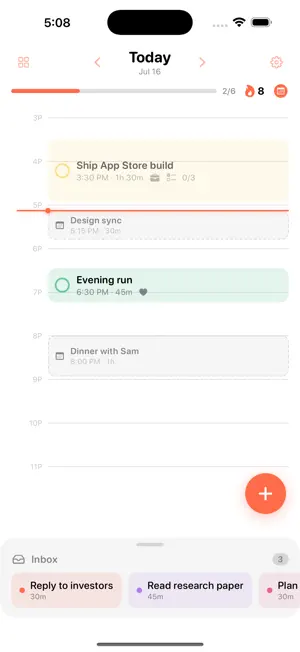
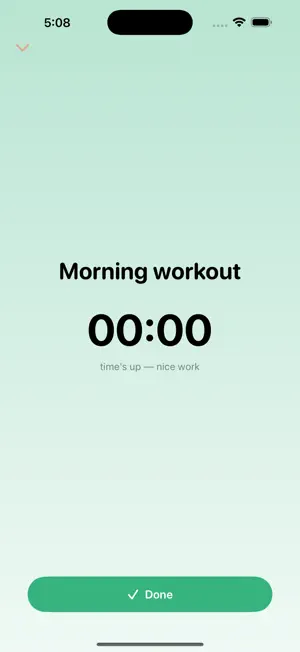
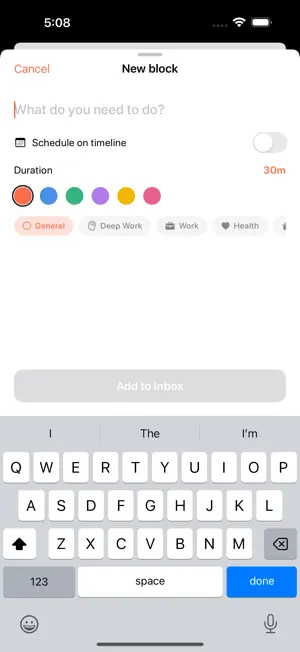
Momentum turns your to-do list into a plan you can actually follow. Most task apps give you a longer and longer list. Momentum gives you a day. Capture what you need to do, then drag each task onto a visual timeline to block real time for it. In the morning you open Momentum and see exactly one thing: what you're doing right now, and what's next. TIME-BLOCK YOUR DAY • A clean, hour-by-hour timeline with a live "now" line • Drag tasks from your Inbox straight onto the day • Reschedule by dragging; nothing is ever more than a gesture away CAPTURE IN A TAP • Type one line — "Gym 6pm 45min" — and Momentum reads the time and length for you • Everything is parsed on your device. Nothing is sent anywhere. FOCUS ON ONE THING • Tap the block you're on for a calm, full-screen countdown • A Live Activity keeps the countdown on your Lock Screen and Dynamic Island • Break a block into a checklist and tick steps off as you work THE MOMENTUM MAP • Not a generic calendar — a heatmap of your follow-through • Every day is tinted by how much of your plan you completed • See your streak, completion, and focused hours at a glance NOTHING FALLS THROUGH • Unfinished blocks roll back into your Inbox so you consciously re-plan them • A gentle streak keeps you coming back WORKS WITH YOUR LIFE • See your calendar events (Google, iCloud, Exchange — any account added in iOS) right on the timeline • Add a block or ask "what's next" with Siri and Shortcuts • A Home and Lock Screen widget shows your current and next block PRIVATE BY DEFAULT • No account. No sign-up. No ads. No tracking. • Your data lives on your device and syncs across your iPhone, iPad, and Mac for free with iCloud. Momentum is designed to feel calm, fast, and beautiful in both light and dark. Plan your day in a minute, then get on with it.
What’s new
Version 1.1.0 · Updated July 24, 2026
Move blocks the easy way: drag to reschedule, or tap a block to edit its time. NEW • Add your blocks to your calendar — pick your Google (or iCloud) calendar and your day syncs there • Repeating blocks (daily, weekdays, or weekly) • Routines: save a planned day and drop it onto any day in one tap • Week view — see and plan your whole week • Collapsible inbox FIXES • Reminders now show reliably • Fixed moving/editing blocks and VoiceOver
App privacy
The developer, JACOB SAWYER STARCKE, reported these privacy practices to Apple.
Data Not Collected
The developer does not collect any data from this app.
Alternatives to Momentum Day Planner
Looking for apps like Momentum Day Planner? Here are 6 similar apps on the App Store.
-
 Momentum HT
-
 Momentum: Flow State
-
 Brief - Quickly Capture Links
-
 Sorted AI
-
 ChecklistApp: Recurring Lists
-
 DeepList
| App | Rating | Price | Last updated | Compare |
|---|---|---|---|---|
| Momentum Day Planner | 5.0 / 5 (1 rating) | Free | July 24, 2026 | |
| Momentum HT | – | Free | Dec 16, 2025 | Compare |
| Momentum: Flow State | – | Free | Jun 23, 2026 | Compare |
| Brief - Quickly Capture Links | – | Free | Jul 12, 2026 | Compare |
| Sorted AI | – | Free | Sep 27, 2026 | Compare |
| ChecklistApp: Recurring Lists | – | Free | Sep 16, 2026 | Compare |
| DeepList | – | Free | Aug 6, 2026 | Compare |