

Splitly: Split PDF
Jhomar Maravillas Productivity iPhoneiPadiPod touch
Splitly: Split PDF is a free Productivity app for iPhone and iPad by Jhomar Maravillas. Requires iOS 16.0. Updated September 22, 2026.
- Price
- Free
- on the App Store
- Size
- 1 MB
- Age 4+
- Updated
- Sep 22
- 2026 · v1.0.3
Screenshots

About Splitly: Split PDF
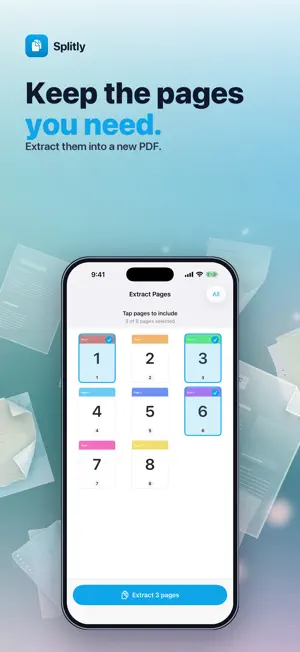
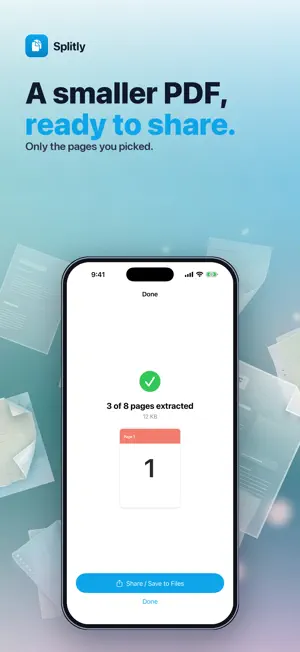
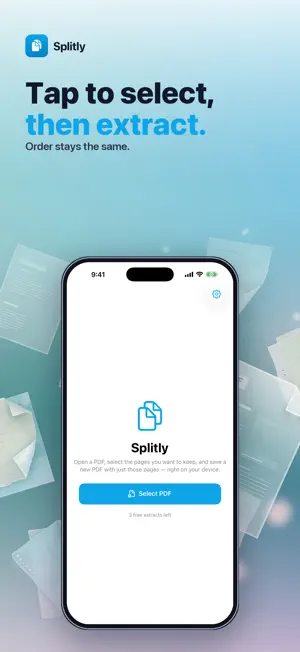
Need only some pages from a long PDF? Splitly extracts the pages you pick into a brand-new PDF — right on your iPhone. No ads. No subscription. Pay once. Your files never leave the device. • EXTRACT PAGES — tap the pages you want to keep, save a new PDF. • ORIGINAL ORDER — selected pages stay in document order. • PRIVATE — 100% on-device with PDFKit. No upload. • SHARE ANYWHERE — Files, Mail, Drive… no watermark. Open a PDF, select pages, extract. Done.
What’s new
Version 1.0.3 · Updated September 22, 2026
Localized App Store screenshots for every language.
App privacy
The developer, Jhomar Maravillas, reported these privacy practices to Apple.
Data Not Collected
The developer does not collect any data from this app.
Alternatives to Splitly: Split PDF
Looking for apps like Splitly: Split PDF? Here are 6 similar apps on the App Store. The highest rated is Scan Cam PDF: Document Scanner (5.0/5), and all 6 are free to download.
-
 Scan Cam PDF: Document Scanner
5.0
Scan Cam PDF: Document Scanner
5.0
-
 Merge all PDFs
-
 Merge PDF & Combine PDF Files
-
 Easy Timetable for School
5.0
Easy Timetable for School
5.0
-
 GIRH
GIRH
-
 PDF Splitter - Split PDF
3.9
PDF Splitter - Split PDF
3.9
| App | Rating | Price | Last updated | Compare |
|---|---|---|---|---|
| Splitly: Split PDF | – | Free | September 22, 2026 | |
| Scan Cam PDF: Document Scanner | 5.0 / 5 (3) | Free | Sep 28, 2026 | Compare |
| Merge all PDFs | – | Free | May 11, 2025 | Compare |
| Merge PDF & Combine PDF Files | – | Free | Aug 4, 2026 | Compare |
| Easy Timetable for School | 5.0 / 5 (1) | Free | Aug 31, 2026 | Compare |
| GIRH | – | Free | Jul 15, 2025 | Compare |
| PDF Splitter - Split PDF | 3.9 / 5 (25) | Free | May 15, 2026 | Compare |
Compare Splitly: Split PDF with the top alternatives: ratings, updates, ASO score and keyword gaps →