

Split PDF - Extract PDF Pages,
Aziz rehman Productivity iPhoneiPadiPod touch
Split PDF - Extract PDF Pages, is a free Productivity app for iPhone and iPad by Aziz rehman. Requires iOS 15.6. Updated September 15, 2026.
- Price
- Free
- on the App Store
- Size
- 38 MB
- Age 4+
- Updated
- Sep 15
- 2026 · v1.0.2
Screenshots



About Split PDF - Extract PDF Pages,
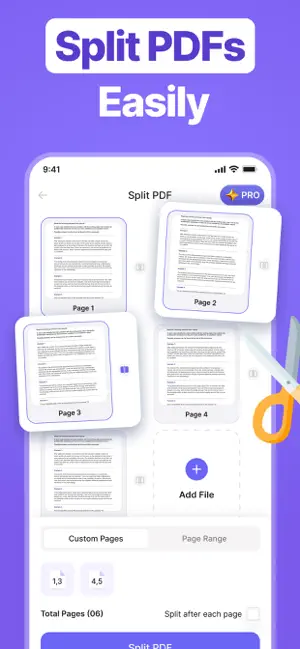
Split PDF – Split, Merge, Compress & Convert PDF Files Manage your PDF documents with ease using **Split PDF**, an all-in-one PDF toolkit designed to make working with files faster and simpler. Whether you need to split large PDF files into smaller parts, merge multiple PDFs into one document, compress files to save storage, or convert PDFs into different formats, everything you need is available in one easy-to-use app. The clean and simple interface makes it easy for anyone to organize and edit PDF documents in just a few taps. Whether you're a student, office worker, teacher, freelancer, or business professional, Split PDF helps you complete everyday PDF tasks quickly and efficiently. Split PDF Need to separate pages from a large PDF? The Split PDF tool lets you divide documents into smaller files by selecting the pages you want. Create individual PDFs or split large documents into multiple parts for easier sharing and organization. Merge PDF Combine multiple PDF files into a single document without hassle. Rearrange files in your preferred order before merging to create one organized PDF for work, school, or personal use. Compress PDF Reduce PDF file size while maintaining good document quality. Compressed PDFs are easier to store, upload, email, and share without taking up unnecessary space on your device. Convert PDF Convert PDF files into supported formats and easily create PDFs from compatible documents and images. The converter helps make your files more flexible for different tasks and workflows. Key Features • Split PDF files into multiple documents. • Merge multiple PDFs into one file. • Compress PDF files to reduce storage space. • Convert PDFs quickly and easily. • Simple, clean, and beginner-friendly interface. • Fast file processing. • Organize documents in just a few taps. • Suitable for work, study, and personal use. • Designed for smooth and reliable performance. Easy to Use No complicated steps or technical knowledge are required. Simply choose your file, select the tool you need, and let the app handle the rest. The straightforward design helps you finish PDF tasks quickly and efficiently. Privacy First Your privacy is important. Your files are processed only to provide the requested PDF features. We do not claim to collect, store, or share your personal documents beyond what is necessary for the app to function. Please review the app's Privacy Policy for complete details. Download **Split PDF** today and enjoy an easy way to split, merge, compress, and convert PDF files whenever you need them. Privacy Policy: https://quanticverge.com/privacy Terms of uses: https://quanticverge.com/terms
What’s new
Version 1.0.2 · Updated September 15, 2026
We Regularly Update our App to make user Experience Excellent!
App privacy
The developer, Aziz rehman, reported these privacy practices to Apple.
Data Not Collected
The developer does not collect any data from this app.
Alternatives to Split PDF - Extract PDF Pages,
Looking for apps like Split PDF - Extract PDF Pages,? Here are 6 similar apps on the App Store. The highest rated is SplitPDF -iReadPDF (5.0/5), and all 6 are free to download.
-
 Split PDF: Extract Pages
-
 SplitPDF -iReadPDF
5.0
-
 Keeply: Receipts Scanner
-
 PDFAmora: Merge & Split PDF
-
 Notes AI: Note Taking App
-
 PDF Split & Extract
| App | Rating | Price | Last updated | Compare |
|---|---|---|---|---|
| Split PDF - Extract PDF Pages, | – | Free | September 15, 2026 | |
| Split PDF: Extract Pages | – | Free | Sep 5, 2026 | Compare |
| SplitPDF -iReadPDF | 5.0 / 5 (1) | Free | Aug 1, 2026 | Compare |
| Keeply: Receipts Scanner | – | Free | Sep 23, 2026 | Compare |
| PDFAmora: Merge & Split PDF | – | Free | Sep 15, 2026 | Compare |
| Notes AI: Note Taking App | – | Free | Oct 9, 2026 | Compare |
| PDF Split & Extract | – | Free | Oct 3, 2026 | Compare |