

Mosaico - Merge your photos
Manuel Minelle Photo & Video iPhoneiPadiPod touch
Mosaico - Merge your photos is a free Photo & Video app for iPhone and iPad by Manuel Minelle. Requires iOS 18.0. Updated October 14, 2026.
- Price
- Free
- on the App Store
- Size
- 4 MB
- Age 4+
- Updated
- Oct 14
- 2026 · v1.1
Screenshots
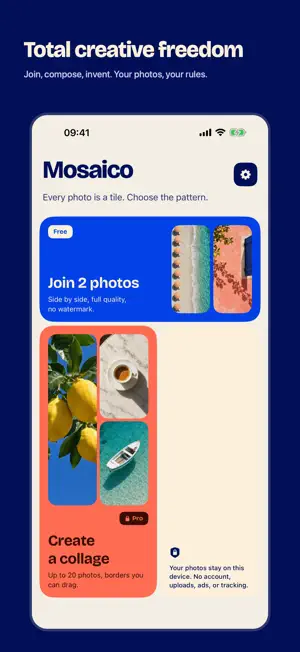


About Mosaico - Merge your photos
Mosaico gives you total creative freedom to join photos and make collages on iPhone and iPad. Pick your images, then compose right on the canvas: drag the borders between photos to change their proportions, press and hold a photo to swap it with another, and drag the edges to choose the format. Mosaico helps without getting in the way: borders snap where photos stay uncropped or match in size, and the crop automatically follows faces and subjects. ACTUALLY USEFUL FOR FREE Join two photos side by side, reorder them, and adjust their framing. Export at full quality with no watermark, no account, and no ads. FREE-FORM COMPOSITION WITH MOSAICO PRO One non-consumable purchase unlocks: • collages of 2 to 20 photos, with borders you can drag and photos you can swap in one move; • suggested, automatic, row, or column layouts, including a hero photo; • any format: 1:1, 4:5, 3:4, 2:3, 9:16, 16:9, or custom dimensions; • vertical joins and proportional cells; • margins, spacing, rounded corners, and a colored or transparent background; • PNG and HEIC export. No subscription. The App Store shows the price for your country or region. PICK UP WHERE YOU LEFT OFF Your last composition stays saved on your device, ready to resume from the home screen. PRIVATE ON YOUR DEVICE Photos are processed only on your device and are not uploaded to the developer's servers. Mosaico requires no account and includes no tracking, third-party analytics, or advertising. For support, privacy, and terms, use the links on the App Store page or in the app's settings.
What’s new
Version 1.1 · Updated October 14, 2026
Total creative freedom in your compositions: • Drag the borders between photos to change their proportions, with snapping to “No crop” and “Equal size”. Double-tap a border to even it out. • Press and hold a photo, then drag it onto another to swap them without losing your layout. • Drag the canvas edges to pick any format, with snapping to 1:1, 4:5, 9:16, and other standard ratios. • Suggested layouts are always one tap away, including a hero photo. • The crop follows faces and subjects so they stay in view. • Remove photos you don't need, and resume your last composition from the home screen. • A new, clearer, more colorful home screen.
App privacy
The developer, Manuel Minelle, reported these privacy practices to Apple.
Data Not Collected
The developer does not collect any data from this app.
Alternatives to Mosaico - Merge your photos
Looking for apps like Mosaico - Merge your photos? Here are 6 similar apps on the App Store. The highest rated is Patch: AI Image Editor (5.0/5), and 5 of the 6 are free to download.
-
 Picstack - Collage & Layers
-
 RNI Flashback
4.6
-
 Reel Maker - Aora
4.8
-
 Patch: AI Image Editor
5.0
-
 Photo Collage Maker ۬
4.4
-
 Dual Camera Recorder: Duocamly
4.4
| App | Rating | Price | Last updated | Compare |
|---|---|---|---|---|
| Mosaico - Merge your photos | – | Free | October 14, 2026 | |
| Picstack - Collage & Layers | – | Free | Oct 2, 2026 | Compare |
| RNI Flashback | 4.6 / 5 (264) | 3.99 USD | Oct 22, 2026 | Compare |
| Reel Maker - Aora | 4.8 / 5 (6) | Free | Nov 24, 2025 | Compare |
| Patch: AI Image Editor | 5.0 / 5 (4) | Free | Aug 14, 2025 | Compare |
| Photo Collage Maker ۬ | 4.4 / 5 (11) | Free | Oct 19, 2026 | Compare |
| Dual Camera Recorder: Duocamly | 4.4 / 5 (7) | Free | Oct 10, 2026 | Compare |