

Inbox Imp: AI Email Organizer
Bitwise Learning Inc Productivity iPhoneiPadiPod touch
Inbox Imp: AI Email Organizer is a free Productivity app for iPhone and iPad by Bitwise Learning Inc. Rated 5.0/5 from 1 ratings. Requires iOS 17.0.
- Rating
- 5.0
- 1 ratings
- Price
- Free
- on the App Store
- Size
- 10 MB
- Age 4+
- Updated
- Oct 19
- 2026 · v1.0.10
Screenshots


About Inbox Imp: AI Email Organizer
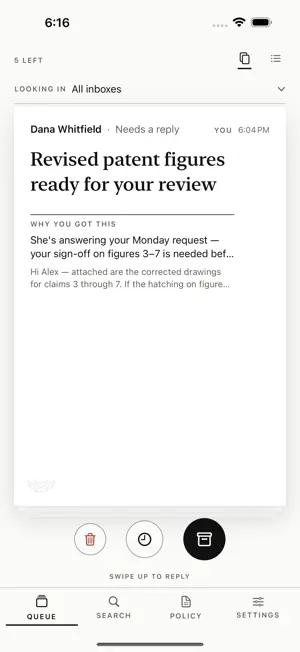
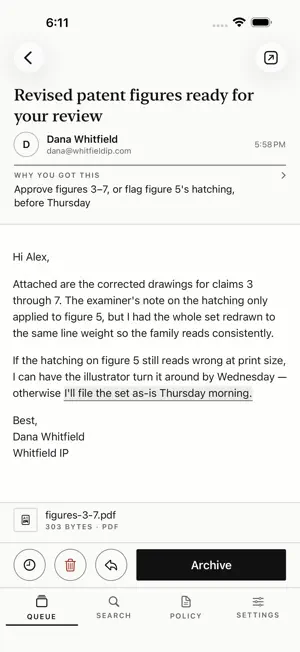
Inbox Imp is an AI email organizer for Gmail and Outlook. It reads your mail so you don't have to: anything that needs a reply stays in your inbox, and everything else is filed where you can still search it. Nothing is deleted behind your back. An AI assistant sorts every incoming email: advertising gets filed, cold pitches go to their own pile, and the handful of messages that actually need you stay in a short, quiet queue. The app shows you that queue: who wrote, what it's about, and why it's worth your time. Clear each message with one swipe. Every inbox you own, one membership. Connect Gmail, Google Workspace, Outlook.com, Hotmail and Microsoft 365 addresses under one account. - Rules you can read: a plain-English page says how your mail is handled, and you can edit it - Safeguards above the AI: login codes, real replies, receipts and money mail, calendar invites and account notices stay in your inbox - Archive, never delete: filed mail stays searchable; only clear junk goes to Trash, recoverable for 30 days - Every action is logged with a reason, one tap to undo, and a Recently archived list to review - "Why you got this" on every message it keeps - Reply, forward and compose with dictation, attachments and AI drafting help - Catch up on a long thread in one line per message - Push roundups instead of a ping for every email; urgent mail still comes through - Ask your mail anything: search that answers questions, not just keywords - Spending: what you paid, by merchant, from your receipts Independently security reviewed: Inbox Imp passed Google's OAuth verification with a CASA Tier 2 assessment, renewed yearly. Try Inbox Imp free for 7 days; no payment details needed to start. After the trial, an Inbox Imp membership is $9.99 per month (auto-renewing, cancel anytime in Settings) and covers all of your inboxes. Privacy policy: https://inboximp.com/privacy Terms of use: https://inboximp.com/terms
What’s new
Version 1.0.10 · Updated October 19, 2026
New Handy tab: the emails you are likely to look for again, in one place. Upcoming trips, reservations and appointments, recent orders and sign-ups, receipts, and heads-ups when something important changes, like a moved booking. Tap a line in a conversation's summary to open the email it came from, with the exact passage highlighted. Threads now show the full email right below the chat, with the summary one tap away. Labels and buttons no longer get cramped or wrap onto extra lines on smaller iPhones or with larger text sizes.
App privacy
The developer, Bitwise Learning Inc, reported these privacy practices to Apple.
Data Linked to You
The following data, which may be collected and linked to your identity, may be used for the following purposes:
- Purchases: Purchase History
- Contact Info: Email Address
- User Content: Emails or Text Messages
Used for: App Functionality
Alternatives to Inbox Imp: AI Email Organizer
Looking for apps like Inbox Imp: AI Email Organizer? Here are 6 similar apps on the App Store.
-
 Looped In: Life Organizer
-
 Thelemail
-
 Sorto: Smart Email Assistant
-
 Aegis Mail: Secure Email
-
 Sorted: AI Space Organizer
-
 Smart Keyboard AI
| App | Rating | Price | Last updated | Compare |
|---|---|---|---|---|
| Inbox Imp: AI Email Organizer | 5.0 / 5 (1 rating) | Free | October 19, 2026 | |
| Looped In: Life Organizer | – | Free | Oct 20, 2026 | Compare |
| Thelemail | – | Free | Oct 16, 2026 | Compare |
| Sorto: Smart Email Assistant | – | Free | Aug 10, 2026 | Compare |
| Aegis Mail: Secure Email | – | Free | Sep 5, 2026 | Compare |
| Sorted: AI Space Organizer | – | Free | Oct 20, 2026 | Compare |
| Smart Keyboard AI | – | Free | Sep 7, 2026 | Compare |