

Looped In: Life Organizer
LoopedIn Labs, LLC Productivity iPhoneiPadiPod touch
Looped In: Life Organizer is a free Productivity app for iPhone and iPad by LoopedIn Labs, LLC. Requires iOS 17.6. Updated October 22, 2026.
- Price
- Free
- on the App Store
- Size
- 51 MB
- Age 12+
- Updated
- Oct 22
- 2026 · v1.0.9
Screenshots



About Looped In: Life Organizer
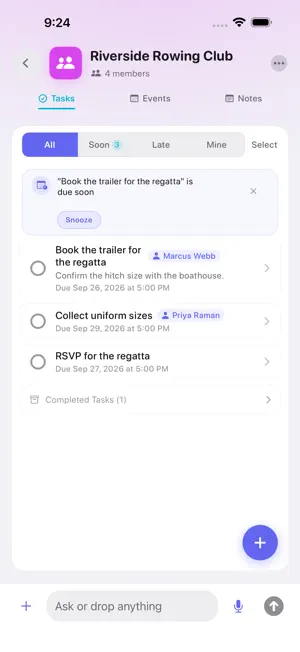
Turn a flyer, a screenshot or a group text into events and to-dos your whole family, team or club can see. Looped In is a shared calendar and to-do list for every part of your life, with an AI assistant, Cue, that does the typing for you. Take a photo of the flyer, paste the message, pick a screenshot or just say it. Cue finds the dates, times and to-dos and fills them in. You look them over, fix anything, and save. Nothing is added until you do. A LOOP FOR EACH PART OF YOUR LIFE A Loop is a shared space for one part of your life: your family, the soccer team, a school committee, a study group, the neighbors on your street. Each Loop has its own events, tasks and notes, so the team's schedule stays out of the family's list. WHAT A LOOP HOLDS Events, including repeating ones. Change one of them or all of them. Tasks with an owner and a due date, so everyone knows who is doing what. Notes for the things that are not a date or a job. EVERY LOOP ON ONE CALENDAR Events from all your Loops come together on one calendar in the app, so one screen shows your whole week. When Cue finds an event, one switch adds it to your iPhone calendar, or to Google Calendar once you connect it. ASK CUE Ask Cue a question and it answers about the Loop you are looking at. Cue suggests and you confirm: nothing is created, changed or removed without your tap. SIRI AND THE SHARE SHEET Say "Looped In add a task", "Looped In add an event" or "Looped In add a note", and tell Siri which Loop it is for. From another app, tap Share and choose Looped In to send it text, a web link or a photo. Siri can also set a Looped In alarm. All of these work with or without Plus. UNDO MEANS UNDO After you save a capture in the app, an Undo button stays on screen for sixty seconds. Tap it and everything that capture added is taken back out. SHARE A LOOP AND THEY JOIN FREE Invite people to a Loop with a link. They can see it and add, change and finish its events, tasks and notes without paying, for as long as they are members. There are no ads on any plan. YOUR FIRST WEEK OF PLUS IS FREE Every new account gets its first 7 days of Looped In Plus free, with no card needed, and nothing is charged when the week ends. Plus covers starting your own Loops, saving what a capture finds, asking Cue, and adding events to your calendar, with 50 captures and 100 questions to Cue a day. Without a subscription you can still run a capture three times a day to see what Cue finds. Looped In Plus is offered as a monthly subscription at $5.99 a month or a yearly subscription at $39.99 a year in the US; local prices are shown in the App Store. When you subscribe, Apple offers eligible new subscribers a 7 day free trial first. One subscription covers everyone in your Apple Family through Family Sharing. Payment is charged to your Apple Account when you confirm the purchase, or when the free trial ends if you start with one. The subscription renews automatically unless auto-renew is turned off at least 24 hours before the end of the current period, and your account is charged for renewal within 24 hours before the end of that period. You can manage your subscription and turn off auto-renew in your Apple Account settings after purchase. Any unused part of a free trial is forfeited when you buy a subscription. Terms of Use: https://loopedinapp.io/terms Privacy Policy: https://loopedinapp.io/privacy Organize the chaos.
What’s new
Version 1.0.9 · Updated October 22, 2026
• Send a capture to several Loops. Under Add to, choose Several Loops…, tick the Loops and tap Done. Each Loop gets its own copy. • Pick a color for an event before you add it. With two or more events that have a date, Color for all events under Add to gives each of them the same color.
App privacy
The developer, LoopedIn Labs, LLC, reported these privacy practices to Apple.
Data Linked to You
The following data, which may be collected and linked to your identity, may be used for the following purposes:
- Usage Data: Product Interaction
- User Content: Other User Content, Emails or Text Messages, Photos or Videos, Customer Support
- Contact Info: Email Address, Name, Phone Number
- Identifiers: User ID, Device ID
- Diagnostics: Crash Data
Used for: Analytics, Product Personalization, App Functionality
Data Not Linked to You
The following data, which may be collected but is not linked to your identity, may be used for the following purposes:
- Purchases: Purchase History
- Identifiers: Device ID
- Diagnostics: Other Diagnostic Data, Performance Data
Used for: Analytics, App Functionality
Alternatives to Looped In: Life Organizer
Looking for apps like Looped In: Life Organizer? Here are 6 similar apps on the App Store. The highest rated is Inbox Imp: AI Email Organizer (5.0/5), and all 6 are free to download.
-
 Inbox Imp: AI Email Organizer
5.0
Inbox Imp: AI Email Organizer
5.0
-
 Sorted: AI Space Organizer
-
 Oops! AI Memory Assistant
-
 MyLifeAI Organizer
-
 CalAction
5.0
CalAction
5.0
-
 Calendar ۬
4.7
Calendar ۬
4.7
| App | Rating | Price | Last updated | Compare |
|---|---|---|---|---|
| Looped In: Life Organizer | – | Free | October 22, 2026 | |
| Inbox Imp: AI Email Organizer | 5.0 / 5 (1) | Free | Oct 22, 2026 | Compare |
| Sorted: AI Space Organizer | – | Free | Oct 20, 2026 | Compare |
| Oops! AI Memory Assistant | – | Free | Sep 29, 2026 | Compare |
| MyLifeAI Organizer | – | Free | Sep 18, 2026 | Compare |
| CalAction | 5.0 / 5 (3) | Free | Sep 21, 2026 | Compare |
| Calendar ۬ | 4.7 / 5 (14) | Free | Sep 30, 2026 | Compare |