

Chronolyze: Watch Timegrapher
Hakan Kutluay Productivity iPhoneiPadiPod touch
Chronolyze: Watch Timegrapher is a free Productivity app for iPhone and iPad by Hakan Kutluay. Requires iOS 26.0. Updated October 13, 2026.
- Price
- Free
- on the App Store
- Size
- 7 MB
- Age 4+
- Updated
- Oct 13
- 2026 · v1.4.0
Screenshots
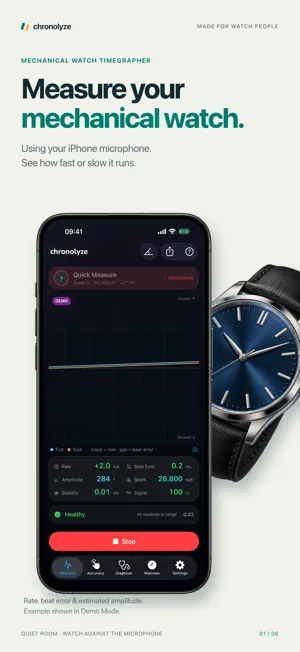


About Chronolyze: Watch Timegrapher
Check whether your mechanical watch runs fast or slow using your iPhone microphone. Measure its rate and beat error, estimate amplitude, and track daily accuracy over time. For microphone measurements, use a quiet room and place the watch case against the phone's microphone. Chronolyze listens to your watch's ticking and displays a classic timegrapher trace — no bench equipment or clip-on sensors needed. Results depend on the watch, microphone contact, and background noise; the signal-quality meter helps you assess the reading. LIVE MEASUREMENT • Rate in seconds per day — is your watch running fast or slow? • Beat error in milliseconds — is the balance swinging symmetrically? • Estimated amplitude in degrees — how far does the balance wheel swing? Requires the correct lift angle and a clear signal • Stability — how steady the rate is holding, so you can tell a settled movement from a restless one • Automatic beat-rate detection from 12,000 to 36,000 bph • Classic two-line timegrapher trace: slope shows rate, gap shows beat error • Signal-quality meter so you know when to trust the numbers • A plain-language verdict on every finished measurement, and a report card you can share ACCURACY TRACKING Track how your watch keeps time in daily wear. Tap along with the seconds hand every few days and Chronolyze calculates its average daily gain or loss between readings. Compare that history with your microphone measurements. Differences can reflect position and wearing conditions; a single comparison does not establish the cause. No microphone needed, so it works even for watches too quiet to measure. POSITIONAL TEST Measure in the six regulation positions — dial up, dial down, crown up, down, left, right — with a guided workflow. Compare the highest and lowest measured rates to see how position affects your watch's timekeeping. Save the results for future checks or to discuss with a watchmaker. MAGNETIZATION CHECK Check for signs of magnetization using your iPhone's magnetometer. Keep the phone still while taking a baseline and scanning the watch. Nearby magnetic objects can affect the reading; this check cannot confirm that the hairspring is magnetized or establish why a watch runs fast. The app does not demagnetize watches. WATCH COLLECTION Keep a watch box in your pocket: per-watch lift angle and beat rate, full measurement history, saved positional runs, accuracy readings, and re-viewable traces for every session. Everything syncs through your own iCloud account, so your collection follows you to every device. BUILT FOR WATCH PEOPLE • A library of 104 movements — Seiko, ETA, Sellita, Miyota, Rolex, Omega, Longines, Citizen, Hamilton, Grand Seiko, Tudor and more — each with the right lift angle and beat rate already set • Set the lift angle by hand for anything not listed (default 52°); amplitude estimates depend on this setting • Pin a nominal beat rate for unusual movements • Dark, instrument-grade interface with iOS 26 Liquid Glass design • Demo movement mode so you can explore every feature without a watch • An animated escapement in Settings that shows exactly what you're hearing WHAT YOU NEED A quiet room and a mechanical watch (hand-wound or automatic). Microphone measurements do not support quartz watches. For best results, rest the watch case directly against the bottom edge of the phone. Whether you're comparing positions, tracking a favorite watch, or preparing questions for your watchmaker, Chronolyze brings measurements and accuracy history together on your iPhone.
What’s new
Version 1.4.0 · Updated October 13, 2026
Accuracy tracking gets its own tab, and measuring is steadier. • Accuracy has its own tab. It opens on the watch you’re measuring, shows when a reading is due, and records one with a single button • Measure and Accuracy share the selected watch: pick it on either tab and the other follows • Lifting the watch off the microphone for a moment no longer wipes the graph; the measurement picks up where it left off • Stability now shows whenever the signal meter is green; the first seconds of a measurement say “Measuring stability…” instead of “Weak signal” • More precise tick timing, so fewer ticks are thrown out as noise • The signal meter shows a dash until there’s a reading, instead of a red 0%, and says “No ticks heard” when nothing reaches the microphone • Start Measuring responds straight away while the microphone gets ready • If no microphone is available, for example during a call, Chronolyze says so instead of closing • A steadier Measure screen: the readings and the status line keep their size as the numbers change, and “Session saved” appears just above the button, where you can see it • The welcome screens explain why Chronolyze needs the microphone before asking, and if access is turned off, Chronolyze takes you straight to Settings
App privacy
The developer, Hakan Kutluay, reported these privacy practices to Apple.
Data Not Linked to You
The following data, which may be collected but is not linked to your identity, may be used for the following purposes:
- Usage Data: Product Interaction
- Diagnostics: Crash Data
Used for: Analytics
Alternatives to Chronolyze: Watch Timegrapher
Looking for apps like Chronolyze: Watch Timegrapher? Here are 6 similar apps on the App Store. The highest rated is ReflowPDF: PDF Reader Mode (4.3/5), and all 6 are free to download.
-
 Parking Verse
-
 WhichWeek
-
 Pocket Shell - SSH client
-
 myCCEMEA 2026
-
 Vanguard Ford Connect
-
 ReflowPDF: PDF Reader Mode
4.3
| App | Rating | Price | Last updated | Compare |
|---|---|---|---|---|
| Chronolyze: Watch Timegrapher | – | Free | October 13, 2026 | |
| Parking Verse | – | Free | Oct 22, 2026 | Compare |
| WhichWeek | – | Free | Apr 15, 2026 | Compare |
| Pocket Shell - SSH client | – | Free | May 14, 2026 | Compare |
| myCCEMEA 2026 | – | Free | Oct 24, 2026 | Compare |
| Vanguard Ford Connect | – | Free | Sep 24, 2026 | Compare |
| ReflowPDF: PDF Reader Mode | 4.3 / 5 (3) | Free | Sep 24, 2026 | Compare |