

Pocket Shell - SSH client
Apps Haus Productivity iPhoneiPadiPod touch
Pocket Shell - SSH client is a free Productivity app for iPhone and iPad by Apps Haus. Requires iOS 15.6. Updated May 14, 2026.
- Price
- Free
- on the App Store
- Size
- 29 MB
- Age 4+
- Updated
- May 14
- 2026 · v1.0.0
Screenshots
About Pocket Shell - SSH client
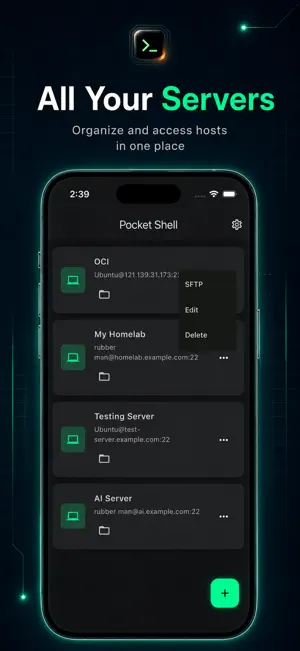
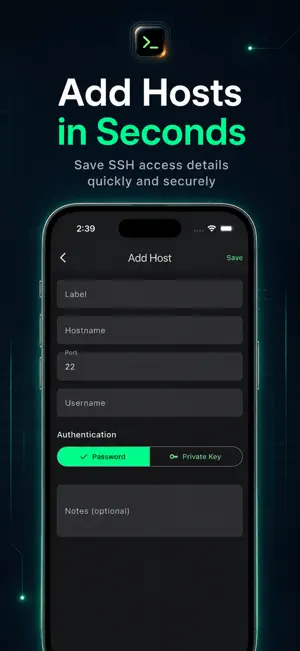
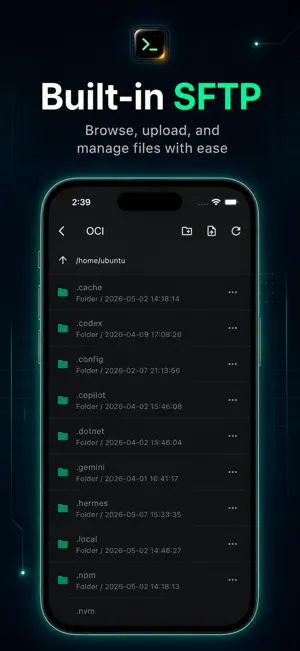
Pocket Shell is a modern SSH client built for developers, server owners, IT users and anyone who needs quick access to remote machines from a mobile device. Connect to your servers, manage saved hosts, browse files with SFTP and run terminal commands from one clean, dark-mode interface. Whether you are checking a VPS, managing a cloud instance, accessing a Linux server or handling quick maintenance tasks while away from your computer, Pocket Shell gives you a simple and focused way to stay connected. Key Features: * SSH Client Save and organize your server connections in one place. Add host details such as hostname, port, username and authentication method, then access your servers quickly when needed. * Terminal Access Open a remote terminal session and run commands directly from your phone. Pocket Shell is designed for quick checks, server monitoring, command execution and remote troubleshooting. * Built-in SFTP File Browser Browse remote folders and manage server files through a clean SFTP interface. Move through directories, view folder structures and access server files without switching tools. * Local Terminal Access a local terminal area for command-line workflows directly inside the app. * Clean Dark Interface Pocket Shell uses a focused dark UI with clear text, simple navigation and developer-friendly controls, making it comfortable to use during long sessions or quick checks. Designed For: - Developers - System administrators - Cloud server users - VPS owners - Linux users - Homelab users - IT support users - Students learning server management - Anyone who needs SSH access on mobile Why Pocket Shell? Pocket Shell is built around one idea: remote server access should feel simple, clean and reliable on mobile. Instead of a cluttered interface, the app keeps the most important tools close: saved hosts, SSH terminal, SFTP file browsing, authentication options and quick access controls. Use Pocket Shell when you need to: - Connect to a Linux server - Check server status - Run quick terminal commands - Manage SSH hosts - Browse remote files with SFTP - Access your VPS or cloud instance - Work with your homelab server - Handle quick server maintenance while away from your computer
App privacy
The developer, Apps Haus, reported these privacy practices to Apple.
Data Not Collected
The developer does not collect any data from this app.
Alternatives to Pocket Shell - SSH client
Looking for apps like Pocket Shell - SSH client? Here are 6 similar apps on the App Store. The highest rated is pythoni2.7$-run code,color,pro (4.7/5), and 5 of the 6 are free to download.
-
 ShellPilot: SSH & Snippets
-
 Bom Agent
-
 pythoni2.7$-run code,color,pro
4.7
pythoni2.7$-run code,color,pro
4.7
-
 password123
-
 viaSocket
-
 OpenNow - Markdown HTML
| App | Rating | Price | Last updated | Compare |
|---|---|---|---|---|
| Pocket Shell - SSH client | – | Free | May 14, 2026 | |
| ShellPilot: SSH & Snippets | – | Free | Sep 27, 2026 | Compare |
| Bom Agent | – | Free | Jul 19, 2026 | Compare |
| pythoni2.7$-run code,color,pro | 4.7 / 5 (18) | 2.99 USD | Jul 16, 2025 | Compare |
| password123 | – | Free | Sep 1, 2026 | Compare |
| viaSocket | – | Free | Jun 12, 2026 | Compare |
| OpenNow - Markdown HTML | – | Free | Jul 10, 2026 | Compare |