

DualCam – Front & Back Camera
丽佳 施 Photo & Video iPhoneiPadiPod touch
DualCam – Front & Back Camera is a free Photo & Video app for iPhone and iPad by 丽佳 施. Rated 5.0/5 from 4 ratings. Requires iOS 16.0.
- Rating
- 5.0
- 4 ratings
- Price
- Free
- on the App Store
- Size
- 5 MB
- Age 4+
- Updated
- Oct 23
- 2026 · v1.2
Screenshots


About DualCam – Front & Back Camera
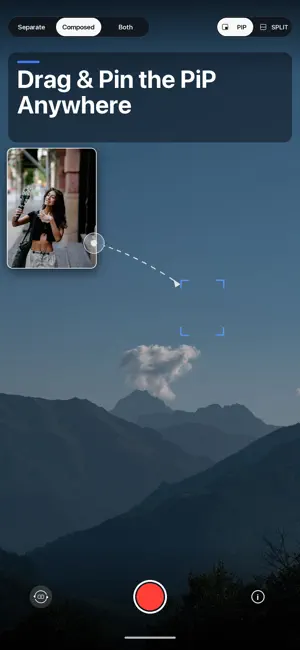
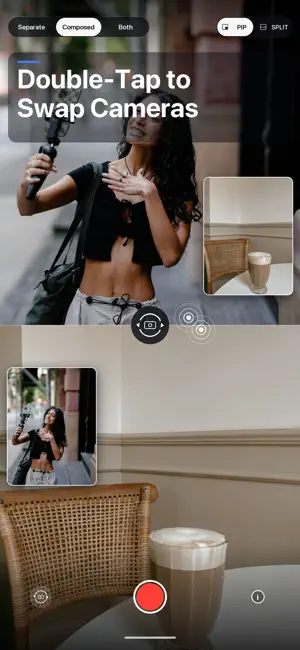
DualCam records your front and back cameras at the same time. One tap starts both, and you decide how the finished clips are arranged and saved. ■ Record both sides of the moment Capture your reaction and what you see together. DualCam works well for reaction videos, vlogs, interviews, travel, unboxings, reviews, and tutorials. ■ Picture-in-picture you control Drag the PiP window and it settles into the nearest corner. Pinch to resize it, or double-tap to swap the front and back views. ■ Switch to split view Stack both views vertically at full width. The layout shown in the preview is the layout saved in the composed video. ■ Choose what to save • Two separate files, one from each camera • One composed PiP or split-screen video • Both the separate files and the composed video ■ Designed to protect your recording If a call, background transition, or high device temperature interrupts a recording, DualCam works to finish and save the content already captured. ■ Ads stay out of the recording A bottom banner appears only while the camera is idle and is hidden during recording. An optional one-time purchase removes the banner; camera features remain available without it. ■ Saved to Photos Videos are saved to your Photos library, and DualCam does not upload them. Advertising data is handled according to your privacy choices. Simultaneous front-and-back recording is available on supported devices. On other devices, DualCam provides single-camera recording; switch between the front and back cameras before recording.
What’s new
Version 1.2 · Updated October 23, 2026
• Improved camera switching stability and preview responsiveness • Minor UI and performance improvements
App privacy
The developer, 丽佳 施, reported these privacy practices to Apple.
Data Used to Track You
The following data may be used to track you across apps and websites owned by other companies:
- Identifiers: Device ID
Data Linked to You
The following data, which may be collected and linked to your identity, may be used for the following purposes:
- Identifiers: Device ID
Used for: Third-Party Advertising
Alternatives to DualCam – Front & Back Camera
Looking for apps like DualCam – Front & Back Camera? Here are 6 similar apps on the App Store. The highest rated is SplitRig: Dual Camera Recorder (5.0/5), and all 6 are free to download.
-
 DualCam: Dual Video Recorder
4.5
-
 Dual Camera - Front & Back
-
 DualCamera Recorder - Dualcam
4.4
-
 DoubleCam - Double Take Camera
4.8
-
 2Camera - Dual Capture Video
4.6
-
 SplitRig: Dual Camera Recorder
5.0
| App | Rating | Price | Last updated | Compare |
|---|---|---|---|---|
| DualCam – Front & Back Camera | 5.0 / 5 (4 ratings) | Free | October 23, 2026 | |
| DualCam: Dual Video Recorder | 4.5 / 5 (6) | Free | Oct 26, 2026 | Compare |
| Dual Camera - Front & Back | – | Free | Jul 20, 2026 | Compare |
| DualCamera Recorder - Dualcam | 4.4 / 5 (18) | Free | Oct 6, 2026 | Compare |
| DoubleCam - Double Take Camera | 4.8 / 5 (62) | Free | Oct 23, 2026 | Compare |
| 2Camera - Dual Capture Video | 4.6 / 5 (13) | Free | Apr 1, 2026 | Compare |
| SplitRig: Dual Camera Recorder | 5.0 / 5 (41) | Free | Oct 10, 2026 | Compare |