

SplitRig: Dual Camera Recorder
Claudia Marrot Photo & Video iPhoneiPadiPod touchApple Watch
SplitRig: Dual Camera Recorder is a free Photo & Video app for iPhone and iPad by Claudia Marrot. Rated 5.0/5 from 38 ratings. Requires iOS 26.0.
- Rating
- 5.0
- 38 ratings
- Price
- Free
- on the App Store
- Size
- 17 MB
- Age 4+
- Updated
- Oct 10
- 2026 · v1.1.11
Screenshots


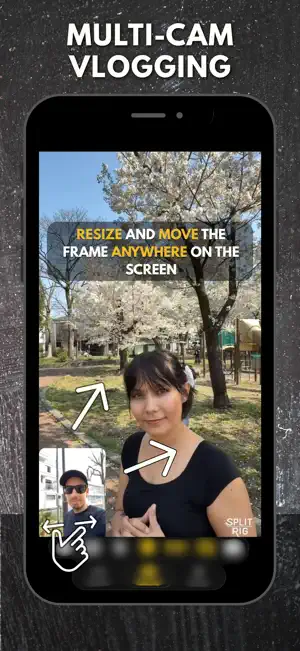
About SplitRig: Dual Camera Recorder
Record both iPhone cameras at the same time. Front and back, in one smooth, perfectly synced video. No editing required. Free forever, with no subscription, no in-app purchases, no ads, and no account. Every feature works from the moment you open the app. The all-in-one dual camera recorder for everyday vloggers, content creators, drivers, runners, cyclists, snowboarders, and reaction creators. Built solo. Privacy first. Nothing leaves your iPhone. WHY CREATORS PICK SPLITRIG - Truly seamless dual-camera capture. Front + rear, perfectly synced, ready to post - Pro-grade cinematic stabilization on both lenses - Built-in teleprompter. Read your script on screen while you record, visible only to you and never in the saved video - Live GPS speedometer, pace, distance and altitude burned into the video. No editing - Works on iPhone 11 through iPhone 17 Pro - Free forever. No subscription, no in-app purchases, no ads · No data collected LAYOUTS - Picture-in-Picture: your face floats over the scene, drag and resize anywhere - Split Screen: side-by-side or stacked, adjustable 30–70% ratio. Perfect for interviews - Face Mode: AI background removal with no green screen. Keep the live scene behind you, or drop in any photo from your library as your backdrop - Single Camera: full-frame rear with all SplitRig controls TWO RECORDING MODES - Action Cam: ultra-wide 0.5×, 60 FPS, extreme stabilization for sports - Record: HEVC at up to 8 Mbps, tap to focus, press and hold to lock focus and exposure, smart thermal management for long shoots LIVE OVERLAY WIDGETS - GPS Speedometer for driving, motorcycling, cycling, running - Distance, Duration, Altitude, Pace - Goal Gauge: set a target distance, watch it fill in real time - Sound Level meter All draggable, resizable, themeable. Position remembered per orientation. Save a favorite widget layout as My Widgets and recall it with one tap. ACTIVITY MODES Walking · Running · Cycling · Driving · Skiing · Skating · General. Set goals, track them live. HANDS-FREE RECORDING - Camera Control button (iPhone 16 and later). Full click to record, slide to zoom - Volume buttons. Vol Down records, Vol Up captures a screenshot - AirPods Pro 2 / 4 / Pro 3. Wireless remote shutter via stem press on iOS 26 - Apple Watch. Full control from your wrist (record, layout, zoom, flash, mute, screenshots) - Dynamic Island & Lock Screen. See recording status at a glance and stop, screenshot, or toggle flash without reopening the app - Action Button & Siri Shortcuts. Quick Record from anywhere PRO AUDIO USB-C, Bluetooth, and Lightning microphones. Hot-swap mid-session. 48 kHz, perfectly synced. Listen to music in the background while you record. NEVER LOSE A RECORDING - Built-in Library: browse, replay, and save any recording to Photos - Automatic recovery: if a recording is interrupted, it is rescued and waiting for you - Smart Pause: leave the app while recording and it pauses. Come back soon to go on; otherwise your recording is saved - Free Up Space: clear already-saved clips from the Library to reclaim storage WHO IT'S FOR - Everyday vloggers. Your face and the scene in one shot, no editing app required - Short-form creators (TikTok, Reels, Shorts, YouTube). Both cameras, posted straight to your platform - Reaction creators. Facecam over the action with no green screen needed - Driving instructors and car POV creators. Dashcam-style with live GPS speed - Runners, cyclists, hikers. Pace, distance, and altitude burned into the video - Skiers, snowboarders, skaters. Action Cam mode with speed overlay - Interviewers, podcasters, real estate agents, tutorial makers. Split-screen storytelling FROM THE DEVELOPER SplitRig is built by an independent developer for serious creators who refuse compromise. No accounts. No ads. No tracking. Everything stays on your iPhone. Free forever. Download once, record everything.
Ratings & reviews
5.0
38 ratings
What’s new
Version 1.1.11 · Updated October 10, 2026
Quick Settings Tap Settings in the new bottom bar to change resolution, frame rate, stabilization and the front camera's shape, right on the camera screen. New Picture in Picture shape Your small picture can now be a circle, not only a rectangle. Open Layout, choose Circle and try it: it gives your videos a fresh new look. A new look, part one A cleaner design, new controls at the bottom of the screen and clearer Settings. The next version goes on with the redesign for an even better experience. Also new • Turn off the share card after each recording; Settings brings it back. • Leave the app while recording and it pauses. Come back soon to go on; otherwise your recording is saved. • A sign at the top tells you when a recording has no sound, and when the microphone is back. • Safe Zone Guide: corner marks show where social apps cover your video with buttons. Fixes • A phone call no longer makes the camera glitch and restart. • Fixed recordings that could have no sound, or sound that started late. • Performance improvements
App privacy
The developer, Claudia Marrot, reported these privacy practices to Apple.
Data Not Collected
The developer does not collect any data from this app.
Alternatives to SplitRig: Dual Camera Recorder
Looking for apps like SplitRig: Dual Camera Recorder? Here are 6 similar apps on the App Store. The highest rated is Double Camera Recorder (4.7/5), and all 6 are free to download.
-
 Double Camera Take
4.5
Double Camera Take
4.5
-
 Dual Camera:- Front & Back Cam
4.6
Dual Camera:- Front & Back Cam
4.6
-
 Double Camera Recorder
4.7
Double Camera Recorder
4.7
-
 Dual Capture Video
4.3
Dual Capture Video
4.3
-
 DoubleTake - Multicam video
3.4
DoubleTake - Multicam video
3.4
-
 DualTake: Portrait & Landscape
4.4
DualTake: Portrait & Landscape
4.4
| App | Rating | Price | Last updated | Compare |
|---|---|---|---|---|
| SplitRig: Dual Camera Recorder | 5.0 / 5 (38 ratings) | Free | October 10, 2026 | |
| Double Camera Take | 4.5 / 5 (15) | Free | May 21, 2026 | Compare |
| Dual Camera:- Front & Back Cam | 4.6 / 5 (78) | Free | Oct 22, 2026 | Compare |
| Double Camera Recorder | 4.7 / 5 (201) | Free | Aug 20, 2026 | Compare |
| Dual Capture Video | 4.3 / 5 (32) | Free | Nov 30, 2025 | Compare |
| DoubleTake - Multicam video | 3.4 / 5 (505) | Free | Mar 10, 2025 | Compare |
| DualTake: Portrait & Landscape | 4.4 / 5 (18) | Free | Oct 18, 2026 | Compare |