

Selects: Clean Up Your Photos
VACLAV TRNKA Utilities iPhoneiPadiPod touch
Selects: Clean Up Your Photos is a free Utilities app for iPhone and iPad by VACLAV TRNKA. Rated 5.0/5 from 14 ratings. Requires iOS 26.0.
- Rating
- 5.0
- 14 ratings
- Price
- Free
- on the App Store
- Size
- 18 MB
- Age 4+
- Updated
- Oct 19
- 2026 · v2.0.0
Screenshots


About Selects: Clean Up Your Photos
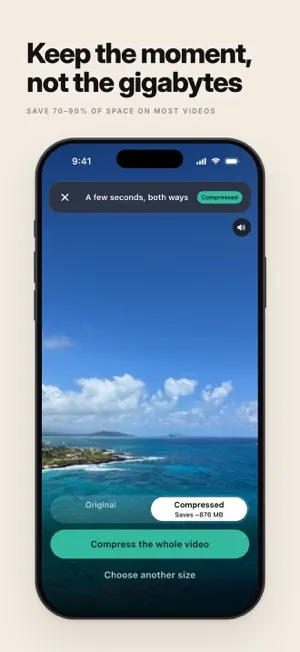
Your photo library is full of near-duplicates. You shot the same moment ten, twenty, thirty times to get one good frame, and every one of them is still sitting there. Selects does the tedious first pass for you. It finds the runs of near-identical shots and pre-picks the keepers: the sharpest, plus the one that is genuinely different so you don't lose the moment. Everything else is suggested for clearing. You glance, correct anything with a tap, and move on. Minutes, not an afternoon. THREE WAYS TO TIDY - Curate: open a month, an album or a range of dates. Selects groups each photoshoot with the keepers already marked, and lists that stretch's videos and screenshots too. Or browse everything in a plain grid. - Tidy up: your whole library, sorted into lists. First what's worth a look: large videos, exact copies, bursts, and compressed videos whose original is still there. Then lists for any time: all screenshots, screen recordings, all videos, blurry and low-light shots, and utility photos like receipts and signs. - Swipe: one photo at a time. Left to set it aside, right to keep it, up to add it to Favorites. Swipe through a month, an album, just videos or screenshots, or any list in Tidy up. Whatever you mark, wherever you mark it, waits in one place until you confirm. A BIG VIDEO DOESN'T HAVE TO GO Selects makes a smaller copy of a long clip and leaves your original exactly as it was. You get a real preview first, encoded from the hardest seconds of that video, so you judge the quality yourself instead of trusting a number. Videos stored in iCloud work too: Selects downloads the original first. Both then sit in your library until you decide: the room comes back when you remove the original, which is its own confirmed step. The smaller copy of an HDR video is still HDR. Slo-mo, Cinematic and spatial videos are never compressed, because a copy would lose what makes them special. YOU STAY IN CHARGE Nothing is removed without your confirmation. Favorites are never suggested for clearing. Tell Selects to Keep more, stay Balanced, or Clear more. Stop whenever you like and it remembers where you got to. YOUR PHOTOS NEVER LEAVE YOUR iPHONE Selects reads your library right here on the device, using Apple's Vision framework. Compressing a video happens here too, on the iPhone's own encoder. No account, no ads, and no photos uploaded anywhere. SAFE BY DESIGN Removals go through the iPhone's own delete, into Recently Deleted for 30 days, so you can change your mind. One thing worth knowing up front: keeping a frame out of a burst saves it as a new photo, which means it leaves any album the burst was in. FREE, AND MEANT TO STAY THAT WAY No trial, no locked features, no subscription. Every part of the app is free. If it saves you an afternoon, there's an optional tip jar. Built by a person who wanted a tidier library.
Ratings & reviews
5.0
14 ratings
What’s new
Version 2.0.0 · Updated October 19, 2026
New: Swipe. Go through your library one photo at a time: left to set it aside, right to keep it, up to make it a favorite. What you set aside waits for you to confirm, and anything you remove stays in Recently Deleted for 30 days. Selects is now three tabs, Curate, Tidy up and Swipe, and videos stored in iCloud can be compressed too.
App privacy
The developer, VACLAV TRNKA, reported these privacy practices to Apple.
Data Not Linked to You
The following data, which may be collected but is not linked to your identity, may be used for the following purposes:
- Identifiers: Device ID
- Usage Data: Product Interaction
- Diagnostics: Crash Data
Used for: Analytics
Alternatives to Selects: Clean Up Your Photos
Looking for apps like Selects: Clean Up Your Photos? Here are 6 similar apps on the App Store. The highest rated is Whoosh - Cloud Photo Backup (5.0/5), and all 6 are free to download.
-
 Whoosh - Cloud Photo Backup
5.0
-
 SpectraSort - AI Photo Sorter
4.3
-
 Network Tools: Net Toolkit
-
 Sievr - AI Photo Cleaner
5.0
-
 AImger - AI Photo Organizer
-
 Fino: Swipe Photo Cleaner
| App | Rating | Price | Last updated | Compare |
|---|---|---|---|---|
| Selects: Clean Up Your Photos | 5.0 / 5 (14 ratings) | Free | October 19, 2026 | |
| Whoosh - Cloud Photo Backup | 5.0 / 5 (1) | Free | Sep 30, 2026 | Compare |
| SpectraSort - AI Photo Sorter | 4.3 / 5 (3) | Free | Oct 24, 2026 | Compare |
| Network Tools: Net Toolkit | – | Free | Sep 16, 2026 | Compare |
| Sievr - AI Photo Cleaner | 5.0 / 5 (2) | Free | Oct 12, 2026 | Compare |
| AImger - AI Photo Organizer | – | Free | Sep 22, 2026 | Compare |
| Fino: Swipe Photo Cleaner | – | Free | Jul 23, 2026 | Compare |