

Sievr - AI Photo Cleaner
Steven Knauss Utilities iPhoneiPadiPod touch
Sievr - AI Photo Cleaner is a free Utilities app for iPhone and iPad by Steven Knauss. Rated 5.0/5 from 2 ratings. Requires iOS 17.0.
- Rating
- 5.0
- 2 ratings
- Price
- Free
- on the App Store
- Size
- 3 MB
- Age 4+
- Updated
- Oct 12
- 2026 · v1.4.0
Screenshots


About Sievr - AI Photo Cleaner
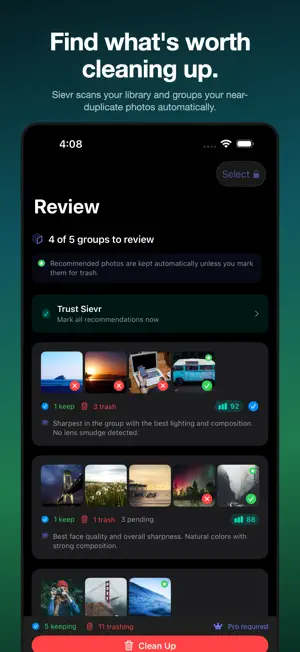
Free up gigabytes in minutes. Sievr scans your photo library, groups your near-duplicate photos, and picks the best shot in every group — so you can clean up the rest with one tap. Burst shots, retakes, slightly different angles of the same scene — Sievr's AI groups them, scores each one for sharpness, faces, lighting, and lens smudges, and recommends which one to keep. You glance at the group, accept the pick (or override it), and move on. A 10,000-photo library cleans up in a single sitting. FREE TO SCAN - Scan your photo library and see your near-duplicate groups - AI scores every photo for sharpness, faces, lighting, and lens smudges - See exactly why each "best shot" was picked, in plain language - No commitment to find out what's worth cleaning UPGRADE TO SIEVR PRO TO CLEAN UP - Clean up your near-duplicates with one tap (photos move to Recently Deleted — 30-day recovery) - Bulk select and batch delete across groups - Cleanup reports — see exactly what you've recovered, every session - Lifetime purchase available — buy once, keep forever - 3-day free trial on weekly; cancel anytime in Settings PRIVATE BY DESIGN - Every photo stays on your phone — no uploads, no cloud, no accounts - No third-party analytics, no tracking, no ads - Powered entirely by Apple's on-device AI Requires iOS 17 or later. iPhone only. Full feature set on iOS 26 and later. Terms of Use (EULA): https://www.apple.com/legal/internet-services/itunes/dev/stdeula/
What’s new
Version 1.4.0 · Updated October 12, 2026
Two photos side by side, and a sharper Sievr everywhere else. • Designed for iPhone Duo's inner display: compare two shots at full size, with Keep, Trash and Skip under each. Your groups sit in two columns, and folding or unfolding keeps your place • The best shot's explanation is never cut off, and it only mentions what Sievr actually measured • Review screens work at large text sizes, with every button readable • Scores and labels on a photo stay easy to read, even on a bright sky • Trash Rest leaves every photo you chose to keep • Widgets count the photos you've taken since your last scan, and read clearly in light mode • Scan New Photos counts only the photos it will check • Fixes for iOS 27, including the upgrade screen
App privacy
The developer, Steven Knauss, reported these privacy practices to Apple.
Data Not Collected
The developer does not collect any data from this app.