

Pennywick: Budget & Receipts
MATE GOG Finance iPhoneiPadiPod touch
Pennywick: Budget & Receipts is a free Finance app for iPhone and iPad by MATE GOG. Requires iOS 18.0. Updated October 12, 2026.
- Price
- Free
- on the App Store
- Size
- 7 MB
- Age 4+
- Updated
- Oct 12
- 2026 · v2.2.0
Screenshots



About Pennywick: Budget & Receipts
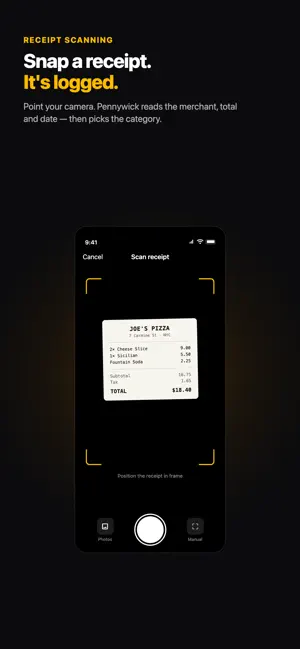
Scan a receipt and Pennywick fills in the entry for you — merchant, total, date, and category — reading it right on your device. No bank login. No account. No ads. Free to download, and free to keep using. WHY PENNYWICK IS DIFFERENT Most budgeting apps want your bank credentials. Pennywick never asks. You scan or type what you spend, and your finances stay on your iPhone and in your own iCloud — where nobody else, including us, can read them. FREE, WITH NO CATCH • Unlimited manual entries, with a full ledger, search, filters, and tags • Budgets per category, savings goals, and this month's trends • Scan 5 receipts a week, from your camera or a file • Export everything to CSV or a full backup — and restore it • Face ID lock, and private sync across your devices via your own iCloud STANDARD — ONE PURCHASE, KEPT FOREVER • Unlimited receipt scanning, from the camera or from PDF, email, and shared files • Household sharing: one ledger with family or roommates. Anyone you invite joins free • Insights across a quarter or a whole year, not just the current month • Recurring entries, so rent, salary, and subscriptions post themselves • Bring your own OpenAI or Gemini key for sharper reading, billed to your account Standard is a single purchase. Pay once, and it stays unlocked. PRO — OPTIONAL SUBSCRIPTION Everything in Standard, plus cloud receipt reading: 150 receipts a month read by a cloud model, with no API key to obtain and no second bill. Only the text of a receipt is ever sent, never the photo, and it stays off until you switch it on. You never need Pro. Everything Pennywick does on your device is a one-time purchase. BUILT FOR PRIVACY Your finance data stays on your device and in your own iCloud account. Pennywick never asks you to create an account. Household sharing uses Apple CloudKit Sharing with people you invite. Receipts are read on your device by default. MADE FOR REAL RECEIPTS Crumpled paper, faded thermal print, long supermarket rolls, foreign currencies, and receipts in English, German, Hungarian, French, Italian, Spanish, Polish, and Czech. Foreign totals convert at daily European Central Bank rates. Already bought Pennywick before it was free? Everything stays unlocked — automatically, permanently, and you don't need to do anything. Download Pennywick and build a budget habit that actually sticks. PRO SUBSCRIPTION DETAILS Pennywick Pro is an auto-renewable subscription, billed monthly or yearly (US: $4.99 per month or $49.99 per year; your local price is shown in the app before you buy). Payment is charged to your Apple Account at confirmation of purchase. It renews automatically unless cancelled at least 24 hours before the current period ends, and you can manage or cancel it any time in Settings › Apple Account › Subscriptions. Standard is a one-time purchase and never renews. Terms of Use (EULA): https://www.apple.com/legal/internet-services/itunes/dev/stdeula/ Privacy Policy: https://pennywick.app/privacy-policy
What’s new
Version 2.2.0 · Updated October 12, 2026
Turn any period into a PDF expense report — every expense, totals by category, and your receipt photos if you want them. Free, like CSV export. New • Expense report as a PDF. Settings › Data & backup turns this month, last month or a custom range into a PDF you can send to an accountant, a landlord or an employer. One switch adds your receipt images. • Converted amounts are now marked ≈. They use the European Central Bank's daily reference rate, which your bank's will differ from — so you can type the rate you were actually charged, and Pennywick keeps it as yours. Nothing about where your data lives has changed: on your device and in your own iCloud. No bank login, no account.
App privacy
The developer, MATE GOG, reported these privacy practices to Apple.
Data Not Linked to You
The following data, which may be collected but is not linked to your identity, may be used for the following purposes:
- Other Data: Other Data Types
Used for: App Functionality
Alternatives to Pennywick: Budget & Receipts
Looking for apps like Pennywick: Budget & Receipts? Here are 6 similar apps on the App Store. The highest rated is Temper: Control your money (5.0/5), and all 6 are free to download.
-
 Temper: Control your money
5.0
-
 Spendly: Visual Expense Log
-
 Cashkeep: Expense & Budget App
4.9
-
 Waget: Budget Expense Tracker
5.0
-
 MobilKincstár
-
 Lumi: Budget & Expense Tracker
| App | Rating | Price | Last updated | Compare |
|---|---|---|---|---|
| Pennywick: Budget & Receipts | – | Free | October 12, 2026 | |
| Temper: Control your money | 5.0 / 5 (1) | Free | Oct 16, 2026 | Compare |
| Spendly: Visual Expense Log | – | Free | Sep 11, 2026 | Compare |
| Cashkeep: Expense & Budget App | 4.9 / 5 (13) | Free | Oct 17, 2026 | Compare |
| Waget: Budget Expense Tracker | 5.0 / 5 (2) | Free | Sep 29, 2026 | Compare |
| MobilKincstár | – | Free | Oct 13, 2026 | Compare |
| Lumi: Budget & Expense Tracker | – | Free | Oct 11, 2026 | Compare |