

OpenVox Reader
Nitesh Kumar Sharma Productivity iPhoneiPadiPod touch
OpenVox Reader is a free Productivity app for iPhone and iPad by Nitesh Kumar Sharma. Rated 4.8/5 from 5 ratings. Requires iOS 17.0.
- Rating
- 4.8
- 5 ratings
- Price
- Free
- on the App Store
- Size
- 172 MB
- Age 4+
- Updated
- Oct 18
- 2026 · v1.9.0
Screenshots

About OpenVox Reader
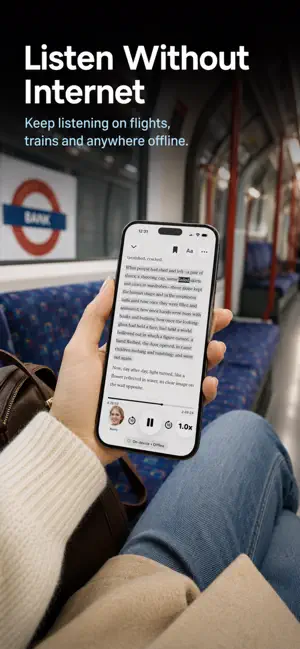
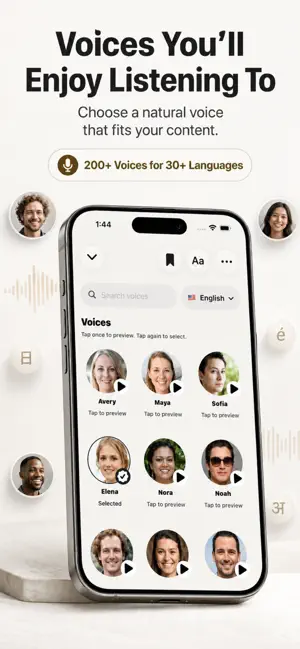
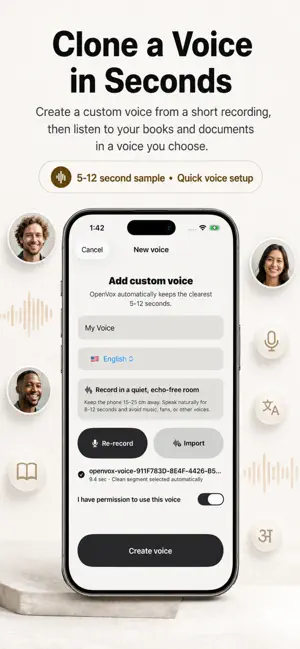
Turn Reading Time into Listening Time OpenVox Reader transforms books, PDFs, documents, web links and text into natural-sounding audio, so you can keep reading while commuting, walking, exercising, resting or working. Import your content, choose from hundreds of voices, create your own custom voice, and listen at your preferred speed without sending your private documents to an online speech service. Listen to Almost Anything Bring all your reading into one simple library: • Import ebooks and PDFs • Add documents and text files • Save web links for listening • Scan printed pages • Paste or type text directly • Organize everything in one place OpenVox Reader can generate and play speech locally on your device, so once the required voices are downloaded, you can listen without an internet connection. Natural Voices You’ll Enjoy Choose from more than 200 voices across 30+ languages and find the voice that best suits your book, article or document. You can also create custom voices for English, German, Italian, Portuguese, and Spanish from a short voice sample using Pocket TTS and listen to your content in a voice you choose. Listen at Your Own Pace Adjust playback from 0.5x all the way to 2.5x with smooth, pitch-preserving audio. Choose convenient presets including: • 0.5x • 1.0x • 1.5x • 2.0x • 2.5x Faster playback is supported with optimized buffering and accurate elapsed and remaining-time calculations. Save Important Sentences Found something worth coming back to? Bookmark the sentence you are currently reading and access it anytime from Saved Sentences. You can: • Save or remove sentences instantly • Browse all saved passages • Filter your saved sentences • Jump directly back to the original location • Delete bookmarks you no longer need Search Inside Your Documents Quickly find words, phrases or sections without scrolling through an entire book or document. Search in Document provides result previews and lets you jump directly to each matching location. EPUB search is optimized chapter by chapter to keep memory usage efficient even with larger books. Listen Without an Internet Connection Keep listening on flights, trains, commutes or anywhere without reliable internet access. Speech generation happens locally, allowing downloaded voices and imported content to remain available when you need them. Private by Design Your documents are processed locally for speech generation rather than being uploaded to a cloud TTS service. OpenVox Reader is built for people who want convenient AI-powered reading while keeping control of their content. Track Your Reading Journey See how much you have actually listened and keep your reading momentum going with: • Listening time • Daily and weekly progress • Reading streaks • Recently opened content • Personal listening statistics Reading time is calculated from audio that was actually spoken, giving you a accurate picture of your listening activity. Made for iPhone and iPad Use OpenVox Reader across iPhone and iPad with iCloud sync for your library. Your content stays organized across your Apple devices, and one purchase unlocks the app on both iPhone and iPad. Read More, Even When You’re Offline Whether you’re travelling, exercising, relaxing, commuting or getting work done, OpenVox Reader helps turn spare moments into meaningful reading time. Download OpenVox Reader and start listening to your reading today.
Ratings & reviews
4.8
5 ratings
What’s new
Version 1.9.0 · Updated October 18, 2026
- A refreshed library grid makes book covers larger on iPad and uses space more efficiently on iPhone. - The (…) button now stays on each cover and uses a glass appearance. - Pocket TTS voices have now improved HD quality.
App privacy
The developer, Nitesh Kumar Sharma, reported these privacy practices to Apple.
Data Not Collected
The developer does not collect any data from this app.
Alternatives to OpenVox Reader
Looking for apps like OpenVox Reader? Here are 6 similar apps on the App Store. The highest rated is Ghost Reader Live (5.0/5), and all 6 are free to download.
-
 Ghost Reader Live
5.0
Ghost Reader Live
5.0
-
 ReadAloud: Text to Speech PDF
3.7
ReadAloud: Text to Speech PDF
3.7
-
 PDF Scanner - Scany
5.0
PDF Scanner - Scany
5.0
-
 Prazo: Calendar & To-Do List
5.0
Prazo: Calendar & To-Do List
5.0
-
 Local TTS - AI Voice Reader
4.6
Local TTS - AI Voice Reader
4.6
-
 Prism Notes
4.9
Prism Notes
4.9
| App | Rating | Price | Last updated | Compare |
|---|---|---|---|---|
| OpenVox Reader | 4.8 / 5 (5 ratings) | Free | October 18, 2026 | |
| Ghost Reader Live | 5.0 / 5 (1) | Free | Oct 15, 2026 | Compare |
| ReadAloud: Text to Speech PDF | 3.7 / 5 (7) | Free | Oct 18, 2026 | Compare |
| PDF Scanner - Scany | 5.0 / 5 (11) | Free | Aug 11, 2026 | Compare |
| Prazo: Calendar & To-Do List | 5.0 / 5 (1) | Free | Oct 19, 2026 | Compare |
| Local TTS - AI Voice Reader | 4.6 / 5 (10) | Free | Sep 28, 2026 | Compare |
| Prism Notes | 4.9 / 5 (35) | Free | Oct 19, 2026 | Compare |
Compare OpenVox Reader with the top alternatives: ratings, updates, ASO score and keyword gaps →