

Juns Schedule
changwoon choi Productivity iPhoneiPadiPod touchApple Watch
Juns Schedule is a paid Productivity app for iPhone and iPad by changwoon choi. Requires iOS 17.0. Updated September 1, 2026.
- Price
- 2.99 USD
- on the App Store
- Size
- 8 MB
- Age 4+
- Updated
- Sep 1
- 2026 · v1.3.0
Screenshots



About Juns Schedule
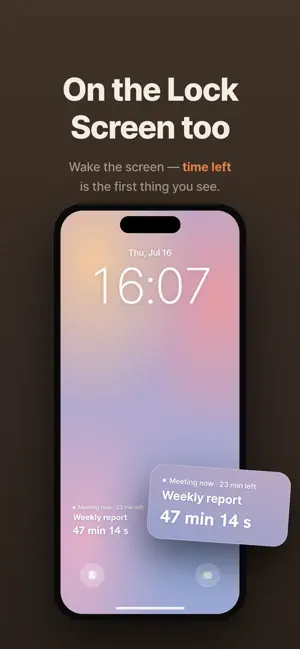
Your day is packed. Juns Schedule does the math so you don't have to. It reads the calendar you already keep and shows one thing that actually matters when you're busy: how much time is left — until your next event starts, and until the one you're in now ends. No more glancing at the clock and subtracting in your head. WHAT YOU GET • Live countdowns to your next event and to the end of what's running now • Home Screen and Lock Screen widgets — the time left, always in view • Apple Watch app and complications — start, end, or skip an event from your wrist • Built on your existing calendar — nothing new to maintain • Fast, minimal entry when you do add something MADE FOR TIGHT DAYS Airport runs where check-in and the gate are minutes apart. Back-to-back meetings. Live production, tours, shoots — any day that moves by the minute. If you keep checking "how long do I have?", this is for you. QUIET BY DESIGN • Time-sensitive alerts when an event is about to start • Optional silent auto-start and end reminders • Numbers you can read at a glance, never a wall of text NO NONSENSE • Pay once. No subscription, no ads, no account. • Reads your calendar on your device. Event details never leave your phone. • Anonymous usage stats only — nothing that identifies you. Juns Schedule isn't another calendar. It's the answer to the only question a busy day keeps asking: how much time do I have left?
What’s new
Version 1.3.0 · Updated September 1, 2026
• The new-event screen has been reorganized • Create all-day events here. • Edit all-day events here too. • Settings › Display › Visible calendars — choose which calendars this app shows. Hide holidays, birthdays or subscribed calendars that don't need a countdown and your home screen, widgets and watch get a lot quieter. Calendars added later show up automatically. • Settings › Display › Show all-day events — hide events without a time, like birthdays and trips.
App privacy
The developer, changwoon choi, reported these privacy practices to Apple.
Data Not Linked to You
The following data, which may be collected but is not linked to your identity, may be used for the following purposes:
- Identifiers: User ID
- Usage Data: Product Interaction
Used for: Analytics
Alternatives to Juns Schedule
Looking for apps like Juns Schedule? Here are 6 similar apps on the App Store.


| App | Rating | Price | Last updated | Compare |
|---|---|---|---|---|
| Juns Schedule | – | 2.99 USD | September 1, 2026 | |
| RITMUS: Habits & Screen Time | – | Free | Sep 30, 2026 | Compare |
| ShieldMail | – | Free | Apr 21, 2026 | Compare |
| Makernote | – | Free | Aug 20, 2025 | Compare |
| Tickku | – | Free | Aug 28, 2026 | Compare |
| 던던-투두/습관/일기를 한번에 | – | Free | Oct 15, 2026 | Compare |
| HK 메모위젯 | – | 1.99 USD | Apr 9, 2026 | Compare |
Compare Juns Schedule with the top alternatives: ratings, updates, ASO score and keyword gaps →