

KatKut AI: AI B-Roll & Caption
Sanjaya Bhattarai Photo & Video iPhoneiPadiPod touch
KatKut AI: AI B-Roll & Caption is a free Photo & Video app for iPhone and iPad by Sanjaya Bhattarai. Rated 5.0/5 from 3 ratings. Requires iOS 16.4.
- Rating
- 5.0
- 3 ratings
- Price
- Free
- on the App Store
- Size
- 69 MB
- Age 17+
- Updated
- Oct 24
- 2026 · v2.0.2
Screenshots

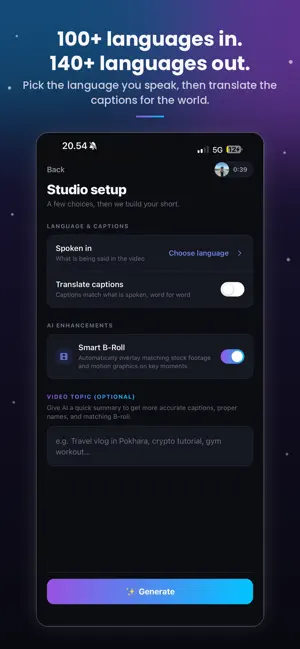
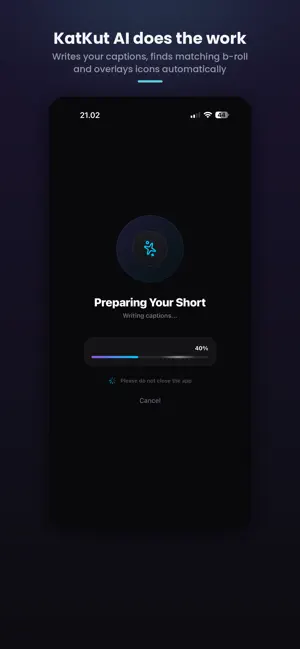

About KatKut AI: AI B-Roll & Caption
KatKut AI is an AI video editor that turns talking videos into engaging, ready-to-post content. Create animated motion graphics, add captions, translate subtitles, find matching B-roll, and customize your videos with more templates, styles, fonts, colors, and effects. Whether you're creating a vertical Reel, Tiktok Videos or a horizontal YouTube video, or a square video, KatKut gives you the tools to make it your own. Edit individual elements, fine-tune your video, and export in up to 4K. STUDIO: TURN TALKING VIDEOS INTO FINISHED CONTENT • AUTO CAPTIONS IN 101 LANGUAGES: Generate accurate, word-timed captions in Nepali, Hindi, English, Spanish, Arabic, Japanese, Bengali, Indonesian, and more. • TRANSLATE SUBTITLES INTO 140 LANGUAGES: Create subtitles in another language to reach a wider audience. • NATIVE OR ROMAN SCRIPT: Choose native writing, such as "कहाँ जाने", or Roman script, such as "kaha jane". • AI OPENING HOOKS: Generate engaging opening titles based on what you say • MORE AI MOTION GRAPHICS: Turn your words into animated timelines, split screens, chat bubbles, rankings, lists, comment sections, price tags, progress rings, checklists, and more. • MORE TEMPLATES, FONTS AND STYLES: Customize your captions and graphics with different templates, fonts, colors, animations, and designs to match your content and personal style. • SMART B-ROLL: Automatically find relevant stock footage based on what you're saying, with footage that matches your video's shape. • EMOJI AND STICKERS: Add relevant emoji, country flags, and animated stickers to make your videos more expressive. • AUTOMATIC SOUND EFFECTS: Enhance your videos with sound effects and transitions that make your content more engaging. • A REAL VIDEO EDITOR: Edit individual elements across separate tracks. Trim, move, retime, delete, or customize captions, footage, and graphics. Preview your changes and undo or redo edits. EDIT ANY VIDEO. CHOOSE YOUR FORMAT. Create content in the format that works best for you. • VERTICAL (9:16): Perfect for TikTok, Instagram Reels, and YouTube Shorts. • HORIZONTAL (16:9): Ideal for YouTube videos and widescreen content. Choose a blurred or black background when your video doesn't fill the frame. Export in 1080p, 1440p, or up to 4K at 30 or 60 fps. REELS: TURN YOUR CLIPS INTO A FINISHED REEL Add up to 40 short clips, and KatKut helps select the strongest moments to create a 60–120-second vertical reel. • 8 EDITING VIBES: Balanced, Snappy, Relaxed, Food & Cooking, Travel & Adventure, Mini Vlog, Unboxing & Style, and Auto. • SMART AUDIO: Reduce unwanted noise while preserving important sounds, music, and memorable moments. • PHOTOS TOO: Add photos with gentle motion to bring your stories to life. MADE FOR EVERY KIND OF CREATOR Whether you create travel vlogs, food videos, tutorials, educational content, product reviews, mini vlogs, or talking-head videos, KatKut helps you spend less time editing and more time creating. Create content in Nepali, Hindi, Bengali, English, Spanish, Arabic, and many more languages. PRIVATE BY DESIGN Your videos stay on your phone. Reels are created entirely on your device. Studio sends a small audio extract for transcription, while downloaded B-roll footage stays on your phone. Start creating with KatKut AI for free. Payment is charged to your Apple ID account at confirmation of purchase. Your subscription automatically renews unless cancelled at least 24 hours before the end of the current subscription period. You can manage or cancel your subscription in your App Store account settings. SUPPORT Questions or feedback? Contact us at [email protected]. Terms of Use (EULA): https://www.apple.com/legal/internet-services/itunes/dev/stdeula/ Privacy Policy: https://katkut.app/privacy-policy Terms of Service: https://katkut.app/terms
What’s new
Version 2.0.2 · Updated October 24, 2026
What's New in KatKut AI • More AI Motion Graphics: Animated timelines, split screens, chat bubbles, rankings, lists, and comment sections that match what you're saying. • Better Captions: New caption styles with improved positioning • AI-Powered Sound Effects: Automatic sound effects and motion graphics make your videos more engaging and ready to post. • Smarter B-Roll: Stock footage now matches your video's aspect ratio for a more natural look. • Edit Videos in Any Format: Work with vertical, horizontal, or square videos. Export in 9:16 for Reels, TikTok, and Shorts, or 16:9 for YouTube. Choose a blurred or black background when your video doesn't fill the frame. • Performance Improvements: A faster, smoother, and more stable editing experience. Update KatKut AI and turn your talking videos into content ready to share!
App privacy
The developer, Sanjaya Bhattarai, reported these privacy practices to Apple.
Data Used to Track You
The following data may be used to track you across apps and websites owned by other companies:
- Usage Data: Advertising Data
Data Linked to You
The following data, which may be collected and linked to your identity, may be used for the following purposes:
- User Content: Audio Data
- Diagnostics: Crash Data
Used for: App Functionality
Data Not Linked to You
The following data, which may be collected but is not linked to your identity, may be used for the following purposes:
- Usage Data: Advertising Data
- Location: Coarse Location
Used for: Third-Party Advertising, Developer’s Advertising or Marketing
Alternatives to KatKut AI: AI B-Roll & Caption
Looking for apps like KatKut AI: AI B-Roll & Caption? Here are 6 similar apps on the App Store. The highest rated is BlinkCut (5.0/5), and all 6 are free to download.
-
 Photo Cleaner - Offline
-
 BlinkCut
5.0
-
 Wavcut: AI Video Editor
5.0
-
 Promptly - AI Video Editor
4.2
-
 AutoCut: Silence Remover
5.0
-
 Submagic ai
1.0
| App | Rating | Price | Last updated | Compare |
|---|---|---|---|---|
| KatKut AI: AI B-Roll & Caption | 5.0 / 5 (3 ratings) | Free | October 24, 2026 | |
| Photo Cleaner - Offline | – | Free | Jul 29, 2026 | Compare |
| BlinkCut | 5.0 / 5 (1) | Free | Oct 20, 2026 | Compare |
| Wavcut: AI Video Editor | 5.0 / 5 (2) | Free | Oct 23, 2026 | Compare |
| Promptly - AI Video Editor | 4.2 / 5 (15) | Free | Sep 26, 2026 | Compare |
| AutoCut: Silence Remover | 5.0 / 5 (7) | Free | Sep 13, 2026 | Compare |
| Submagic ai | 1.0 / 5 (1) | Free | Aug 10, 2026 | Compare |