

BlinkCut
Sri Appala Adatrao Photo & Video iPhoneiPadiPod touch
BlinkCut is a free Photo & Video app for iPhone and iPad by Sri Appala Adatrao. Rated 5.0/5 from 1 ratings. Requires iOS 26.0. Updated October 20, 2026.
- Rating
- 5.0
- 1 ratings
- Price
- Free
- on the App Store
- Size
- 10 MB
- Age 4+
- Updated
- Oct 20
- 2026 · v2.0
Screenshots


About BlinkCut
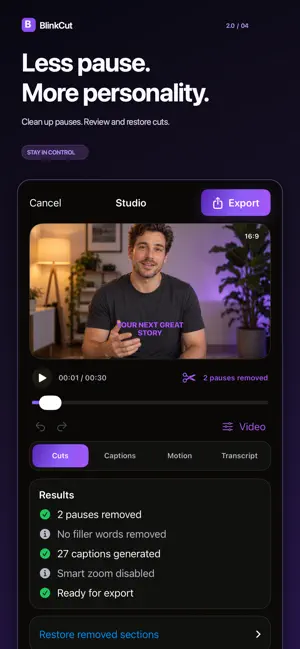
Edit your story. Keep your footage yours. BlinkCut turns talking-head videos into polished, captioned content using Apple’s on-device speech and media technologies. Clean up pauses, customize captions, add Smart Zoom, balance audio, and give your video a finished look—all processed directly on your iPhone or iPad. 100% on-device media processing. No cloud AI. No third-party AI models or services. Your videos, audio, and transcripts aren’t uploaded for processing. Whether you’re creating for TikTok, Instagram Reels, YouTube Shorts, or a UGC campaign, BlinkCut helps you spend less time editing and more time creating. FEATURES Clean up awkward pauses Automatically detect and remove long pauses for smoother pacing. Review your cuts and restore removed sections whenever you need to. Make captions your own Generate editable captions with Apple’s on-device speech recognition. Review the text, correct mistakes, and customize the style, color, size, and placement. Export subtitles Save captions as SRT or WebVTT files for use in other editing and publishing tools. Subtitle timing follows your edited video. Add Smart Zoom Bring movement to talking-head videos with automatic zooms and speaker-focused framing. Edit through your transcript Review words, correct captions, and remove unwanted speech. Undo and redo changes as you refine your edit. Improve your audio Adjust original audio volume, level quiet recordings, and add fades. Import background music, control its volume, and automatically lower it during speech. Choose your frame Create portrait, square, or landscape videos. Position captions at the top, center, or bottom, with adjustable margins. Find your look Adjust exposure, contrast, and saturation, or choose an Original, Vivid, Warm, or Monochrome look. Keep processing on your device BlinkCut uses Apple technologies to process your media locally. Speech assets may require an initial download; transcription has no cloud fallback. DESIGNED FOR • UGC and social media creators • Coaches and educators • Founders and content marketers • Anyone sharing ideas through video FREE FEATURES • Import videos up to 2 minutes • Automatic captions • Automatic pause cleanup • Automatic Smart Zoom • Multiple caption styles • On-device editing and processing BLINKCUT PRO • Import videos up to 5 minutes • Unlimited exports • Export without a watermark • Unlimited transcript edits • Manual Smart Zoom controls • Manual zoom points Subscriptions automatically renew unless canceled at least 24 hours before the end of the current billing period. Manage or cancel your subscription in your App Store account settings. Terms of Use: https://rullit.com/blinkcut/terms/ Privacy Policy: https://rullit.com/blinkcut/privacy/
What’s new
Version 2.0 · Updated October 20, 2026
BlinkCut 2.0 brings more creative control—all with 100% on-device media processing using Apple technologies. No cloud AI or third-party AI services. • Export subtitles as SRT or WebVTT. • Create portrait, square, and landscape videos. • Adjust caption placement and safe margins. • Level audio, add fades, and import background music with automatic lowering during speech. • Fine-tune exposure, contrast, and saturation, or choose a preset look. • Undo and redo edits, and restore removed sections. • Improved caption timing, safer automatic cuts, and more reliable previews and exports.
App privacy
The developer, Sri Appala Adatrao, reported these privacy practices to Apple.
Data Not Collected
The developer does not collect any data from this app.
Alternatives to BlinkCut
Looking for apps like BlinkCut? Here are 6 similar apps on the App Store. The highest rated is Wavcut: AI Video Editor (5.0/5), and all 6 are free to download.
-
 Wavcut: AI Video Editor
5.0
Wavcut: AI Video Editor
5.0
-
 KatKut AI: AI B-Roll & Caption
5.0
KatKut AI: AI B-Roll & Caption
5.0
-
 Captions for Video: AI Subs
3.7
Captions for Video: AI Subs
3.7
-
 Auto Caption Video Subtitles
4.8
Auto Caption Video Subtitles
4.8
-
 AI Captions for Videos: VidCap
4.7
AI Captions for Videos: VidCap
4.7
-
 Auto Captions: Video Subtitles
4.6
Auto Captions: Video Subtitles
4.6
| App | Rating | Price | Last updated | Compare |
|---|---|---|---|---|
| BlinkCut | 5.0 / 5 (1 rating) | Free | October 20, 2026 | |
| Wavcut: AI Video Editor | 5.0 / 5 (2) | Free | Oct 23, 2026 | Compare |
| KatKut AI: AI B-Roll & Caption | 5.0 / 5 (3) | Free | Oct 24, 2026 | Compare |
| Captions for Video: AI Subs | 3.7 / 5 (6) | Free | Sep 19, 2026 | Compare |
| Auto Caption Video Subtitles | 4.8 / 5 (920) | Free | Oct 23, 2026 | Compare |
| AI Captions for Videos: VidCap | 4.7 / 5 (1,569) | Free | Oct 25, 2026 | Compare |
| Auto Captions: Video Subtitles | 4.6 / 5 (1,491) | Free | Dec 23, 2025 | Compare |
Compare BlinkCut with the top alternatives: ratings, updates, ASO score and keyword gaps →