
PDF Pro AI Editor
MathArena Productivity iPhoneiPadiPod touch
PDF Pro AI Editor is a free Productivity app for iPhone and iPad by MathArena. Requires iOS 17.0. Updated July 22, 2026.
- Price
- Free
- on the App Store
- Size
- 2 MB
- Age 4+
- Updated
- Jul 22
- 2026 · v1.1
Screenshots


About PDF Pro AI Editor
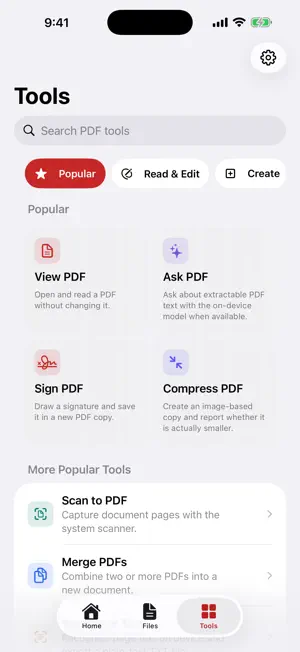
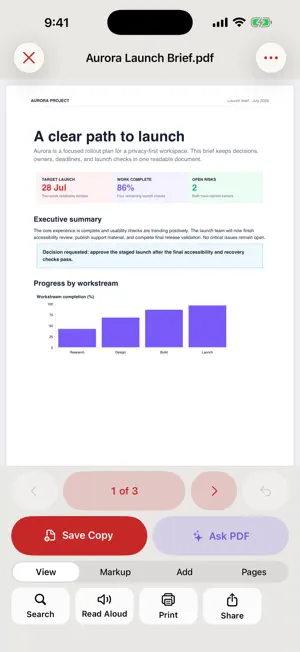
PDF Pro AI gives you 28 practical PDF tools in a private, iOS-native workspace. Open a document from Files, Mail, Safari, or another app, make the changes you need, and save a new copy while the original stays unchanged. EDIT AND REVIEW • Read, search, print, share, and listen to PDFs • Fill compatible AcroForm fields • Add text, signatures, highlights, opaque covers, stamps, and watermarks • Move, resize, edit, or delete app-created document blocks • Ask questions about extractable PDF text on device CREATE AND ORGANIZE • Scan paper documents with Apple's document scanner • Turn selected photos into a PDF • Merge PDFs and extract, rotate, delete, reorder, or number pages • Export rendered pages as PNG images CONVERT AND ENHANCE • Export extractable text as a Word-compatible RTF document • Recognize page text on device and export it as TXT • Enhance scanned pages into a clearer grayscale PDF copy COMPRESS AND PROTECT • Compress one PDF or a batch of PDFs into measured new copies • Choose high-quality, balanced, or small-file output • Protect a compatible PDF copy with a new password • Unlock a compatible PDF using its known password PRIVATE DOCUMENT ASSISTANT Ask questions or summarize extractable PDF text without uploading the document. Eligible devices can use Apple's on-device language model. Other supported devices use a clearly labeled local extractive result with source excerpts. BUILT FOR YOUR CONTROL • No account • No subscription or feature paywall • No advertising or tracking • No app-initiated document upload • Files, camera, photos, printing, and sharing are used only when you choose them Compatibility varies for malformed PDFs, XFA or JavaScript forms, certificate signatures, uncommon encryption, image-only search, and third-party PDF features. Word-compatible export contains extractable text rather than recreating the original layout. OCR and assistant results should be checked before relying on important details.
What’s new
Version 1.1 · Updated July 22, 2026
PDF Pro AI 1.1 brings a cleaner Apple-native design and expands the private tool catalog to 28 workflows. • Redesigned Home, Tools, and editor controls • Added page numbering, stamps, and watermarks • Added batch PDF compression • Added scanned-page enhancement • Added Word-compatible RTF text export • Refreshed the app icon to match PDF Pro AI across platforms • Improved Dynamic Type, dark mode, Reduce Motion, and press feedback As before, document work stays on device and changes are saved to new copies.
App privacy
The developer, MathArena, reported these privacy practices to Apple.
Data Used to Track You
The following data may be used to track you across apps and websites owned by other companies:
- Identifiers: Device ID
Data Not Linked to You
The following data, which may be collected but is not linked to your identity, may be used for the following purposes:
- Identifiers: Device ID
Used for: Third-Party Advertising, Developer’s Advertising or Marketing, Analytics
Alternatives to PDF Pro AI Editor
Looking for apps like PDF Pro AI Editor? Here are 6 similar apps on the App Store. The highest rated is PDF Pro AI (5.0/5), and all 6 are free to download.
-
 Pagez PDF Tools
-
 PDF Studio: Editor & Reader
-
 PDF Pro: Editor & Tools
-
 PDF Reader - PDF PRO Editor
-
 PDF Editor, Converter - Reader
-
 PDF Pro AI
5.0
PDF Pro AI
5.0
| App | Rating | Price | Last updated | Compare |
|---|---|---|---|---|
| PDF Pro AI Editor | – | Free | July 22, 2026 | |
| Pagez PDF Tools | – | Free | May 5, 2026 | Compare |
| PDF Studio: Editor & Reader | – | Free | Aug 25, 2026 | Compare |
| PDF Pro: Editor & Tools | – | Free | May 6, 2026 | Compare |
| PDF Reader - PDF PRO Editor | – | Free | Feb 17, 2026 | Compare |
| PDF Editor, Converter - Reader | – | Free | Aug 18, 2026 | Compare |
| PDF Pro AI | 5.0 / 5 (1) | Free | May 3, 2026 | Compare |
Compare PDF Pro AI Editor with the top alternatives: ratings, updates, ASO score and keyword gaps →