

Noted: AI Notes & Planner
Hasti TAJGARDOUN Productivity iPhoneiPadiPod touch
Noted: AI Notes & Planner is a free Productivity app for iPhone and iPad by Hasti TAJGARDOUN. Requires iOS 15.1. Updated September 26, 2026.
- Price
- Free
- on the App Store
- Size
- 78 MB
- Age 4+
- Updated
- Sep 26
- 2026 · v1.0.1
Screenshots

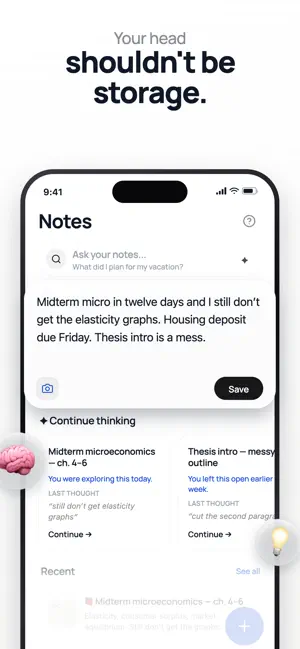

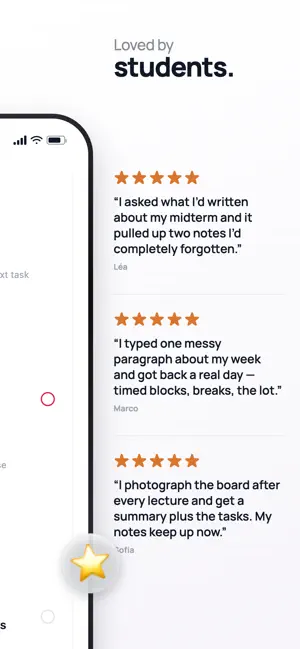
About Noted: AI Notes & Planner
I built Noted because I was drowning in university — in a language I didn’t speak — and my notes, deadlines, and half-finished thoughts lived in ten different places. I needed something that helped me organize faster without thinking for me. Write anything. A messy brain dump. A photo of a whiteboard. Something you say out loud. Noted figures out what it is, files it, and keeps it connected to the rest of your notes. Later you can ask things like “what did I say about the exam?” and get an answer from your own stuff — not the internet. Here’s what it does: • Capture fast — type, voice, or photo • Auto-organize into folders so Unsorted doesn’t become a graveyard • Connect related notes so ideas don’t disappear • Turn notes into tasks when there’s something to do • Build a day or week plan from plain language (“prep for two exams without cramming”) • Search your notes in normal sentences • Weekly review so you see what you actually captured You’re still in charge. Move sessions. Ignore suggestions. Edit anything. Noted gives structure, not pressure. The AI is there to sort, surface, and schedule — not to replace your thinking. Built for students and anyone whose head is full: exams, shifts, projects, the stuff you keep meaning to come back to. If you’ve ever opened five apps and still couldn’t remember what mattered today, this is for you. I’m 19 and I built this for myself first. If it helps you put things down and get them done, that’s the whole point. Terms of Use (EULA): https://noted-phi-sand.vercel.app/terms Privacy Policy: https://noted-phi-sand.vercel.app/privacy
What’s new
Version 1.0.1 · Updated September 26, 2026
A new Schedule • Your timeline is the first thing you see — no scrolling past the planner to find your day. • The date and the Day / Week / Month switch stay pinned at the top, so you can move through your week from anywhere on the page. • Blocks now tell you what they are at a glance: a Weekly badge for routines, an AI badge for planned sessions. • Refreshed category colors for study, work, sport and personal. • Dark mode now works properly across the whole timeline. AI planning, on your terms • Planning moved to a button at the bottom — there when you want it, out of the way when you don't. • Review before you save: every proposed session is laid out in full, and anything that clashes with what's already booked is flagged first. Photo notes • Pick what AI should do with a photo — transcribe the text, make a checklist, extract tasks, summarize, or suggest next steps. Ticking off a scheduled block now updates everywhere in the app straight away.
App privacy
The developer, Hasti TAJGARDOUN, reported these privacy practices to Apple.
Data Linked to You
The following data, which may be collected and linked to your identity, may be used for the following purposes:
- Purchases: Purchase History
- Contact Info: Email Address, Name
- User Content: Photos or Videos, Audio Data, Other User Content
- Identifiers: User ID
- Usage Data: Product Interaction
Used for: App Functionality
Alternatives to Noted: AI Notes & Planner
Looking for apps like Noted: AI Notes & Planner? Here are 6 similar apps on the App Store. The highest rated is ETasks: To-Do List & Alarms (5.0/5), and all 6 are free to download.
-
 Halled - AI Talk Task Manager
-
 MaheNoe
4.8
MaheNoe
4.8
-
 ETasks: To-Do List & Alarms
5.0
ETasks: To-Do List & Alarms
5.0
-
 AI Note Taker: Transcribe Memo
4.3
AI Note Taker: Transcribe Memo
4.3
-
 Ask Watch AI
4.6
Ask Watch AI
4.6
-
 murmur: ai practice calls
4.3
murmur: ai practice calls
4.3
| App | Rating | Price | Last updated | Compare |
|---|---|---|---|---|
| Noted: AI Notes & Planner | – | Free | September 26, 2026 | |
| Halled - AI Talk Task Manager | – | Free | Nov 17, 2025 | Compare |
| MaheNoe | 4.8 / 5 (15) | Free | Sep 12, 2026 | Compare |
| ETasks: To-Do List & Alarms | 5.0 / 5 (4) | Free | Oct 1, 2026 | Compare |
| AI Note Taker: Transcribe Memo | 4.3 / 5 (27) | Free | Mar 11, 2025 | Compare |
| Ask Watch AI | 4.6 / 5 (10) | Free | Oct 18, 2026 | Compare |
| murmur: ai practice calls | 4.3 / 5 (32) | Free | Oct 24, 2026 | Compare |