

Ask Watch AI
mobilComm Ltd, organizační složka Productivity iPhoneiPadiPod touchMacApple Watch
Ask Watch AI is a free Productivity app for iPhone and iPad by mobilComm Ltd, organizační složka. Rated 4.7/5 from 13 ratings. Requires iOS 18.0.
- Rating
- 4.7
- 13 ratings
- Price
- Free
- on the App Store
- Size
- 196 MB
- Age 4+
- Updated
- Nov 28
- 2026 · v2.2.50
Screenshots
Save to Pinterest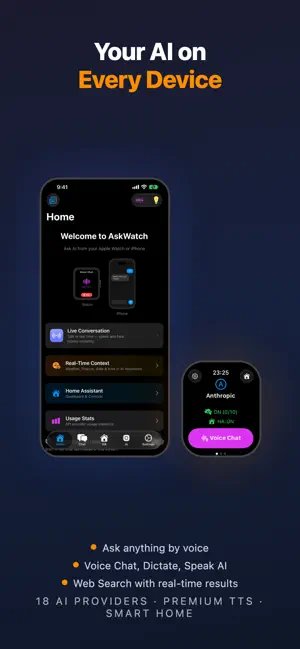


About Ask Watch AI
Ask Watch AI brings the power of 18 leading AI providers directly to your Apple Watch, iPhone and CarPlay. Use your voice to ask questions, get translations, summarize text, control your smart home — all from your wrist. THREE VOICE MODES • Voice Chat — hands-free continuous conversation. Talk naturally, AI responds with voice, then listens again • Dictate AI — tap, speak or type, read the answer • Speak AI — push-to-talk. Hold to speak, release for response LIVE CONVERSATION — REAL-TIME VOICE • OpenAI Live, Gemini Live, Grok Voice 3, ElevenLabs and Inworld — talk and hear the answer in real time • OpenAI Live listens while it speaks: interrupt it mid-sentence • Home control and notes in OpenAI Live, Gemini Live and Grok Voice • Your own API key, or a subscription: Gemini Live with Plus and Ultra, OpenAI Live and Grok Voice with Ultra 18 AI PROVIDERS + CUSTOM SERVER Use your own API keys with OpenAI (ChatGPT), Anthropic (Claude), Google (Gemini), Groq, Perplexity, xAI (Grok), Mistral, DeepSeek, OpenRouter, Cerebras, Cohere, Together AI, SiliconFlow, Z.ai, Moonshot (Kimi), MiniMax, Qwen, and Meta. Or connect your own server — Ollama, vLLM, or any OpenAI-compatible endpoint. Pay only for what you use. WEB SEARCH • AI answers enriched with real-time web results • Supported: OpenAI, Anthropic, Google, Perplexity, OpenRouter, Groq and DeepSeek (selected models) • In Live Conversation: OpenAI Live, Gemini Live and Grok Voice PREMIUM TEXT-TO-SPEECH • ElevenLabs — 30+ premium voices with natural intonation • OpenAI — ten voices, marin and cedar first, on OpenAI's newest speech model; Ultra adds the AskWatch Voice • Azure AI Speech — your own Azure key, region and voice • Voxtral — Mistral's voices with your own Mistral key • Piper — free open-source cloud voices, no API key needed • Custom TTS — use your own speech server • Apple TTS — 30+ languages, works offline INSTANT ACCESS • Watch Face Complications, Control Center, iOS Widgets • Live Activities — smart home sensors on Lock Screen & Dynamic Island • Siri Shortcuts — "Hey Siri, Dictate AI" • Action Button (Watch Ultra), Double-tap (Series 9+) SMART FEATURES • Conversation Memory — natural follow-up questions • Real-time context — weather, exchange rates, stocks & crypto • Compare Providers — same question to multiple AIs side by side • Notes — a private notebook your AI can search, save to and edit by voice • Maps — tell your AI where you want to go and it opens Apple Maps • Prompt Templates — Translate, Summarize, Explain + custom • History & Export — search, share, export conversations SMART HOME — HOME ASSISTANT • Voice control for lights, switches, climate, scenes, automations • Live dashboard with real-time entity states • Push notifications and Live Activities • AI-Enhanced mode — natural language smart home commands • Local + Cloud (Nabu Casa) with automatic fallback APPLE CARPLAY • Voice AI assistant while driving — hands-free • Smart home control from your car • TTS responses through car speakers PRIVACY & SECURITY • API keys in device Keychain with hardware encryption • Chat history AES-256 encrypted, stored only on device • Face ID / Touch ID / PIN protection • Direct HTTPS to AI providers — we never see your data Terms of Use: https://askwatch.app/en/terms.html Privacy Policy: https://askwatch.app/en/privacy.html
Ratings & reviews
4.7
13 ratings
What’s new
Version 2.2.50 · Updated November 28, 2026
• Calendar & Reminders — let your AI read, add, change, complete or delete your events and reminders; deleting or changing a whole series asks you first. Off until you turn it on in Real-Time Context → Calendar & Reminders, in chat on iPhone, iPad and Mac, and also in Live Conversation, on Apple Watch and in CarPlay. • MCP servers and Skills — connect tools such as Notion, Todoist, Linear or Jira and give your AI reusable instructions. Settings → MCP Servers and Skills, in chat on iPhone, iPad and Mac. • ElevenLabs and Inworld in Live Conversation — with your own key. Pick the voice (ElevenLabs: your own account voices too; Inworld: 300+ voices grouped by language), the speed and your own opening line. • Apple Watch — choose how a conversation starts: Settings → Conversation → Conversation start (shown while Context Memory is on). Always new starts fresh, Continue picks up your last chat, Ask asks you each time. Also a new X Large layout, clearer chat modes and more room for answers on small watches. • OpenAI voices on OpenAI's new speech model — ten voices, marin and cedar first. The old model and voices stay selectable until OpenAI retires them on 6 January 2027. With AskWatch Ultra you can pick the AskWatch Voice. • An easier first start — one provider list with Groq marked Free and a box that explains API credits for OpenAI, Anthropic and Google. • GPT-6.1 Terra — with your own OpenAI key or with AskWatch Ultra. Previously in v2.2: • Grok Voice 3 with AskWatch Ultra — Live Conversation with xAI's Grok, no key of your own needed, within your daily Ultra Live time, on iPhone, Apple Watch, Mac and in CarPlay, and it can search the web while you talk. Already use your own xAI key? Turn on Prefer Own API Keys to keep it. • Four new AI providers — Moonshot (Kimi), MiniMax, Qwen and Meta, 18 in all. Use them with your own API key; for Kimi, MiniMax and Qwen, pick the Global or China (mainland) region next to the key. • Maps and location — tell your AI where you want to go and it opens Apple Maps for you; it can also use where you are to answer. Works in chat and voice on iPhone, Apple Watch, Mac and in CarPlay. Your location is shared only when you allow it, in Real-Time Context → Location & Maps for AI. • Azure AI Speech — a new voice for reading answers aloud on iPhone, CarPlay, Apple Watch, Apple TV and Mac. Add your own Azure key, pick a region and a voice. • iPhone Duo — Chat, Home, Notes, Settings, Compare and Live Conversation use two columns on the open screen. • Apple Watch is easier to use on small screens: larger tap areas in the Medium and Compact layouts, Templates as an icon next to the main button, Voice Chat shows "Listening…" in Compact and fits 40 and 41 mm watches in the Large layout, and a swipe to the right closes it. • OpenAI Live — the first true full-duplex voice model on your Apple Watch, iPhone, Mac and in CarPlay. It listens while it speaks: interrupt it mid-sentence, ask it to search the web, control your home or save a note, and the conversation keeps flowing. Make it your own — 13 voices, three GPT-5.6 models behind it and your own opening line — with your own OpenAI key (BYOK) or with AskWatch Ultra. • Notes — a private notebook your AI can search, save to and edit by voice, on iPhone, Apple Watch, Mac and in CarPlay, and only with the models you allow. • Apple Watch complications work again on watchOS 10 and 11 (Series 4, Series 5 and SE 1st generation). • Gemini 3.8 Live — Live Conversation with Google on its newest real-time voice model, with Home Assistant control, notes and web search; automatic on a subscription, or pick it under Google → Live Conversation → Model with your own key. • Web search in Live Conversation — Gemini Live and Grok Voice search the web while you talk; one switch per provider and device. • An assistant that opens in your words — write your own greeting for Live Conversation, or leave it empty for the default in your language.
App privacy
The developer, mobilComm Ltd, organizační složka, reported these privacy practices to Apple.
Data Not Linked to You
The following data, which may be collected but is not linked to your identity, may be used for the following purposes:
- Identifiers: Device ID
- Usage Data: Product Interaction
- Location: Precise Location
- Contact Info: Email Address
- User Content: Audio Data
- Diagnostics: Crash Data, Performance Data, Other Diagnostic Data
Used for: Analytics, App Functionality
Alternatives to Ask Watch AI
Looking for apps like Ask Watch AI? Here are 6 similar apps on the App Store. The highest rated is Chirp: AI for Watch (4.6/5), and all 6 are free to download.
-
 Chirp: AI for Watch
4.6
-
 Watch AI – GPT Voice Assistant
-
 Wiri: GPT AI Chatbot for Watch
3.4
-
 WristGPT: AI for Watch
4.2
-
 Iris: AI Assistant for Watch
4.2
-
 Petey - AI Chat for Watch
3.8
| App | Rating | Price | Last updated | Compare |
|---|---|---|---|---|
| Ask Watch AI | 4.7 / 5 (13 ratings) | Free | November 28, 2026 | |
| Chirp: AI for Watch | 4.6 / 5 (26) | Free | Nov 27, 2026 | Compare |
| Watch AI – GPT Voice Assistant | – | Free | Oct 6, 2026 | Compare |
| Wiri: GPT AI Chatbot for Watch | 3.4 / 5 (16) | Free | Nov 28, 2026 | Compare |
| WristGPT: AI for Watch | 4.2 / 5 (11) | Free | Jul 8, 2026 | Compare |
| Iris: AI Assistant for Watch | 4.2 / 5 (23) | Free | Oct 21, 2026 | Compare |
| Petey - AI Chat for Watch | 3.8 / 5 (352) | Free | Sep 8, 2026 | Compare |
Compare Ask Watch AI with the top alternatives: ratings, updates, ASO score and keyword gaps →