

CardCalc: Credit Card Bills
Takumi Sekiguchi Finance iPhoneiPadiPod touchApple Watch
CardCalc: Credit Card Bills is a free Finance app for iPhone and iPad by Takumi Sekiguchi. Requires iOS 16.0. Updated October 26, 2026.
- Price
- Free
- on the App Store
- Size
- 10 MB
- Age 4+
- Updated
- Oct 26
- 2026 · v1.1.1
Screenshots


About CardCalc: Credit Card Bills
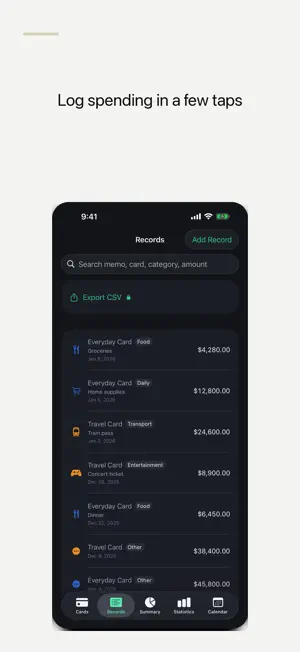
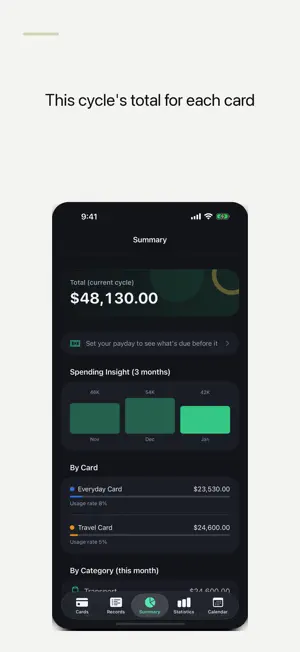
CardCalc is a manual credit card spending tracker, budget planner and bill reminder. Log what you spend, see this billing cycle's total for each card, check how much your cards will withdraw before your next payday, and never miss a payment date—without connecting a bank account or entering card numbers. Features: - Manage multiple cards: name, closing day, payment day (for cards paid in the month after the closing day), optional credit limit and an auto-pay setting (marked as paid on the due date) - Log an amount, date, category and note in a few taps; record income too - Undo a deleted record right after you swipe it away - Until Payday: set your payday (once or twice a month) to see the total your cards will withdraw before it, with a breakdown by card - Weekend-aware dates: move a payday or card debit that falls on a weekend to the Friday before or the Monday after (used for Until Payday; the calendar and reminders keep the registered date) - Local reminders before payment dates, with a "mark as paid" action right from the notification - Paid / unpaid status for each payment and an app icon badge for upcoming bills - Recurring expenses for subscriptions and fixed costs, and change the amount for just one month (such as a utility bill) without touching past months - Calendar view of payment dates and spending - Charts by period and category (bar; pie on iOS 17 or later), plus a 3-month Spending Insights view - Category budgets with alerts when you go over - Custom categories: create, edit and delete - Search transactions and mark them as reconciled - Choose a currency for each card, with a manual exchange rate for all-card totals in the app (the widget's monthly total is not converted) - Export your records as CSV (Full Access) - Home Screen and Lock Screen widgets, Apple Watch app, Siri and Shortcuts, Spotlight search - Back up and restore - iCloud sync across your devices (Full Access) - App lock with passcode or Face ID - Finance-style dark theme The free version supports up to two cards and shows a banner across the main tabs. A single, non-renewing Full Access purchase unlocks unlimited cards, CSV export and iCloud sync, and removes ads. There is no subscription. While your purchase status is still being checked or can't be checked (for example, offline), CardCalc applies no limits and shows no ads, so earlier buyers don't lose access. Your card names, spending records and credit limits stay on your device (or in your own iCloud if you turn on sync). CardCalc has no bank integration and no account sign-in. Privacy Policy: https://smallappworks.com/cardcalc/privacy/ Support: https://smallappworks.com/cardcalc/support/
What’s new
Version 1.1.1 · Updated October 26, 2026
- Until Payday: see the total of card payments due before your next payday, card by card - Choose how paydays and payment dates that fall on a weekend are shifted - Change the amount of just the next recurring expense without touching the monthly amount - Undo a deleted usage record right after deleting it - Set an exchange rate per card to combine all cards into one total - Home Screen widget with your next payment and this month's spending - Spending Insight (3 months) chart and a dark finance-style theme - Removed the empty band under the toolbar on each tab
App privacy
The developer, Takumi Sekiguchi, reported these privacy practices to Apple.
Data Used to Track You
The following data may be used to track you across apps and websites owned by other companies:
- Identifiers: Device ID
- Usage Data: Advertising Data
Data Linked to You
The following data, which may be collected and linked to your identity, may be used for the following purposes:
- Location: Coarse Location
- Identifiers: Device ID
- Usage Data: Product Interaction, Advertising Data
Used for: Third-Party Advertising, Developer’s Advertising or Marketing, Analytics, App Functionality
Data Not Linked to You
The following data, which may be collected but is not linked to your identity, may be used for the following purposes:
- Diagnostics: Performance Data, Other Diagnostic Data, Crash Data
Used for: Third-Party Advertising, Developer’s Advertising or Marketing, Analytics, App Functionality
Alternatives to CardCalc: Credit Card Bills
Looking for apps like CardCalc: Credit Card Bills? Here are 6 similar apps on the App Store. The highest rated is AI Receipt Scanner: Receeto (4.8/5), and all 6 are free to download.
-
 Steady: Daily Budget Planner
-
 Credit Card Control
-
 Trailly: Financial Assistant
-
 SAVY: Couple & Family Budget
-
 Tregua: Finanzas tranquilas
-
 AI Receipt Scanner: Receeto
4.8
| App | Rating | Price | Last updated | Compare |
|---|---|---|---|---|
| CardCalc: Credit Card Bills | – | Free | October 26, 2026 | |
| Steady: Daily Budget Planner | – | Free | Oct 30, 2026 | Compare |
| Credit Card Control | – | Free | Jul 8, 2026 | Compare |
| Trailly: Financial Assistant | – | Free | May 17, 2026 | Compare |
| SAVY: Couple & Family Budget | – | Free | Oct 24, 2026 | Compare |
| Tregua: Finanzas tranquilas | – | Free | Aug 9, 2026 | Compare |
| AI Receipt Scanner: Receeto | 4.8 / 5 (20) | Free | Nov 2, 2026 | Compare |